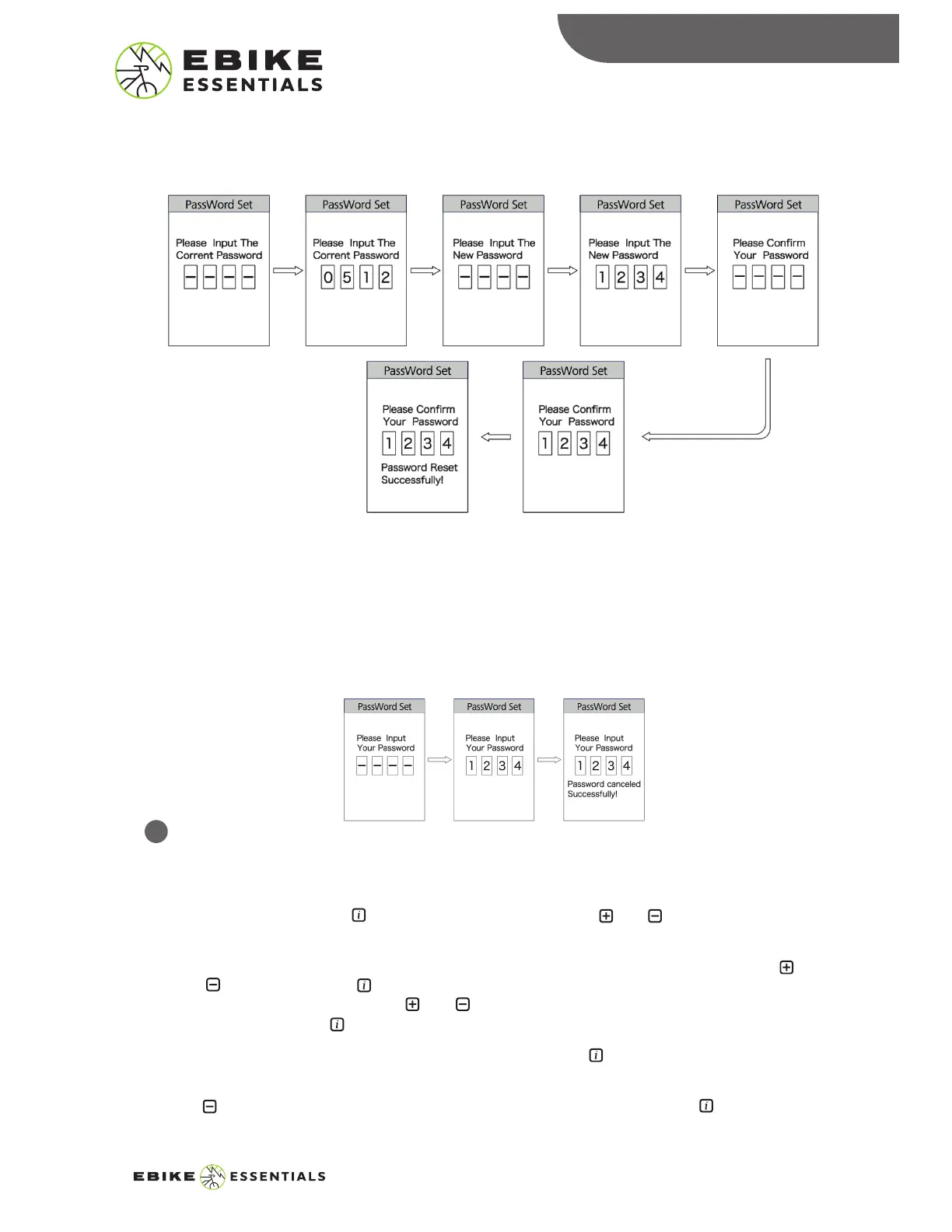
iii. Close Password:
• To disable the password option, enter the start password interface and select the “OFF” option.
The interface will display a prompt to input the current password to disable the password
option. After correctly entering the current password, the interface will display a prompt
showing you have successfully disabled the password. It will exit back to the password menu
automatically.
• If you enter the incorrect password 10 times, the display will turn off automatically.
Clock Setting:
The clock in this display uses 24-hour notation. Please note that the clock will reset every time you
remove the battery of the device.
• To set the clock, press the button on the option and use the and buttons to adjust
each value.
• The cursor will appear on the first input digit of the hour section, adjust this input using the
and buttons. Press the button to confirm the selection and switch to the second input
digit. Adjust this as well, using the and buttons. Confirm your selection and switch to the
minute by pressing the button.
Repeat this for the remaining input digit of the clock and press the button to save the setting
and exit this option.
Use the button to scroll down to the “Back” option and select it by pressing the button to
exit the display setting menu.
DISPLAY SETTINGS
11
DPC18 MANUAL© Copyright Ebike Essentials. All Rights Reserved.
www.Bafangusadirect.com
12


 To Next Page