9
USER SETTING
CONSUMER MANUAL – DP C18.CAN
7 USER SETTING
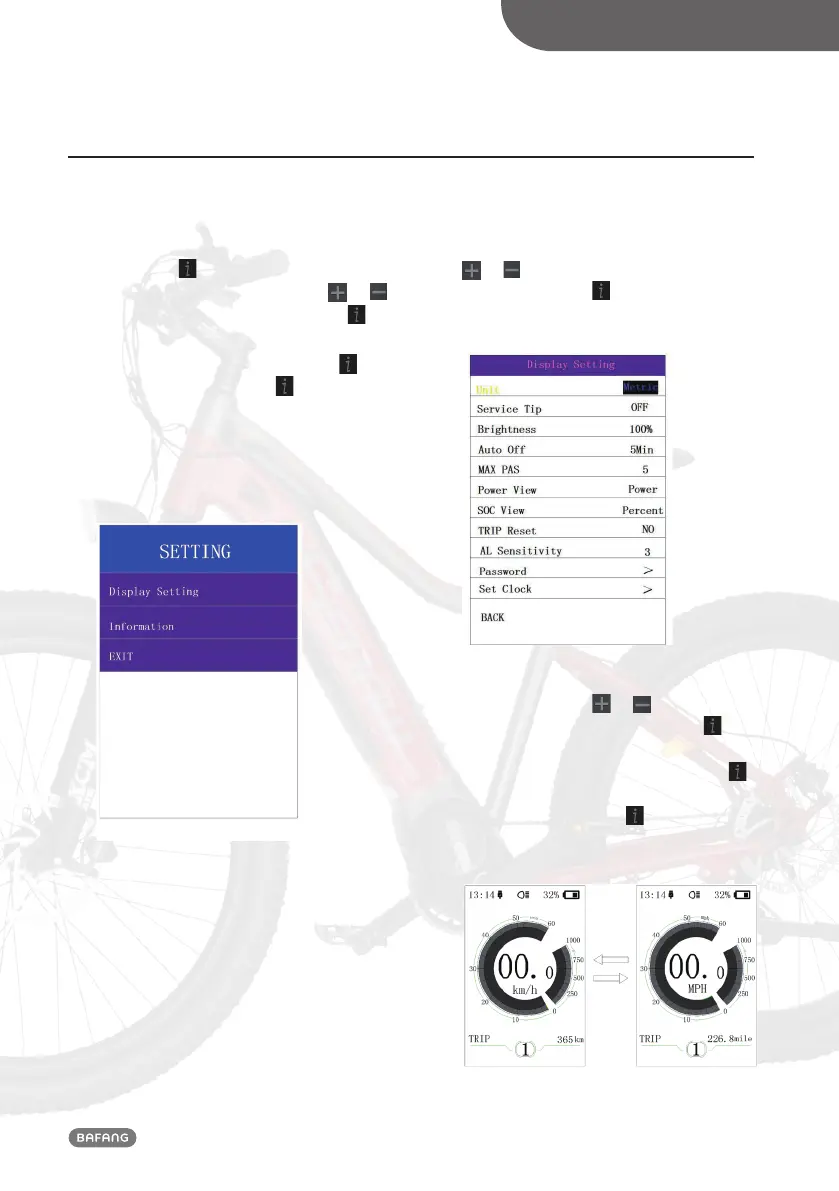
7.1 “SETTING” interface
After the HMI powered on, briefly
press(<0.5S) for two times to enter into
the “SETTING”. Briefly press (<0.5S) or
to select and then briefly press (<0.5S) to
confirm and enter into the option.
Select “EXIT” and briefly press(<0.5S)
to
exit, or briefly press (<0.5S) for two times
in any interface to exit, then the set dates
are saved.
If there is no any operation within 20s, the
set interface will be exited and no any dates
are saved (as following).
7.2 “Display setting” interface
In “SETTING” interface, briefly press (<0.5S)
or to select “Display setting” and then
briefly press (<0.5S) to confirm and enter
into “Display setting”. There are thirteen
options in this interface.
7.2.1 “Unit” --- set unit for km/mile
Briefly press (<0.5S)
or to select
“Unit”, and then briefly press (<0.5S)
to enter into the interface. Select “Metric”/
“Imperial”, and then briefly press (<0.5S)
to save and exit back to “Unit” interface,
then briefly press (<0.5S) for two times to
exit or you can also select “BACK” → “EXIT”
to exit back to the main interface.



 To Next Page