RESTRICTING OPERATION CONTINUED
°°°
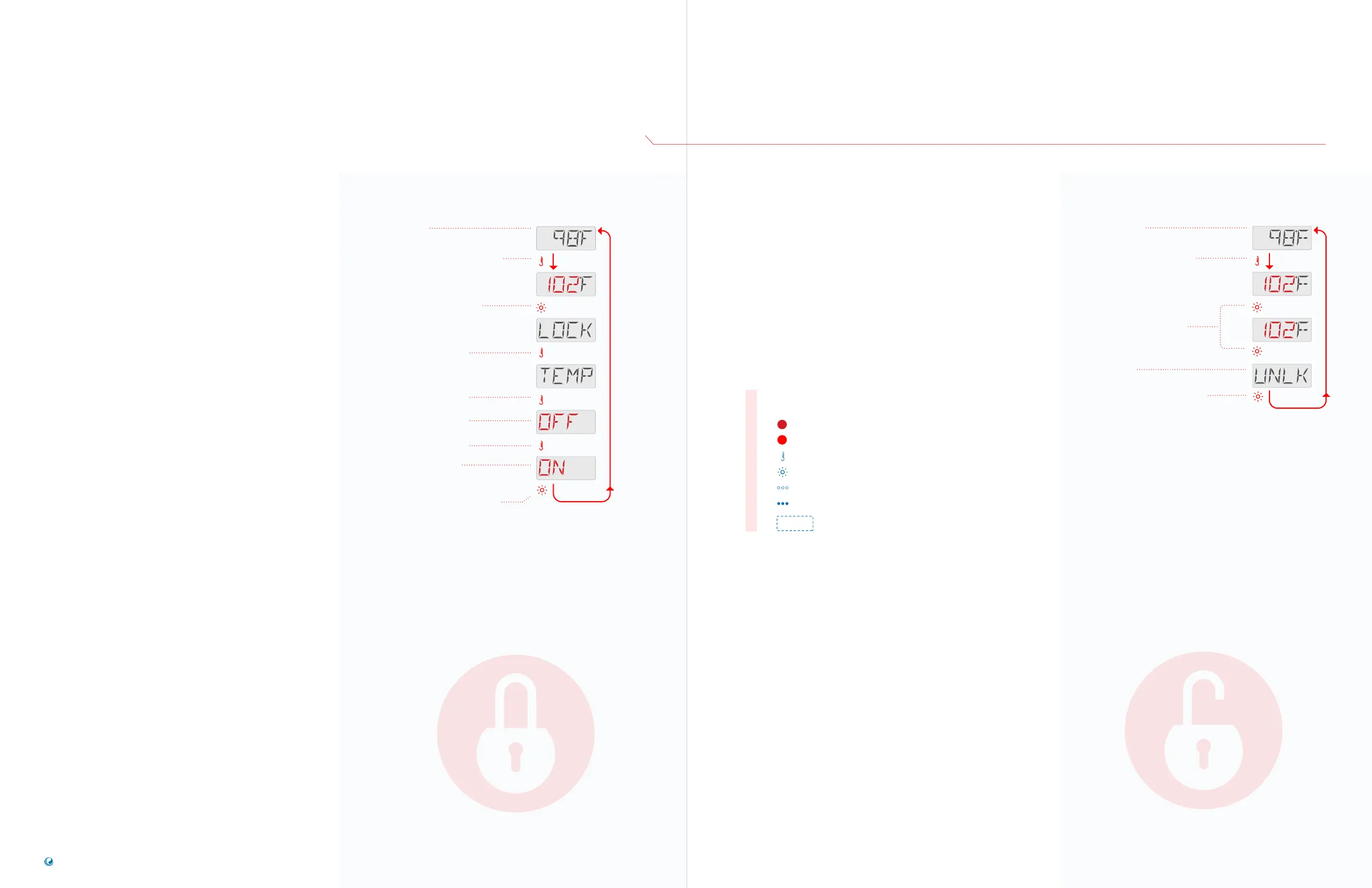
Lock Temperature & Settings
Follow this sequence to lock the temperature
and settings.
Locking the Temperature allows Jets and other
features to be used, but the Set Temperature
and other programmed settings cannot be
adjusted.
Temperature Lock allows access to a reduced
selection of menu items:
View the Set Temperature
FLIP
LOCK
UTIL
INFO
FAULT LOG
The next page illustrates how to Unlock
the Temperature and Settings.
SEQUENCE
Press the TEMP button. The Set
Temperature will appear and flash.
While the Set Temperature is
flashing, press LIGHT until
LOCK appears.
Press the TEMP button.
Press the TEMP button.
OFF indicates that the
temperature is unlocked.
Press the TEMP button.
ON indicates that the
temperature is locked.
Press LIGHT to save your setting.
The Main Screen will
appear automatically.
If you do not press LIGHT, your setting
will not be saved, and the Main Screen
will appear momentarily.
Main Screen
Unlock Temperature & Settings
Follow this sequence to unlock the
temperature and settings.
This unlock sequence may be used from any
screen that may be displayed on a
restricted panel.
NOTE: If the panel has a WARM and a COOL
temperature button (view page 3), only the WARM
button will work in the Unlock Sequence.
Press the TEMP button. The
Set Temperature will appear
and flash.
While holding down the TEMP
button, press the LIGHT
button two times slowly.
UNLK indicates that the Panel
and/or Temperature
is unlocked.
Press the LIGHT button, and
the Main Screen will appear.
Or, pause a moment, and
the Main Screen will appear
automatically.
Main Screen
SEQUENCE
• • •
Flashing characters
Progressive message
Press TEMP button for “action”
Press LIGHT button to “select”
Pause / back to Main Screen / setting not saved
Pause / back to Main Screen / setting saved
Menu Items may or may not appear
SEQUENCE KEY
( View page 2 for full description )
TP200 USER GUIDE 42369 Rev A2
12
11
Balboa Water Group | Your Single Source Solution



 To Next Page