Revolution
Transforming the Control of Hot Tubs
29
Manufactured under one or more of these patents. U.S. Patents: 5332944, 5361215, 5550753, 5559720, 5,883,459, 6253227, 6282370, 6590188, 6976052, 6965815, 7030343, 7,417,
834 b2, Canadian Patent: 2342614, Australian patent: 2373248 other patents both foreign and domestic applied for and pending. All material copyright of Balboa Water Group.
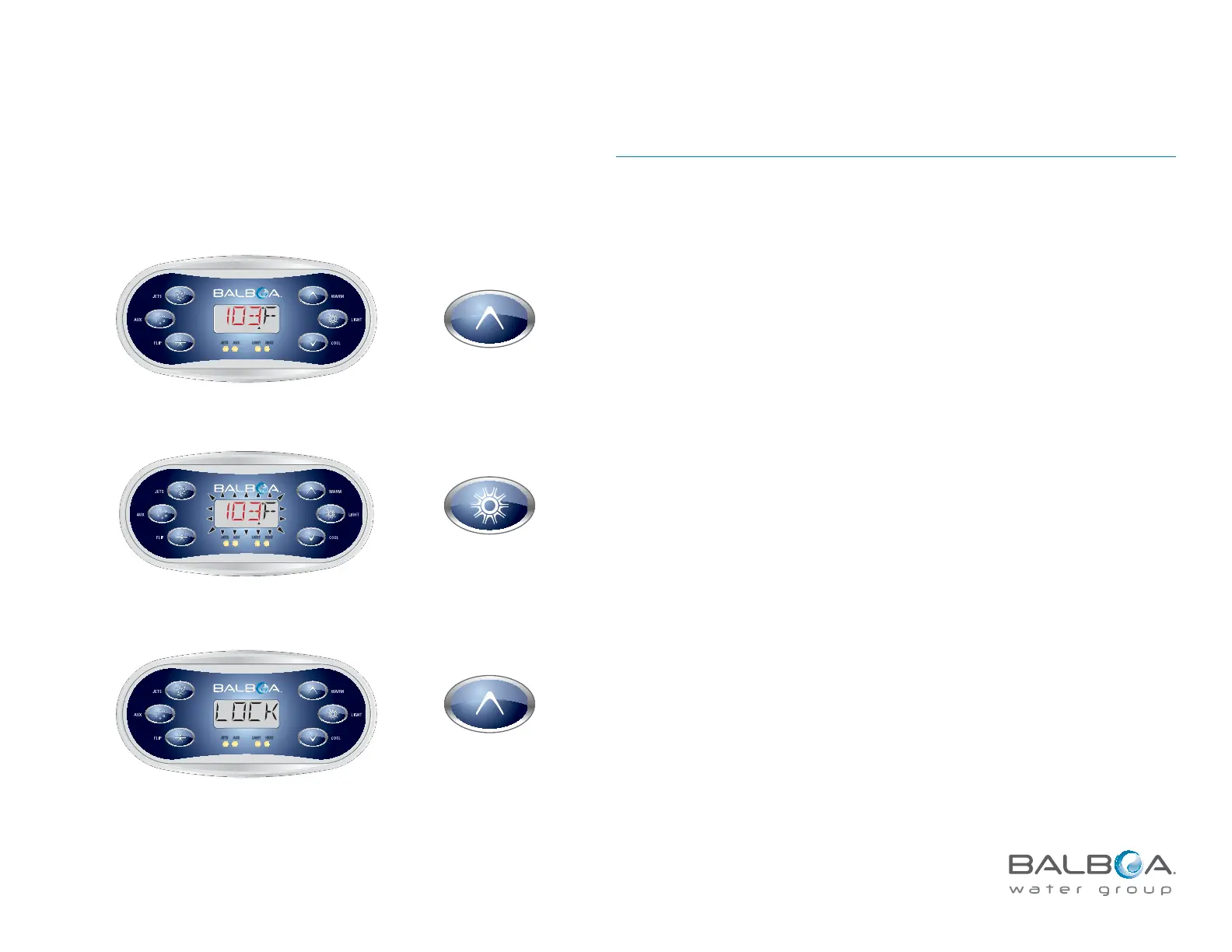
LOCK (Restricting Panel Operation)
Locking the panel prevents the spa from being used; it also prevents unwanted
temperature adjustments.
Main Menu > LOCK
NOTE:
All automatic functions are still active.t
Locking the Temperature allows Jets and other features to be used, but the t
Set Temperature and other programmed settings cannot be adjusted.
t Temperature Lock allows access to a reduced selection of menu items, which
include Set Temperature, FLIP, LOCK, UTIL, INFO and FALT LOG.
SET
JETS AUX LIGHT HEAT
Press LIGHT
repeatedly until
LOCK appears
SET
R
ANGE
SET
JETS AUX LIGHT HEAT
Main Screen
Press TEMP
Press TEMP
SET
R
ANGE
SET
JETS AUX LIGHT HEAT
The temperature flashes.



 To Next Page