MENU
START
STOP
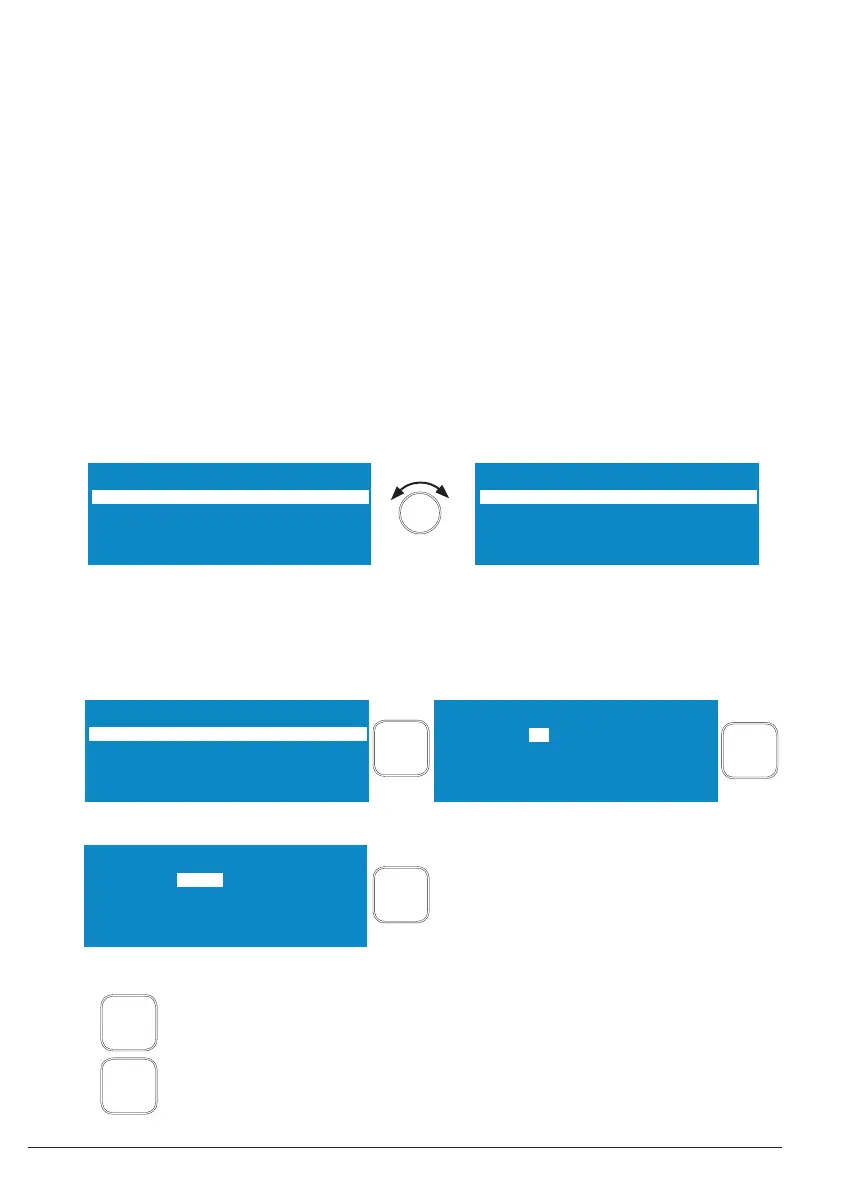
AM 50% ProgNo 5*
time non-stop
pulse 00.5s 01.0s
energy 0.000 kJ
AM 50% ProgNo 5*
time 01:30 00:00
pulse 00.5s 01.0s
energy 0.000 kJ
time 01:30 00:00 time non-stop
AM 50% ProgNo 5*
time 01:30 00:00
pulse 00.5s 01.0s
energy 0.000 kJ
AM 50% ProgNo 5*
time 01:30 00:00
pulse 00.5s 01.0s
energy 0.000 kJ
time 01:30 00:00
01
MENU
MENU
1 to 59 minutes
AM 50% ProgNo 5*
time 01:30 00:00
pulse 00.5s 01.0s
energy 0.000 kJ
01:30
START
STOP
1 to 59 seconds
16 / 38 51406c GB/2019-07
1 electronic GmbH & Co. KG • Heinrichstraße 3-4 • 12207 Berlin • Deutschland • info@bandelin.com
The following operating parameters can be set:
• Default values for the amplitude or power [Am or Pw]
• Default values for the sonication time [time]
• Default values for the pulsation of the ultrasound (turn-on and turn-off time) [pulse]
• Limit value for the temperature monitoring [...°C]
• Operating mode for the ultrasound control [En]
The operating parameters “ Energy” and “Elapsed sonication time” cannot be edited.
3.2.1 Sonication time [time]
A value of 9 hours, 59 minutes and 59 seconds (9:59:59) can be set as the maximum sonication
time. If the set value is exceeded during ultrasound operation, the sonication will stop. The
specifi cation “non-stop” is equivalent to unlimited continuous operation until operation is ended by
pressing the “START/STOP” button.
a) Set continuous operation [non-stop]
b) Set the sonication time
If a value of 59 minutes or seconds is exceeded when setting the time, or a shortfall occurs when
setting back the time, the values for the set hours or minutes will change accordingly.
proceed to next set value or operating parameter
back to stand-by mode


 To Next Page