Foto
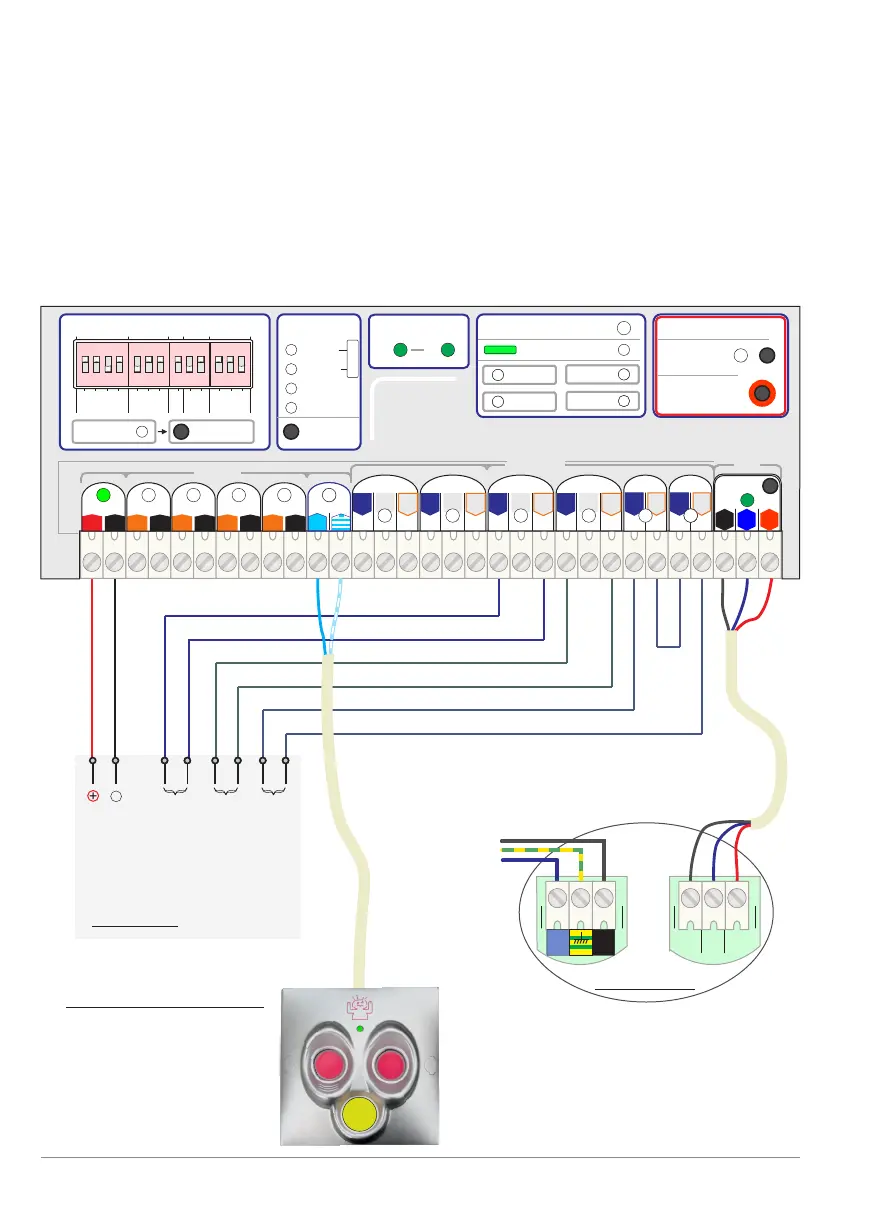
Panic button: 820-13S
Description and
instructions: see
www.bandit.be >
products >
panic buttons
p. 36 - Installation example 3
1 2 3 4 1 2 3 1 2 3 1 2 31 2 3 4 1 2 3 1 2 3 1 2 3
Status:
Alarm
Guard
Panic
Beep
Fire
Fog isolation
Fog control:
BA
CF31 v2
BANDIT
www.bandit.be
Force ejection
Cartridges:
Front
Settings:
Front
Inputs
M³
Move
PanBut.
Error
VDC
12
11 / 14 vdc
Guard
Alarm
Conf.
G+
A+
C+
G-
C-
Fire
F+ F-
Power
no
com
OK
nc
no
Tamper
com
Empty
no
com
no
com
PanBut.PanBut.
Inputs
Outputs
A-
Alarm
Guard
Panic
Fog isolation
Fog control:
Force ejection
Guard
Alarm
G+
A+
G-
A-
Panic
Fog isolation
Fog control:
Force ejection
Alarm
A+
Fog
nc
Cover
Moved
PanBut.
T
o Fog
Tamper
Reset
Comm.
Dip change
Read dips
nc
no
com
Guard
no
com
Alarm
nc
1
2 3
Comm.
G
A
C
F
2
3
1 2
3
X Y 1
1 2 3 4 1 2 3 1 2 3 1 2 3
1 2 3
LN
Example diagram 3.
Easy connection to controlling alarm with
BANDIT panic button 820-xx and dialler
Alarm panel with 1 dailler input (OK)
1 dailler input (Empty and / or power output).
Bandit fog generator 100-120 m³ cartridges.
Ancillary devices: BANDIT panic button 820-xx.
Earth
ON ON ON ON
!
Alarm panel
Tamper (loop)
Input technical
failure to dailler
Input problem
to dialler
Supply 12 V
+
_
Fog generator
Power
VAC
BANDIT Controller CF31 v2 / Manual v.102



 To Next Page