70
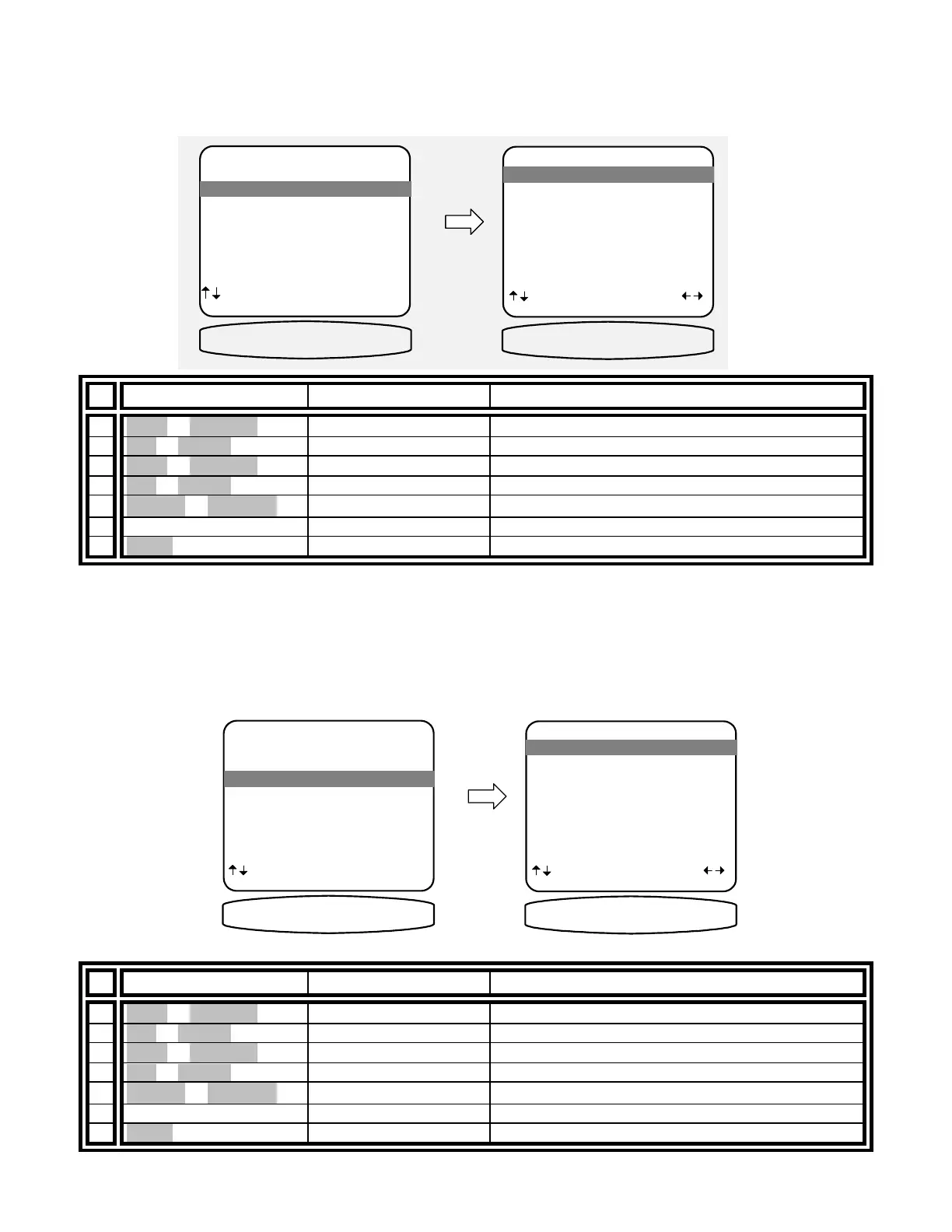
Setup Control Out 1
Control out 1 is dedicated to Zone 1 (A) it can be programmed to be on or off for each source. For example you
may wish to use the control out to pull down a projection screen for your V1 and DVD sources but roll it up for
Tuner and CD. Control out 1 can also be set to HEADPHONE or RS-232. HEADPHONE mode is intended to
control external amplifiers to permit headphone listening without the need for manually turning off your external
amplifiers. Select the RS-232 option when Control out 1 is to be set using BKC-DIP.
From Remote From Front Panel Action
1
À(UP) or §(DOWN)
(UP) or (DOWN) move to Control Out 1
2 SEL or ENTER (ENTER) activate CONTROL OUT 1 SETUP
3
À(UP) or §(DOWN)
(UP) or (DOWN) move to desired source
4 SEL or ENTER (ENTER) select desired source
5
¶
(LEFT) or
•
(RIGHT)
VOLUME KNOB select desired control operation
6 repeat 3 – 4 repeat 3 – 4 set control out 1 for other sources
7 MENU MENU return to CONTROL OUT SETTINGS
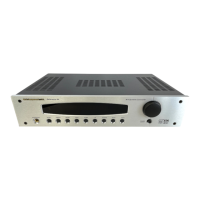
Control Out 2, 3, and 4 - Control out 2, 3, and 4 can be used in either zone. For each source they can be
programmed to be on when that source is selected in Zone 1 (A), Zone 2 (B), or both zones. If the source is
selected in neither zone the control out will be off. Control outs 2, 3, and 4 can also be set to REMOTE. In
REMOTE mode your processor acts like a remote repeater - IR remote signals detected by your processor are
repeated on the control out. Select the RS-232 option when a Control out is to be set using BKC-DIP.
Setup Control Out 2
CONTROL OUT SETUP
1 Control Out 1
2 Control Out 2
3 Control Out 3
4 Control Out 4
next item SEL select
MENU advanced setup
2 Control Out 2
CONTROL OUT 2
CONTROL OUT 2 SETUP
1 TUNER Zone B
2 V1 Zone B
3 V2 Zone B
4 TV Zone B
5 DVD Zone B
6 CD Zone B
7 SAT Zone B
8 Tape Zone B
next item adjust
MENU control out setup
1 TUNER Zone B
C2 TUNER ZONE B
From Remote From Front Panel Action
1
À(UP) or §(DOWN)
(UP) or (DOWN) move to Control Out 2
2 SEL or ENTER (ENTER) activate CONTROL OUT 2 SETUP
3
À(UP) or §(DOWN)
(UP) or (DOWN) move to desired source
4 SEL or ENTER (ENTER) select desired source
5
¶(LEFT) or •(RIGHT)
VOLUME KNOB select desired control operation
6 repeat 3 – 4 repeat 3 – 4 set control out 2 for other sources
7 MENU MENU return to CONTROL OUT SETTINGS
CONTROL OUT 1
CONTROL OUT 1 SETUP
1 TUNER Phones
2 V1 Phones
3 V2 Phones
4 TV Phones
5 DVD Phones
6 CD Phones
7 SAT Phones
8 Tape Phones
next item adjust
MENU control out setup
1 TUNER Phones
C! TUNER PHONES
CONTROL OUT SETUP
1 Control Out 1
2 Control Out 2
3 Control Out 3
4 Control Out 4
next item SEL select
MENU advanced setup
1 Control Out 1


 To Next Page