71
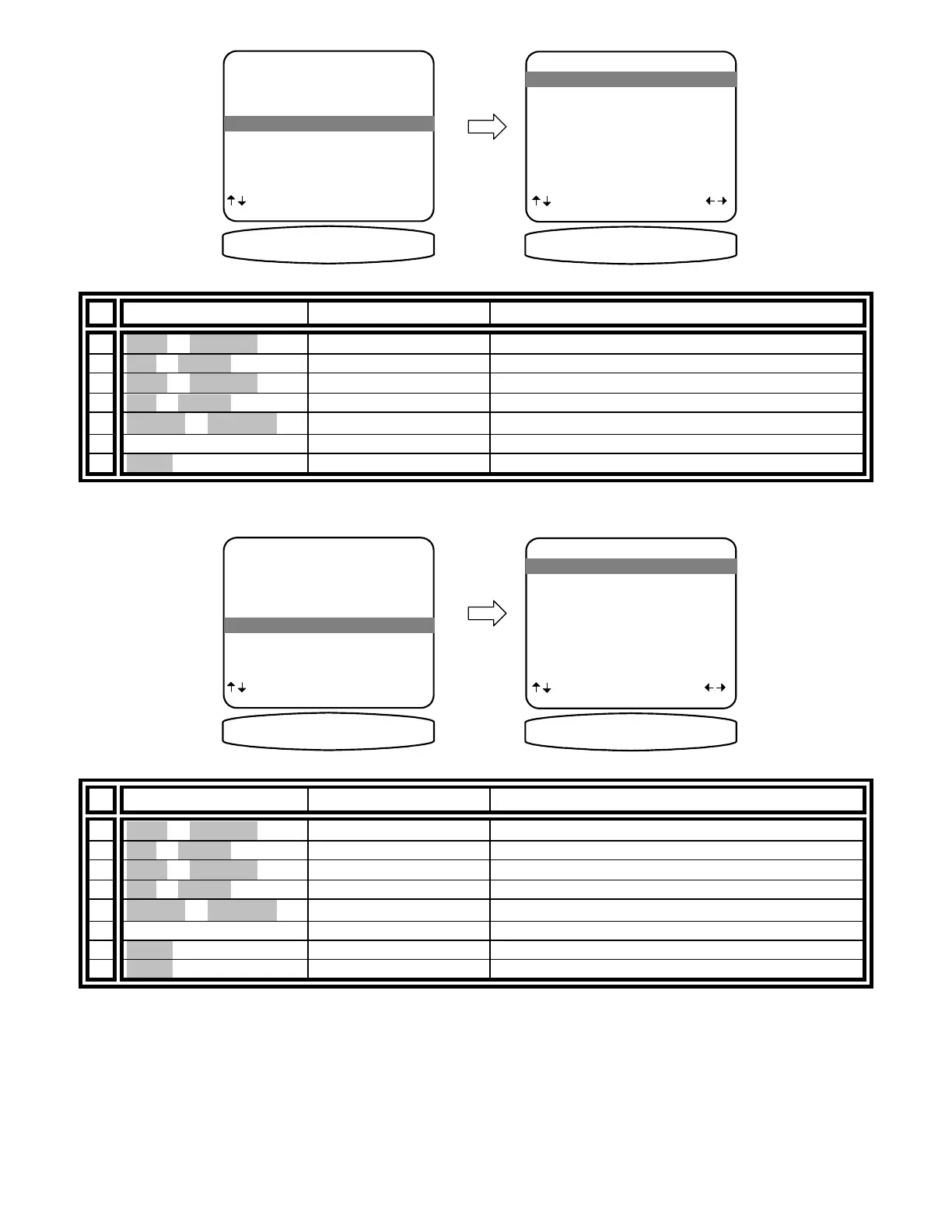
Setup Control Out 3
CONTROL OUT SETUP
1 Control Out 1
2 Control Out 2
3 Control Out 3
4 Control Out 4
next item SEL select
MENU advanced setup
3 Control Out 3
CONTROL OUT 3
CONTROL OUT 3 SETUP
1 TUNER Zone A+B
2 V1 Zone A+B
3 V2 Zone A+B
4 TV Zone A+B
5 DVD Zone A+B
6 CD Zone A+B
7 SAT Zone A+B
8 Tape Zone A+B
next item adjust
MENU control out setup
1 TUNER Zone A+B
C3 TUNER ZA+ZB
From Remote From Front Panel Action
1
À(UP) or §(DOWN)
(UP) or (DOWN) move to Control Out 3
2 SEL or ENTER (ENTER) activate CONTROL OUT 3 SETUP
3
À(UP) or §(DOWN)
(UP) or (DOWN) move to desired source
4 SEL or ENTER (ENTER) select desired source
5
¶(LEFT) or •(RIGHT)
VOLUME KNOB select desired control operation
6 repeat 3 – 4 repeat 3 – 4 set control out 3 for other sources
7 MENU MENU return to CONTROL OUT SETTINGS
Setup Control Out 4
CONTROL OUT SETTINGS
1 Control Out 1
2 Control Out 2
3 Control Out 3
4 Control Out 4
next item SEL select
MENU advanced setup
4 Control Out 4
CONTROL OUT 4
CONTROL OUT 4 SETUP
1 TUNER Remote
2 V1 Remote
3 V2 Remote
4 TV Remote
5 DVD Remote
6 CD Remote
7 SAT Remote
8 Tape Remote
next item adjust
MENU control out setup
1 TUNER Remote
C4 TUNER REMOTE
From Remote From Front Panel Action
1
À(UP) or §(DOWN)
(UP) or (DOWN) move to Control Out 4
2 SEL or ENTER (ENTER) activate CONTROL OUT 4 SETUP
3
À(UP) or §(DOWN)
(UP) or (DOWN) move to desired source
4 SEL or ENTER (ENTER) select desired source
5
¶(LEFT) or •(RIGHT)
VOLUME KNOB select desired control operation
6 repeat 3 – 4 Repeat 3 – 4 set control out 4 for other sources
7 MENU MENU return to CONTROL OUT SETTINGS
8 MENU MENU return to ADVANCED SYSTEM SETUP


 To Next Page