EasyManua.ls Logo

Barco G62 - Input;Output (I;O) Panel; Control Panel

Barco G62
124 pages
Print Icon
To Next Page IconTo Next Page
To Previous Page IconTo Previous Page
Loading...
R5914653 /02 G6226
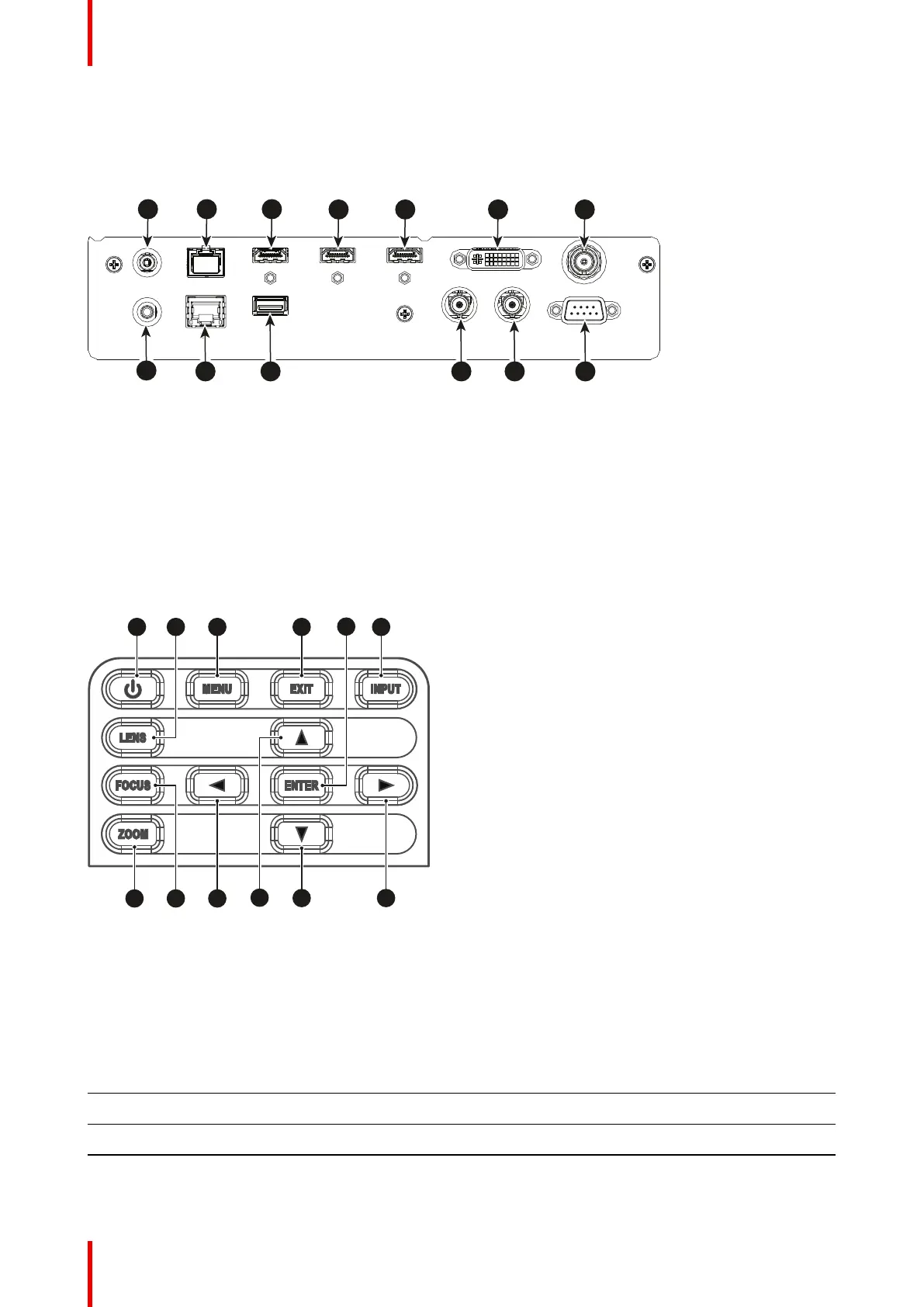
3.1 Input/Output (I/O) Panel
Input and output ports location
DC 12V
HDBaseT
HDMI OUT
HDMI-2 IN
HDMI-1 IN
DVI-D
3G-SDI IN
ETHERNET
USB
3D SYNC
IN
RS232
REMOTE
IN
OUT
3D SYNC
1
8
9 10 11 12 13
2 3
4 5 6 7
Image 3–1
1 DC 12V connector
2 HDBaseT connector
3 HDMI out connector
4 HDMI 2 in connector
5 HDMI 1 in connector
6 DVI-D connector
7 3G SDI in connector
8 Wired remote connector
9 Network connector RJ45
10 USB Type A connector
11 3D Sync out connector
12 3D Sync in connector
13 RS232 connector
3.2 Control panel
Button location
Z
INPUTEXIT
MENU
LENS
FOCUS
OOM
ENTER
1 2 3 6
7 8 9
11
10
5
12
4
Image 3–2
1 POWER
2 LENS
3 MENU
4 EXIT
5 ENTER
6 INPUT
7 ZOOM
8 FOCUS
9 LEFT
10 UP
11 DOWN
12 RIGHT
Button function
Button Function
POWER Turn the projector on or off.
LENS Adjust lens position.
MENU Show the main menu on screen.
Input & Communication

Table of Contents

Other manuals for Barco G62

Related product manuals