User Manual “Streaming Client“ - V1.31 - 8. Jan. 2007
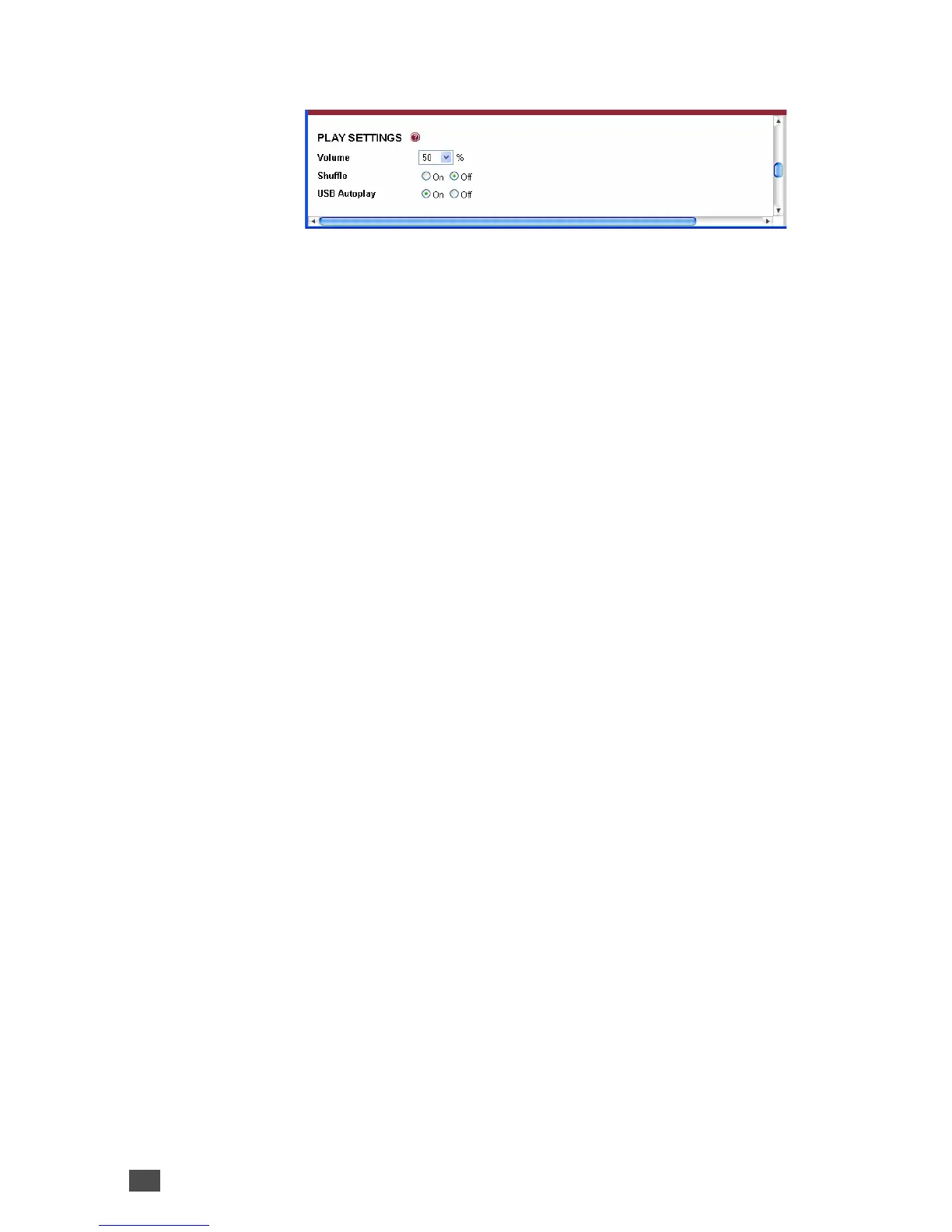
Volume
Select the preferred output volume (Headphone out,
RCA Line out, Speaker out) to be adjusted at power up.
Default: “50” percent
Shuffle
This feature works only when playing from a playlist.
When Shuffle is enabled the play order of songs in a
playlist is randomized (shuffled).
Default: “Off”
Exception: When playing from the local USB memory
and a file called “shuffle.txt” is present then shuffling is
enabled regardless of the “Shuffle” setting (see USB
Autoplay).
USB Autoplay
This feature enables the automatic creation and playback
of a playlist containing all MP3 and WMA songs on a
connected USB media (in case the active URL is pointing
to a missing playlist). The songs found are stored in the
playlist named “__exstr.m3u” and a file called “shuffle.txt”
is created to enable the shuffled play back of the songs.
To prevent the play back of the same song after a power
failure the number of the current file played is stored in
the file “plist.id”.
A connected USB media (memory stick) will be scanned
for a M3U playlist named “playlist.m3u” pointing to the
files on the USB media. The audio files contained in the
playlist are played if found and skipped if missing.
Default: “On”
26 Device Configuration


 To Next Page