www.micro-components.com, microComponents@bartels-mikrotechnik.de
Tel: +49-231-9742-500, Fax: +49-231-9742-501
5.3 Connecting the pump to the mp-x
Please note that it is only possible to connect either one mp6/mp6-pp or a maximum of two
mp5 to the mp-x otherwise a maximum voltage drop is possible!
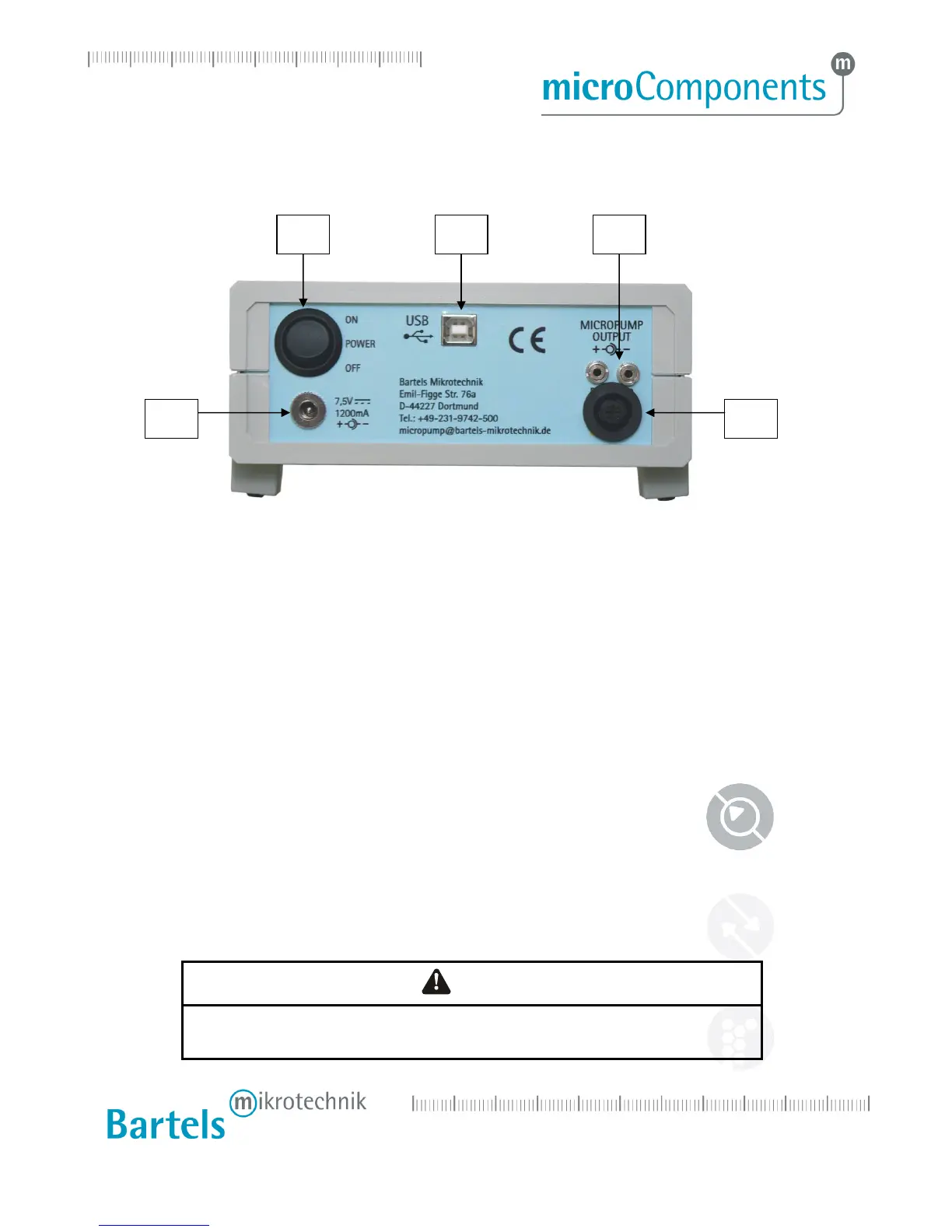
Step 1: Plug the micropump control cable into the corresponding micropump connector.
Step 2: Check the mains adaptor plug polarity. It is pictured next to the power supply connector at the
back of the controller. If the plug polarity is wrong, the controller can’t work. Please make sure
that the setting on the included connector is attuned to 7.5 V.
Step 3: Connect the mains adaptor with the power supply connection.
Step 4: Plug the mains adaptor into a mains socket.
Step 5: Now you can start the control unit with the main power switch.
DANGER
THE “MICROPUMP OUT” CONNECTOR CAN CARRY HIGH VOLTAGE !
BE CAREFUL, WHEN YOU PLUG IN THE MICROPUMP CONTROL CABLE!
1 Main power switch
2 Power supply connector
3 USB interface for computer connection
4 Two connectors for the mp5
5
One connector for the mp6


 To Next Page