Page 13 of 82 OM0408/49
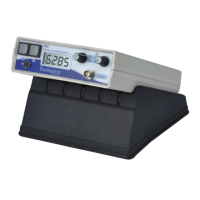
Figure 1a. MS2 meter, front panel.
Key to Figure 1a
1. ‘Measure’ (‘M’) push button
2. Toggle switch
3. ‘Zero’ (‘Z’) push button
4. On/Off Switch
5. Range multiplier switch
6. Socket for coaxial cable connection to sensor
There are five front panel controls.
1. ‘Measure’ push button, labelled ‘M’: permits sample readings to be taken.
2. Toggle switch: performs the same function as the push button but permits continuous
measurements.
3. ‘Zero’ push button, labelled ‘Z’: permits ‘air’ readings to be taken. By performing
a measurement to ‘air’ this control re-sets the instrument and brings subsequent
measurements within the range of the display.
4. On/Off Switch: controls the internal battery supply and also permits the selection of either SI
or CGS units.
5. Range multiplier switch: allows selection of either x1 or x0.1 sensitivity range. In the second
case the result is shown to the first place of decimal and a 10-fold increase in measurement
time provides additional noise filtering. The switch also activates the battery indicator.
531
2
4
6


 To Next Page