Configuration through web interface– 13
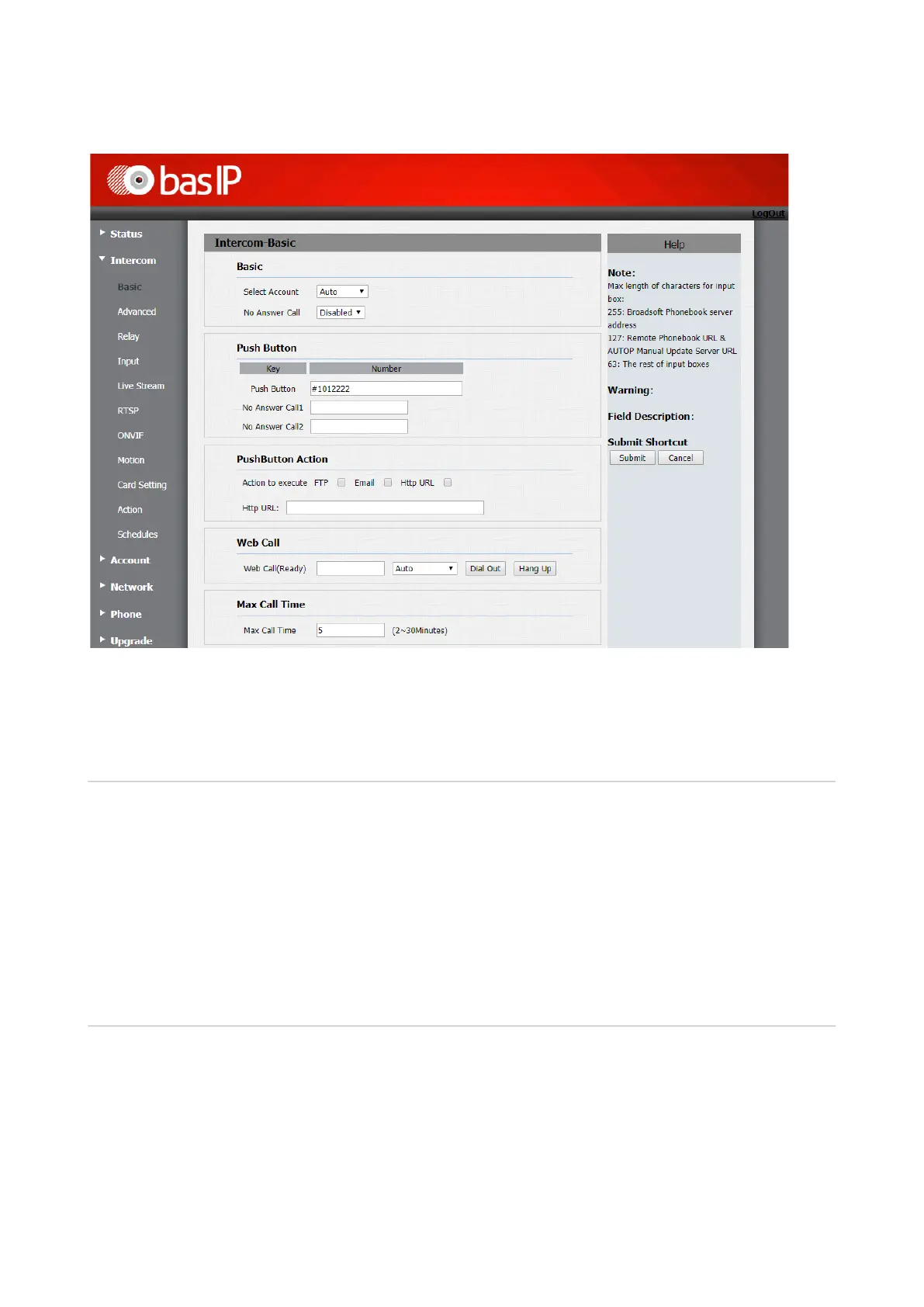
Select account: Account which is used for calls.
No answer call: Call forwarding function if no answer is received from dialed subscriber.
Push button
Push button: A field for entering a subscriber number you are dialing by pressing the ring
button.
To call the device using the internal protocol, you need to enter the 7-digit number, for example,
"#1012222", where "1" is the number of a building, "01" – the number of the unit, "22" - the floor
number and "22" - the apartment number.
No answer call 1,2:Fields for entering subscriber’s numbers, which incoming call will be
forwarded to, if it is no answer from main number.
Push button actions
FTP: Sending the visitor’s photo to FTP-server.
E-mail: Sending of the visitor's photo to the specified E-mail.
HTTP URL: GET request to the specified address.
HTTP URL: The URL to which GET request will be sent if such option selected.


 To Next Page