15
Language
Time
Calibrate
Appliance and display settings
English
Français
Türkçe
Please select language
Language
has been set
Settings
Assisted Mode
Specials
Appliance and display settings
WHEN THE APPLIANCE IS FIRST PLUGGED
IN it will ask you to set the Lan-
guage and 24 hour Clock.
A
FTER A POWER FAILURE the Clock will
flash and needs to be reset.
YOUR OVEN HAS a number of func-
tions which can be adjusted to
your personal taste.
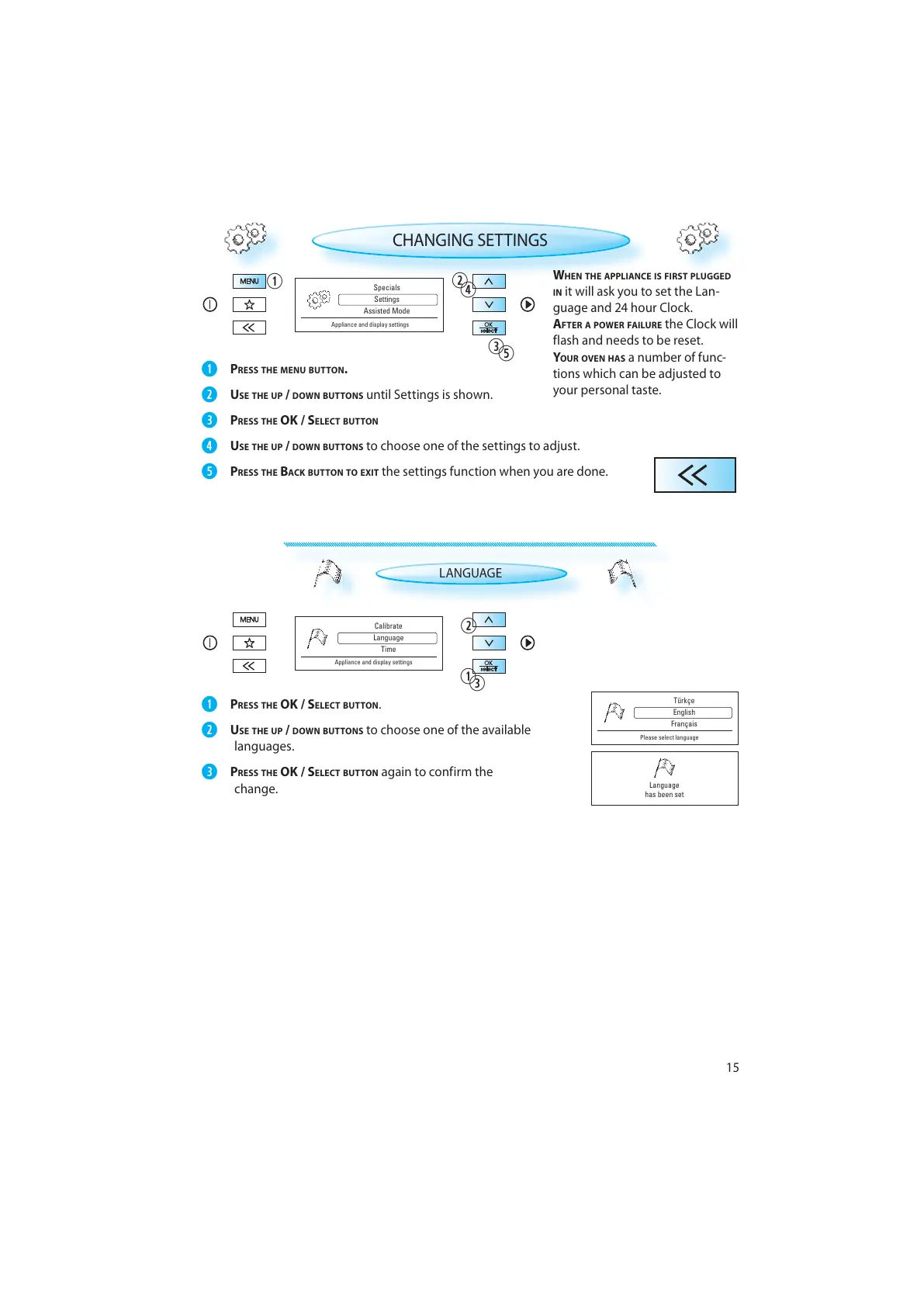
CHANGING SETTINGS
PRESS THE MENU BUTTON.
USE THE UP / DOWN BUTTONS until Settings is shown.
PRESS THE OK / SELECT BUTTON
USE THE UP / DOWN BUTTONS to choose one of the settings to adjust.
PRESS THE BACK BUTTON TO EXIT the settings function when you are done.
LANGUAGE
PRESS THE OK / SELECT BUTTON .
USE THE UP / DOWN BUTTONS to choose one of the available
languages.
PRESS THE OK / SELECT BUTTON again to confirm the
change.



 To Next Page