31
71.09161.01
en
'"$503:4&55*/(4
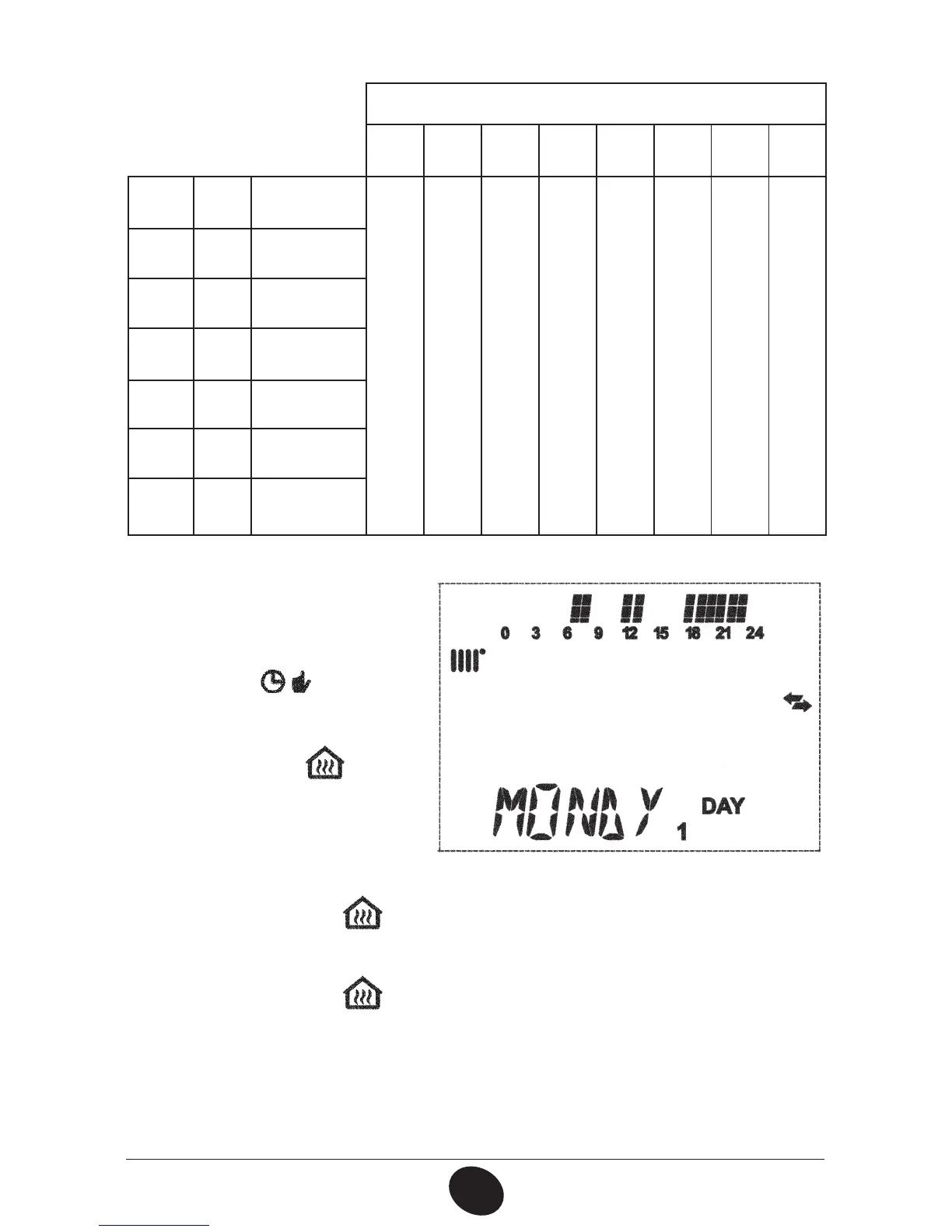
On 1 Of 1 On 2 Of 2 On 3 Of 3 On 4 Of 4
.0/%:
%":(monday)
06:00 08:00 11:00 13:00 17:00 23:00 24:00 24:00
56&%:
%":(tuesday)
8&%%:
%":(wednesday)
5)6%:
%":(thursday)
'3*%:
%":(friday)
4"5%:
%":(saturday)
46/%:
%":(sunday)
To set a single time band,
proceed as follows:
1) Press the *1 button and then
the button
2) choose a day of the week
(1…7) by repeatedly pressing
the buttons +/-
3) press the 0,CVUUPO
4) the display shows the
message PO and the 4
digits of the time ashing, as
TIPXOJOUIFàHVSFCFMPX
0608_2802
5) use the buttons +/- UPTFUUIFCPJMFSMJHIUJOHUJNF
6) press the 0,CVUUPO
7) the display shows the message PGBOEUIFEJHJUTPGUIFUJNFáBTIJOH
8) use the buttons +/-
UPTFUUIFCPJMFSTXJUDIJOHPGGUJNF
9) press the 0,CVUUPO
10) repeat the same operations (from point 4) to set the remaining three time
CBOET
11) press the IP button to exit the function.


 To Next Page