7
REV 0.9.5
4. POWER DRAFT BLOWERS FANS
All blowers are equipped with an adjustable damper and an aluminum nozzle.
The blower housing is constructed of stainless steel for a clean, durable and
long lasting finish.
The 10 CFM Pit Viper fan is good for medium grills and smokers, including all
ceramic grills and bullet-style smokers. The 25 CFM Pit Bull fan is suited to offset
smokers and larger cabinet smokers; two fans can be used for large custom
built and trailer-based models.
All fans have an adjustable slide damper. This feature allows the user to make
fine adjustments on their own grill or smoker due to natural drafts that effects
cooking temperature during the blower’s off cycle. Testing on different settings
is recommended. Open the damper fully for quick start-up or grilling at high tem-
peratures. Close it half way for smaller cookers or low and slow cooking. Close
three-quarters of the way for cold smoking. Close all the way to kill the fire.
5. KEY OPERATION
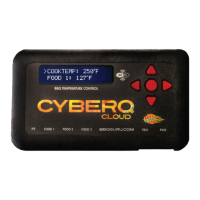
UP Indexes value up / scrolls
DOWN Indexes value down / scrolls
LEFT Selects digit / previous menu
RIGHT Selects digit / next menu
MODIFY/ENTER (M/E) Selects / saves (powers up/down when held down)
UP + DOWN + - Access / leave Setup menu
The Key backlight blinks when there is Wi-Fi activity.
Whenever a key is pressed, a short chirp occurs on the beeper as user feedback.
The chirp can be turned off in the System Setup menu.
Anytime the beeper is sounding, pressing any key will silence it and clear the
alarm condition. To turn the alarm beeper off, set the ALARM BEEPS in the
System Setup menu to zero.
The contrast and brightness can be adjusted by the ‘hot keys’ described below
and in the system setup menu. We suggest you exercise caution, as too large an
adjustment can render the display unreadable.
Pressing the M/E KEY and UP KEY increases the Backlight brightness.
Pressing the M/E KEY and DOWN KEY decreases the Backlight brightness.
Pressing the M/E KEY and RIGHT KEY increases the Display contrast.
Pressing the M/E KEY and LEFT KEY decreases the Display contrast.
Holding down all four arrow keys (UP, DOWN, LEFT, RIGHT) for approximately 5
seconds will reset all settings to factory defaults. The CyberQ Cloud Wi-Fi will
then show RESETTING EEPROM and restart.


 To Next Page