30
REV 0.9.5
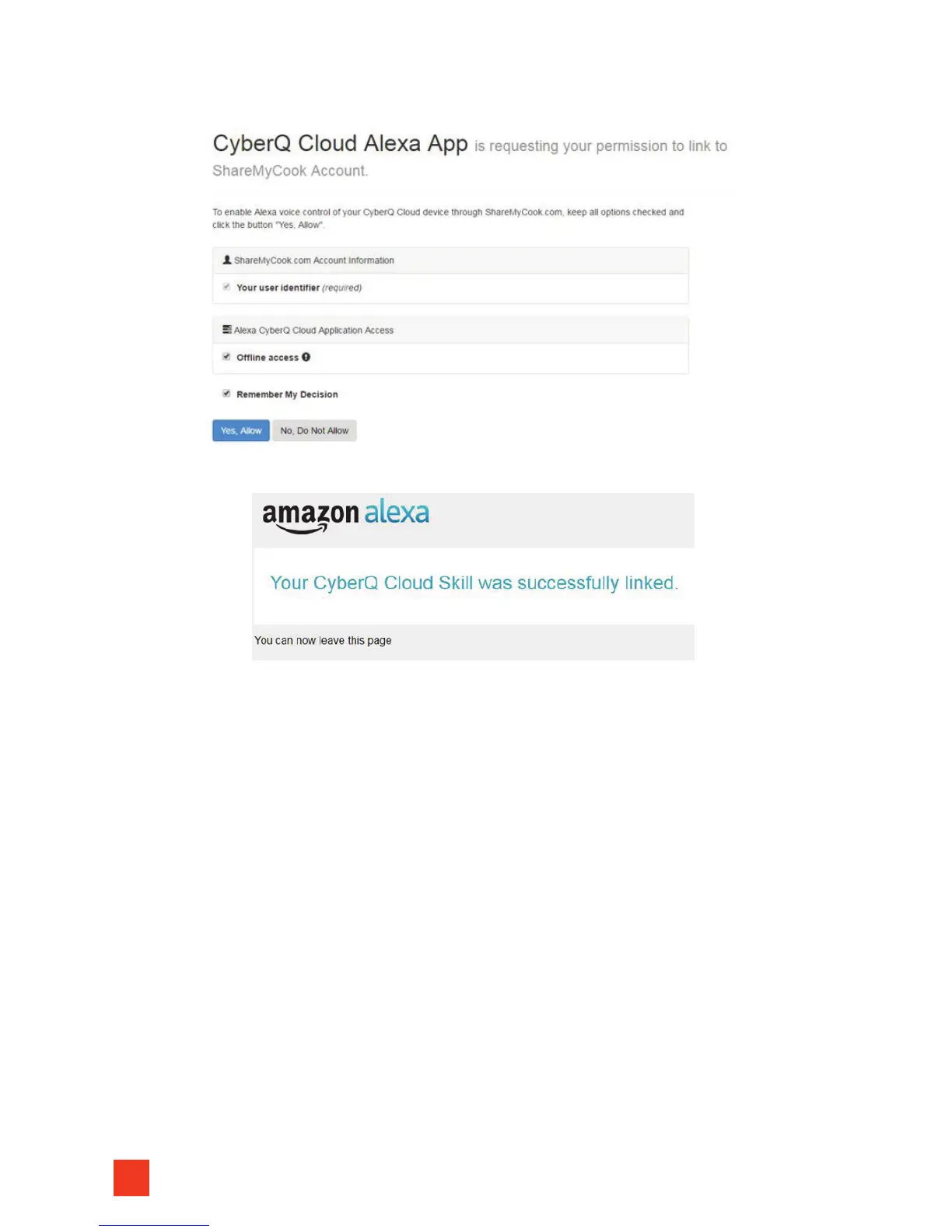
8. Once logged in, it will ask you if you grant permission. You will click ‘Yes, Allow’:
9. Once successful, you should see something similar to this:
10. You are now ready to use ‘Voice Control’! Refer to the Voice Commands
section of the manual for a list of the voice commands you can use.
12. VOICE CONTROL USING AMAZON ALEXA
VOICE COMMANDS
After you have successfully linked your Amazon Alexa-enabled device (sold sep-
arately) with your CyberQ Cloud (please refer to the ‘Voice Control Initial Setup’
in the manual for directions), you can start using voice commands, allowing you
to monitor and control your device with just the sound of your voice.
Alexa expects commands spoken in a specific way. Often she can interpret vari-
ations, but we recommend using the commands as listed below. For the food
names and specific temperatures and timer settings, you should substitute with
your own settings.
Alexa, Ask CyberQ Cloud, what is the pit temperature?
Alexa, Ask CyberQ Cloud, what is the food 1 temperature?
Alexa, Ask CyberQ Cloud, what is the food 2 temperature?
Alexa, Ask CyberQ Cloud, what is the food 3 temperature?


 To Next Page