Chapter 2: Routine Maintenance
Advisor
®
Service Manual 2-1
General Cleaning
The LCD and all external surfaces may be cleaned with a mild, diluted soap and a damp, soft cloth. Do not
use soutions that contain chlrine, ammonia, uoro-carbons, or hydrocarbons. Do not use abrasive cleaners or
high ber wipes that may scratch the surface. Do not allow cleaners to remain on the system surfaces, wipe o
immediately
NOTE! Before cleaning the unit, ensure that the monitor is o and the mains power cord is disconnected.
NOTE! Do not allow liquid to enter the case or submerge any part of the system. Allow components
to dry thoroughly before reconnecting the system to AC power. Evidence that liquid has been
allowed to enter the monitor voids the warranty.
Performance and Safety Checks
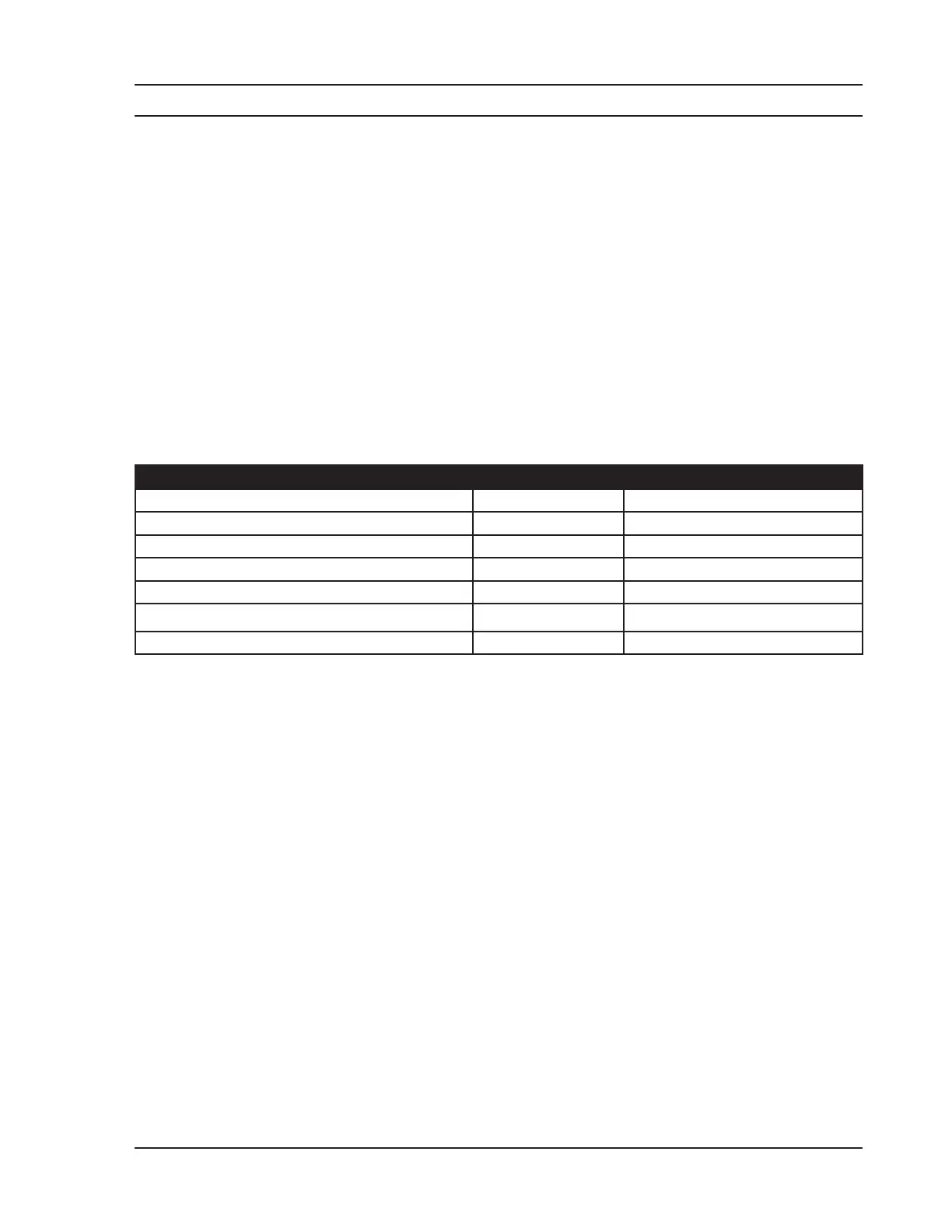
RECOMMENDED MAINTENANCE FREQUENCY INSTRUCTIONS
General Cleaning As needed
Inspect the system, cables, and cords Before use See page 2-1.
Safety checks, in accordance with IEC 60601-1 Annually See page 2-7.
Non-invasive Blood Pressure calibaration verication Annually See page 2-2.
ECG calibaration verication Annually See page 2-3.
CO
2
HILO calibration
Monthly See page 2-5.
Critical Failure Alarm (CFA) verication Annually See page 2-6.
System, Cables, and Cords Inspection
Examine the exterior for cleanliness and general physical condition. Ensure that the housing is intact, hardware is
present and secure, and labeling is legible.
Examine the power cord for damage. Ensure that the prongs of the plug are secure in the casing, and that no
damage is present in the cord itself.
Inspect all patient cables, leads, and sensors.
Chapter 2: Routine Maintenance


 To Next Page