iMX113 BD Pyxis ™ ES Refrigerator Tower Operation Manual
360395/E 14
Notes
• The backup battery system will provide backup power for approximately two hours only if the backup battery has been
allowed to charge for at least 48 hours since the last interruption.
• During a power failure, the backup battery provides power to the monitoring system and the power failure alarm. If the
backup battery is not functioning, the power failure alarm will not be activated.
• If the backup battery does not provide power to the monitoring system during the power failure alarm test, replace
the battery.
5.1 Operating the Refrigerator on an Emergency Power System
After the emergency power system is online, the BD Pyxis™ ES Refrigerator Tower will resume normal operation.
NOTICE
• If AC power has failed and the emergency AC power system is started, the refrigerator will restart using emergency
AC power.
• Do not switch o the i.C
3
monitoring/Access Control backup battery if operating on the emergency AC power system.
• When AC power is restored and the emergency power system is shut down, the refrigerator will resume normal operation.
5.2 Accessing the Refrigerator and Bins During a Power Failure
The BD Pyxis™ ES Refrigerator Tower may be accessed in two ways during an AC power failure. While the refrigerator is
operating on backup battery power, the door may be unlocked using the BD Pyxis MedStation or by switching the door lock key
switch OFF. Doing either of these will disengage the integrated magnetic lock and allow access to the refrigerator.
NOTICE
If medications are manually removed from the refrigerator during a power failure, it is the responsibility of the user to
follow the facility’s standard operating procedures for safe transfer practices.
Access Bins
1. Open the exterior door.
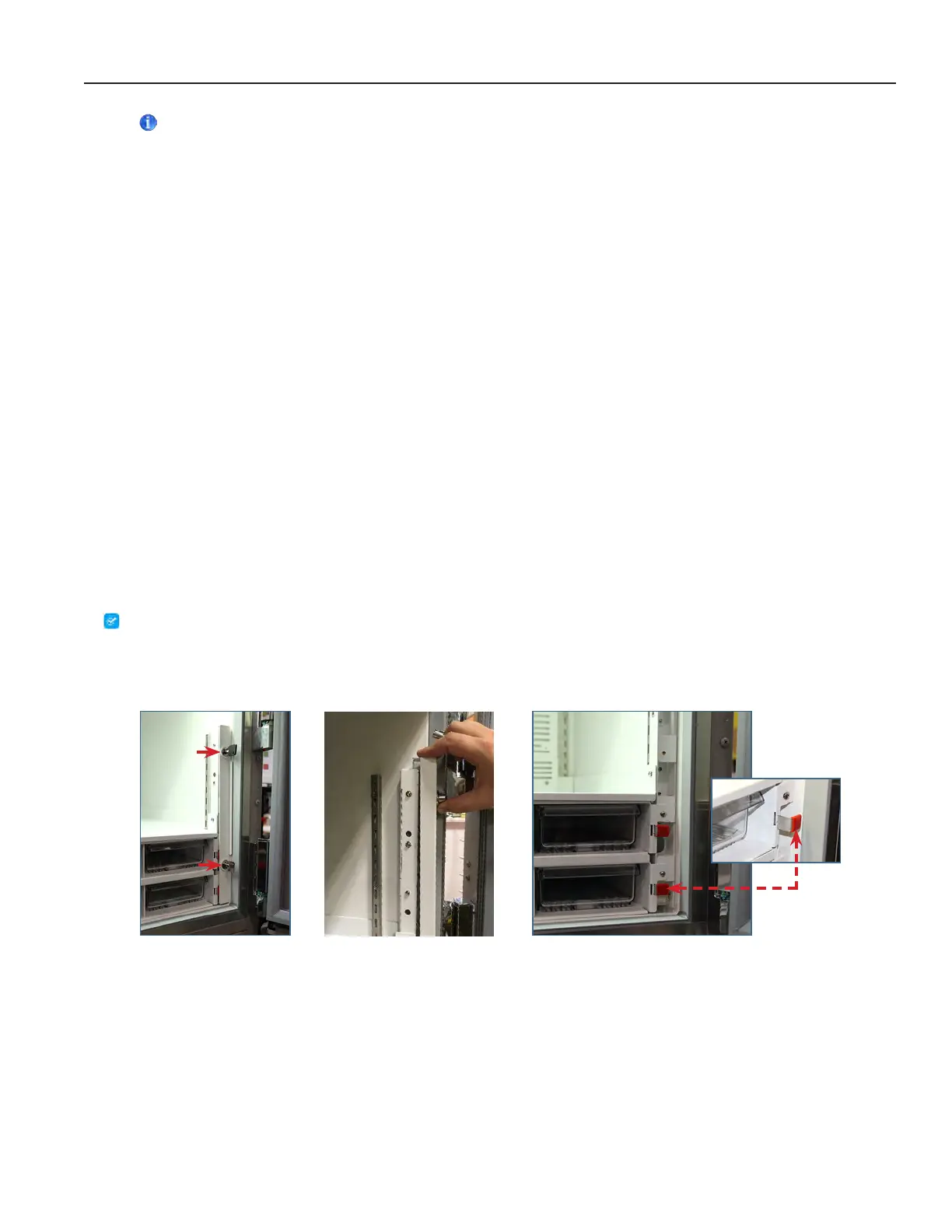
2. Using the module assembly keys (Figure 1), unlock the manual release access cover.
3. Lift the cover upward to disengage the tabs (Figure 2) and pull out to remove the cover and reveal the bin release lever(s).
Figure 1 Figure 2 Figure 3
4. Pull the red tabbed manual release lever outward until the notch on the bottom edge of the lever is aligned with the
module frame, then push down to secure the lever in place (Figure 3). This releases the locking mechanism for each bin in
the module. Repeat for each module installed.
5. Pull out only the bin(s) containing the medication(s) to be removed.
6. Remove the medication(s) from the bin.
7. Slide the bin(s) into the module location until it stops.
8. Lift up on the red tabbed manual release lever and slide it into the slot in the module frame.



 To Next Page