Page 12 of 12 75.5751.12 IXIO-DT1 20230913
TROUBLESHOOTING (cont.)
Can’t find your answer?
Visit www.beainc.com or scan QR code for Frequently Asked Questions!
Tech Support & Customer Service: 1-800-523-2462
General Tech Questions: techservices-us@BEAsensors.com | Tech Docs: www.BEAsensors.com
©BEA | Original Instructions | PLEASE KEEP FOR FURTHER USE - DESIGNED FOR COLOR PRINTING
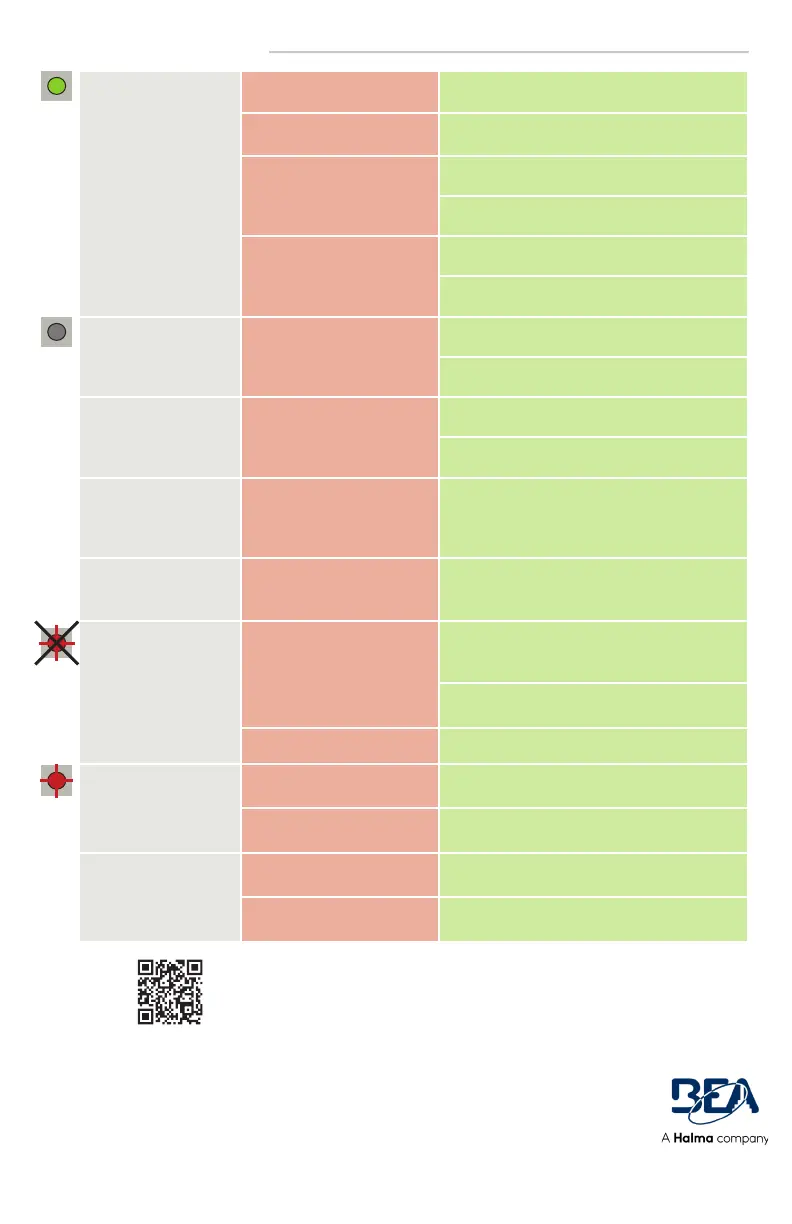
GREEN LED illuminates
sporadically
The sensor is disturbed by rain
and/or leaves.
Increase radar immunity filter.
Ghosting created by door
movement.
Change radar field angle.
The sensor vibrates. Check if the sensor and door cover is secure.
Check position of cable and cover.
The sensor sees the door or
other moving objects.
Remove the objects if possible.
Change radar field size, angle, or immunity.
The LED and the LCD
displays are off
No power to sensor. Check wiring.
Check for correct power supply.
The reaction of the door
does not correspond
with the LED signal
Incorrect output configuration
/ wiring.
Check output configuration setting.
Check wiring.
Cannot access LCD
menu or change
parameters via remote
control
The sensor is protected by a
password.
Enter the correct password. If you forgot the
code, cut and restore the power supply to access
the sensor without entering a password during
1 minute.
Sensor does not
respond to remote
control
Dead batteries. Replace batteries.
RED Visible External
Monitoring (Test
Indication LED) does
not flash
Monitoring installation/setup
error.
Verify door control is capable of monitoring
and the sensor monitoring wires are properly
connected to the door control.
Verify monitoring (TEST) is ON in the sensor
settings.
Sensor malfunction. Replace the sensor.
RED Visible External
Monitoring (Test
Indication LED) flashes
continuously
Wiring issue. Verify wiring.
Door control not set correctly. Verify door control monitoring set to Active Low.
Door cycles open and
remains open
Door control monitoring set
to Active High.
Set door control monitoring to Active Low.
Safety and/or Motion output
is set incorrectly.
Correctly set the given output required for the
door control.


 To Previous Page