31
5.3 Programming the Failsafe (receiver menu point N)
At receiver menu point N you have to program the fail-safe position for the throttle channel. If during ope-
ration, the received signal is interrupted, the throttle servo / motor controller (connected to the output CH5)
is automatically reset to this fail safe position. To avoid accidents, you should program electric motors to “o“
and reduce throttle on nitro helicopters to idle.
We recommend to directly connect speed controller and additional functions to the receiver to use the Failsafe /
Hold functions of the remote control system (see 4.2.1). But you can also CH5 and CH6 on the MICROBEAST for
these functions!
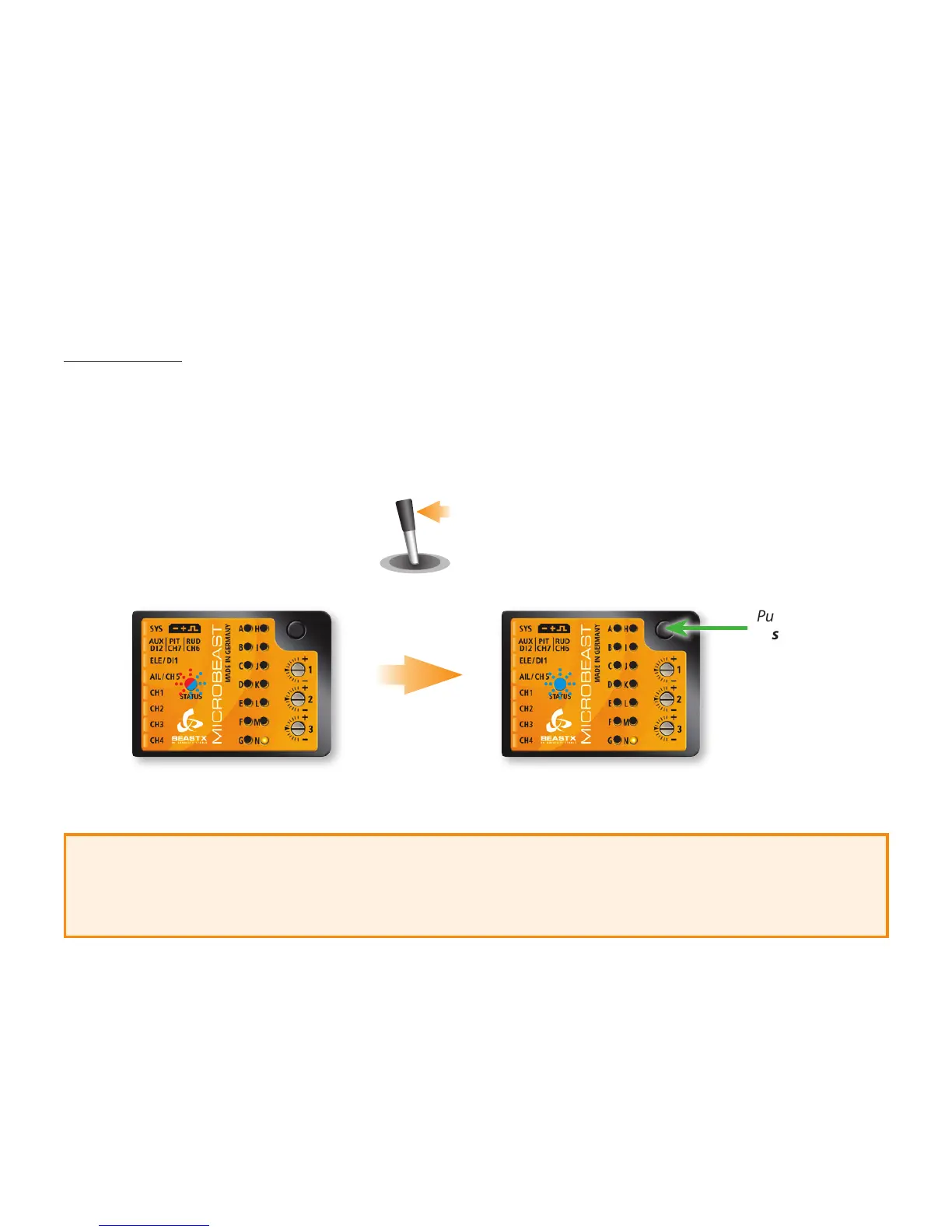
Set the throttle channel on your remote control to the desired position and press the button briey. If you
did not connect a function to CH5, anyway press the button to complete setup.
This completes the basic receiver setup and the MICROBEAST will go into sleep state after the button
is pressed (all menu LEDs ash). Power o the unit and proceed as described in the next chapters.
Set throttle
channel to
failsafe position
Push button
shortly
LED N: ashing
Status-LED: ashing red / blue
Fig. 14
For the other channels there is no fail-safe programming. In case of interruption of the recei-
ved signal, these channels just hold the position corresponding to the last valid signal
(Failsafe programming)


 To Next Page