72
* Factory Setting
G Cyclic response
With point G can be set how aggressive the MICROBEAST responds to cyclic control commands (roll
and pitch). This can reduce the usual uniform and linear control feeling of ybarless systems and
approach it to the feeling of a ybared helicopter.
If you want to use this feature, start from the “slightly increased“ setting, gradually increasing to the
desired level, until you have found your ideal setting.
A too high setting will result in uncontrollable, inaccurate rotation and deteriorating stopping
behavior of each control function.
How high this feature is adjustable without causing any adverse eects depends on many factors such
as heli size, swashplate servos, main rotor blades, main rotor speed, servo power supply and depending
on the particular heli setup.
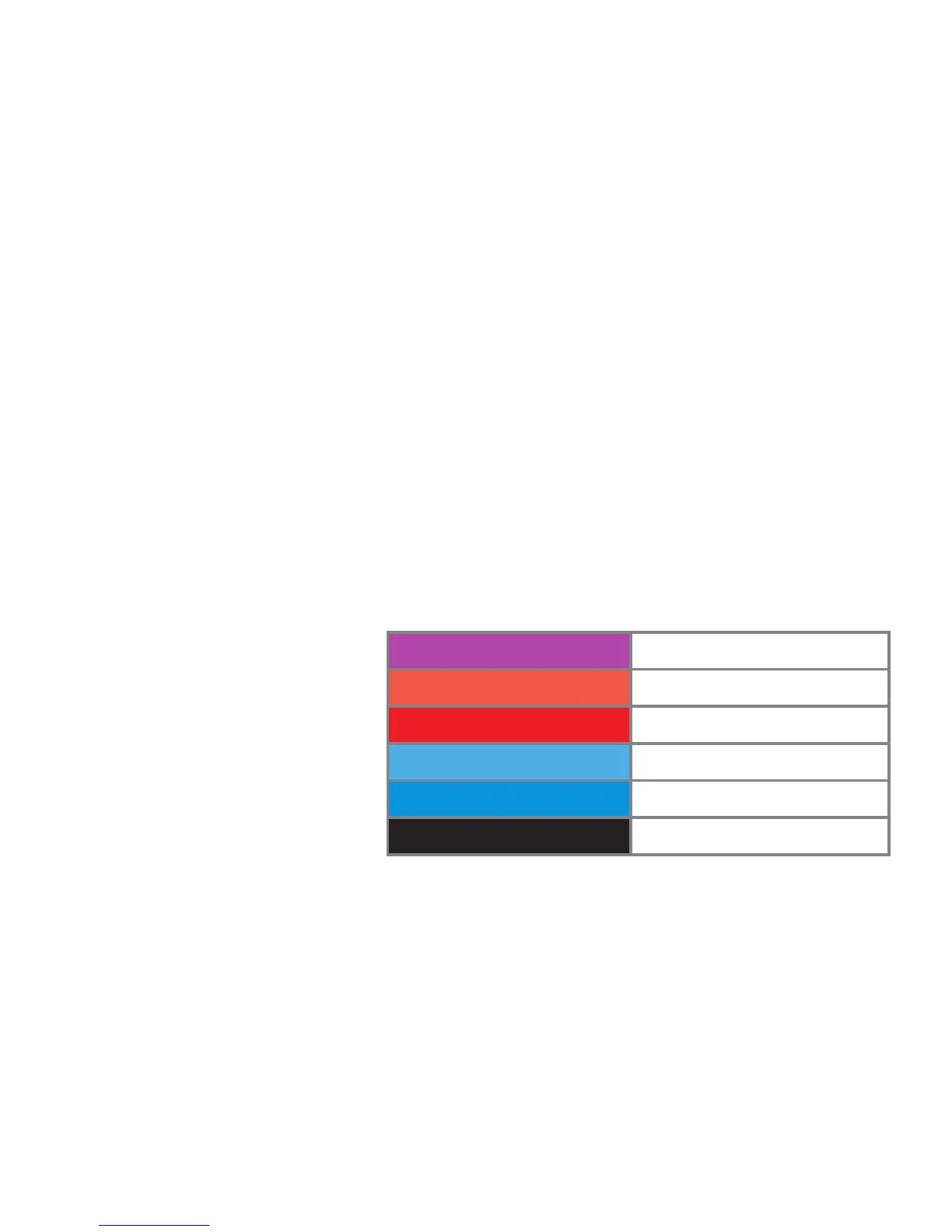
Status-LED Cyclic response
purple normal *
red ashing slightly increased
red increased
blue ashing high
blue very high
o user dened
The choice is made by moving the tail
stick into one direction until the
Status-LED lights in the desired color.
The option “user dened” allows you
to dene your own setting with the
PC software.
Push the button to save the conguration and to proceed to parameter menu point H.


 To Next Page