33
Never y while the MICROBEAST is in one of the setup or parameter menu!
In this condition the gyro control and the stick controls are disabled.
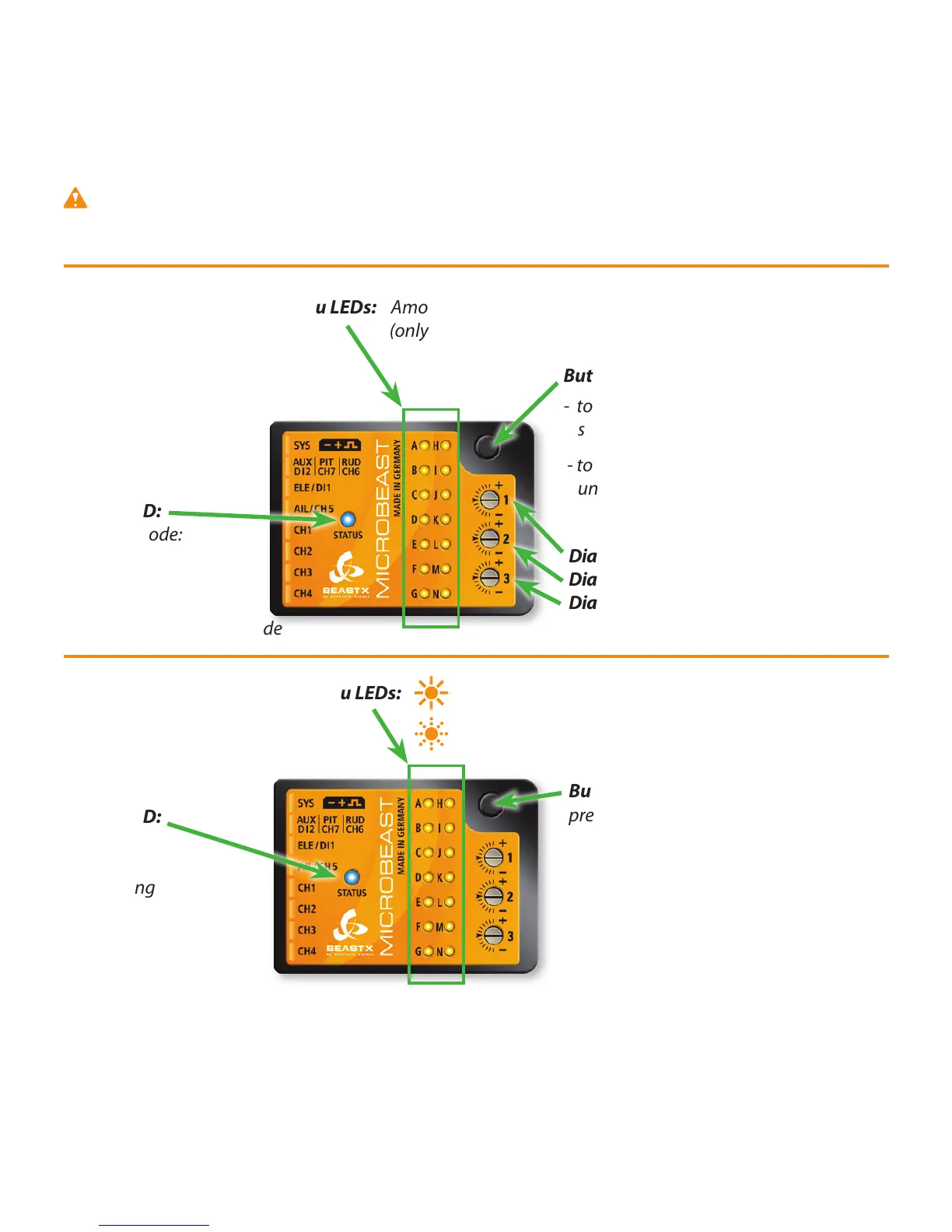
Status-LED:
Tail gyro mode:
o, ashing blue or blue
= HeadingLock mode
purple = Normal-Rate mode
Menu LEDs: Amount of tail gain A=0% to N=100%
(only after powering up or when adjusting the gain)
Menu LEDs: steady on = setup menu
ashing = parameter menu
Button:
- to enter setup menu push down several
seconds until LED A is steady on
- to enter Parameters menu push shortly
until LED A is ashing
Dial 1: cyclic gain
Dial 2: direct cyclic feed forward
Dial 3: tail dynamic
Operation Mode
Menu selection
Status-LED:
o
purple
red ashing
red
blue ashing
blue
Button:
press shortly for next menu point
Selection by tail stick input or aileron / elevator / pitch stick within menus as needed.
Fig. 15


 To Next Page