Channel selection/ Group selection/ Central command
The channel of a transmitter can be programmed into one or more receivers.
Only the channels in which receivers are programmed are displayed. One
channel is activated through an individual command, several channels through
a group command or central command.
One group has a maximum of 4 channels and is assigned a colour.
Depending on the model/ specification of the transmitter, several groups can
be selected.
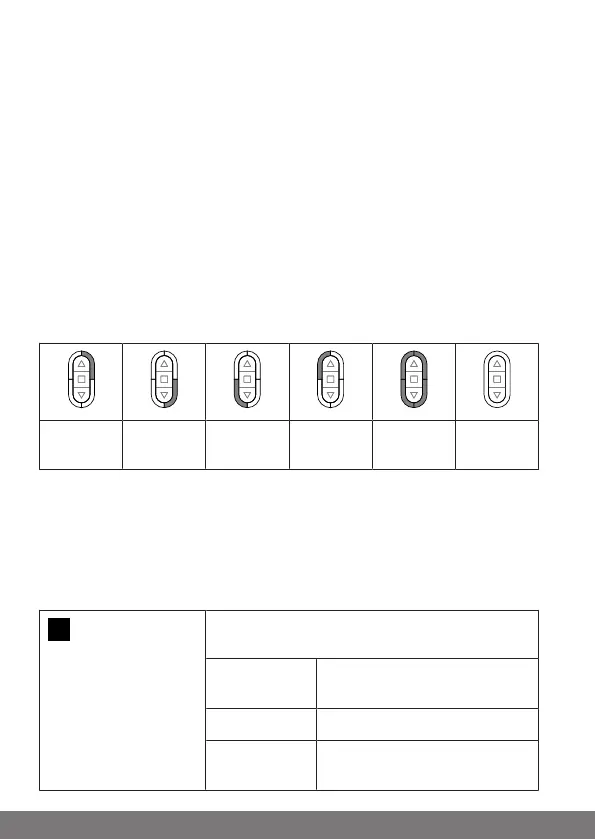
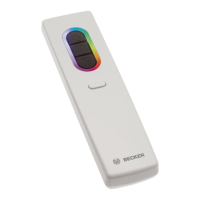
One quarter of the LED ring lights up to indicate each of the individual chan-
nels. A group consists of four channels which are represented by different col-
ours.
If the entire LED ring lights up in one of the group colours, this group is selec-
ted. With the group command, all channels of the selected group are activ-
ated.
If the entire LED ring lights up white, the central command is selected. With the
central command, all channels of all groups are activated.
Channel 1 Channel 2 Channel 3 Channel 4 Group Central
command
manual/ automatic
You can display and select the "Manual" or "Automatic" setting by pressing the
STOP button. Only manual drive commands and emergency signals can be
performed with the "Manual" setting. In addition, automatic drive commands
are also performed in the "Automatic" setting. The automatic functions are not
interrupted if a manual drive command is carried out when in automatic mode.
3s
Press the STOP button for 3seconds to display
the current status.
Automatic
mode:
The LED ring lights up green.
Manual mode: The LED ring lights up red.
Different
modes:
The LED ring lights up yellow.
22-en



 To Next Page