EasyManua.ls Logo

Becker S20 MLS - User Manual

Becker S20 MLS
44 pages
Go to English
Print Icon
To Next Page IconTo Next Page
Loading...
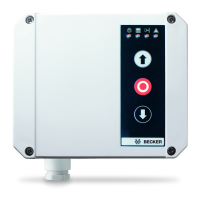
S20 MLS
Montage- und Betriebsanleitung
Torsteuerung
Wichtige Informationen für:
• den Monteur; • die Elektrofachkraft; • den Benutzer
Bitte entsprechend weiterleiten!
Diese Anleitung ist vom Benutzer aufzubewahren.
de
S20
en
fr
nl
Notice de montage et d’utilisation
Commande de porte
Informations importantes pour :
• l'installateur ; • l'électricien ; • l'utilisateur
À transmettre à la personne concernée !
Cette notice doit être conservée par l’utilisateur.
Montage- en gebruiksaanwijzing
poortbesturing
Belangrke informatie voor:
• de monteur • de elektricien; • de gebruiker
Aan de betreende personen doorgeven!
De gebruiker dient deze gebruiksaanwzing te bewaren.
Assembly and Operating Instructions
Door control unit
Important information for:
• Fitters; • Electricians; • Users
Please forward accordingly!
These instructions must be kept safe for future reference.

Table of Contents

Question and Answer IconNeed help?

Do you have a question about the Becker S20 MLS and is the answer not in the manual?

Becker S20 MLS Specifications

General IconGeneral
BrandBecker
ModelS20 MLS
CategoryControl Unit
LanguageEnglish

Summary

General Information

Warranty

Safety Information

Hazard Indicators

Defines 'Caution', 'Attention', and 'Note' symbols indicating potential hazards or useful information.

Intended Use

Abbreviations Used

Installing the Control Unit

Electrical Connection

Details the necessary electrical connections for the control unit, emphasizing qualified electrician requirements.

Installing the Mains Connection

Specifies requirements for connecting the control unit to the main power supply, including cable and plug details.

Setting Mode

Operator Controls

UP Button

Describes the function of the UP button for opening the door, including stop and reverse actions.

STOP Button

Details how the STOP button functions to halt door movement.

DOWN Button

Explains the DOWN button's function for closing the door, including safety edge and light barrier interactions.

Checking the Direction of Movement

External Control Sensors and Safety Devices

EMERGENCY STOP Button

Details the connection and function of an external EMERGENCY STOP button for immediate shutdown.

External Triple Push Button

Explains how to connect and use an external triple push button for door control.

Wicket Door Switch; Spring Break Safety Device

Describes connecting a wicket door switch or spring break safety device for enhanced safety.

Induction Loop

Slack Rope Switch

Pull-in Safety Device

External Single Push Button

Light Barrier

Safety Edge

DIP Switch Settings for Safety Edges

Table detailing DIP switch configurations (1, 2, 3) for different types of safety edges.

Setting the DIP Switches

LED Displays

Troubleshooting (What to do if...?)

Technical Data

Complete Connecting Diagram

Related product manuals