Installation
3.3 Power Supply of the Industrial PC
The Industrial PC is fitted with a 24 V
DC
power supply unit.
3.3.1 Pin assignment of the connector
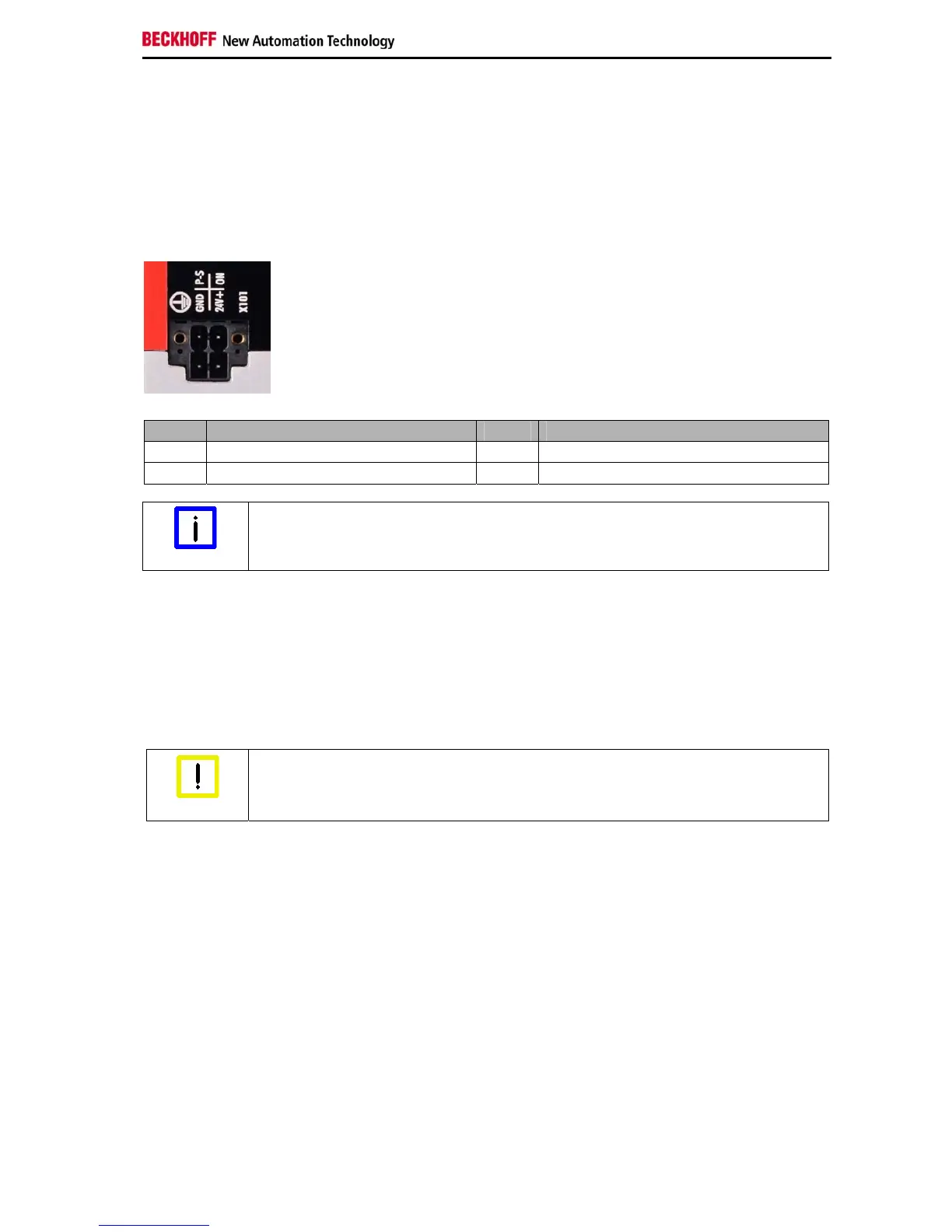
The power supply and the external circuit of the Industrial PC are connected via the 4-pole plug connector
(Phoenix DFMC 1,5/2-STF-3,5 BK – 1708595):
Pin Function Pin Function
GND 0V P-S Power-Status Output
24V + Power Supply ON PC_ON Input
Conductive cross-section
Note
The connector is specified for 8 A and can lift conductive cross-sections until 1.5 mm
2
.
3.3.2 Cable Cross Sections
For the connection of the power supply, wiring with a cable-cross-section of 1.5 mm
2
must be used.
With bigger distances between voltage source and PC, you take the voltage drop as a function of the
cable-cross-section as well as voltage fluctuations of your distribution voltage into account, so that is
secured that the voltage doesn't fall under 22 V at the power supply.
Insert fuse
Attention
The power supply must be protected with maximum 16 A.
3.3.3 Check voltage rating and connect
Fitted with the 24 V
DC
power supply unit:
1. Check that the external power supply is providing the correct voltage.
2. Insert the power supply cable that you have assembled into the Industrial PC's power supply
socket. Then connect it to your external 24 V power supply.
C6030-0060 17


 To Next Page