Product overview
EP1xxx40 Version: 2.5.0
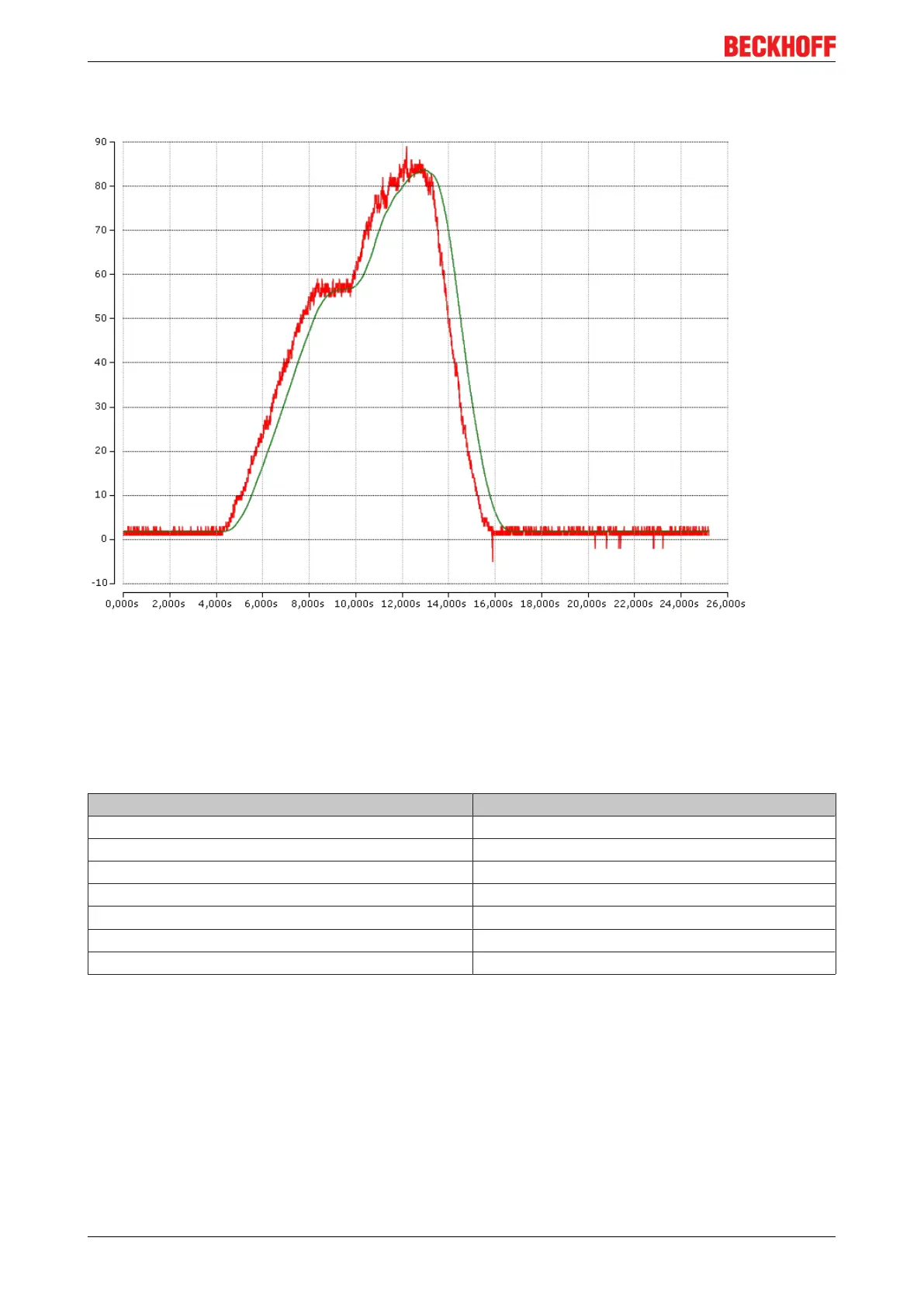
The angle is displayed with a resolution of 1 degree. Since the value is still noisy, filtering on the PC is
recommended.
Fig.33: red = angle values from EP1816-3008, green = after arithmetic mean calculation on the PC
Reference directions
• "Power supply high / EtherCAT connection low" -> negative angle X
• "Power supply low / EtherCAT connection high" -> positive angle X
• "Box tilted to the left (top to the left)" -> positive angle Y
• "Box tilted to the right (top to the right)" -> negative angle Y
Color Meaning
AI Inputs Channel 1: Input 1 -180° to +180° relative to X
AI Inputs Channel 2: Input 2 -180° to +180° relative to Y
AI Inputs Channel 3: Input 3 0
AI Inputs Channel 4: Input 4 -180° to +180° relative to Y
AI Inputs Channel 5: Input 5 -180° to +180° relative to X
AI Inputs Channel 6: Input 6 0
Calculation based on the acceleration values
If the calculation takes place on the PC, the "Presentation" in CoE object 0x8080:1D must be set to Milli-G.


 To Next Page