50 51Quick Start GuideSYNCUSSION SY-1
MIDI 操作
SY-1 可以使用两种 MIDI 模式之一, 这些模式是通过 USB 使用 SynthTribe 应用选择的。 当 SY-1 断电时, 所选模式将被记住,
直到应用程序更改为止。
模式 1 – 仅使用由直插开关 43 设置的 MIDI 通道。 通道 1 由 MIDI 音符 36 触发, 通道 2 由 MIDI 音符 38 触发。 没有 MIDI
音高控制, 因此音高只能由面板控制设置确定。 通道 1 衰减可以使用 MIDI CC 80 进行调整, 通道 2 可以使用 MIDI CC 81
进行调整。 为了获得最佳效果, 将顶部面板控制 15 和 29 设置为中间点。
通电时按住 CH 1 TRIG 按钮也可以进入模式 1。
模式 2 – 通道 1 将响应由直插开关 43 选择的通道上的 MIDI 消息, 而通道 2 将响应前一个 MIDI 通道 (注:如果直插开关
设置为 16, 则通道 2 将响应 MIDI 通道 15, 而不是 MIDI 通道 1)。 每个通道的音高可以使用 MIDI 音符 21 到 84 进行控制,
衰减设置如模式 1。 超出范围的音符将发音为可用范围的最低音和最高音。
通电时按住 CH 2 TRIG 按钮也可以进入模式 2。
校准和固件更新
打开 SY-1 电源时按住 CH 1 TRIG 和 CH 2 TRIG 按钮。再按 CH 1 TRIG 按钮启动振荡器校准 (CH 1 LED 闪烁;CH 2 LED 不亮)。 校准
完成后, SY-1 将恢复正常运行 (两个 LED 均不亮)。
按下 CH 2 TRIG 按钮将 SY-1 置于 DFU 模式, 它将等待来自 SynthTribe 应用程序以外的来源的固件更新。 两个 LED 都将
不亮。 更新完成后, SY-1 将恢复正常运行。
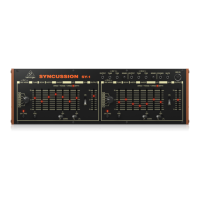
SYNCUSSION SY-1 Controls
(EN)
Step 3: Getting
started
OVERVIEW
This ‘getting started’ guide will help you set up your Syncussion SY-1 and briey introduce
its capabilities.
CONNECTION
To connect the Syncussion SY-1 to your system, please consult the connection guide earlier
in this document.
SOFTWARE SETUP
The Syncussion SY-1 is a USB Class Compliant MIDI device, and so no driver installation
is required. The Syncussion SY-1 does not require any additional drivers to work with
Windows and MacOS.
HARDWARE SETUP
Make all the connections in your system. Keep the Syncussion SY-1 power turned o when
making any connections.
Ensure your sound system is turned down.
Turn on the Syncussion SY-1 before turning on any power ampliers and turn it o last.
This will help prevent any turn on or turn o “pops or thumps” in your speakers.
WARM UP TIME
We recommend leaving 15 minutes or more time for the Syncussion SY-1 to warm up
before recording or live performance. (Longer if it has been brought in from the cold.) This
will allow the precision analog circuits time to reach their normal operating temperature
and tuned performance.
FIRMWARE UPDATE
Please check the behringer.com website regularly for any updates to theBehringer
SYNTHTRIBE app.
The app looks for the latest rmware le which can thenbe downloaded and used to
update the Syncussion SY-1.
SYNCUSSION SY-1 Getting started








 To Next Page