34 / 160 EN
Local air conditioner / User Manuel
Do not repair or disassemble the air conditioning by yourself. Unqualified repair will lead to failure of
the warranty card, and may cause damage to users or their properties.
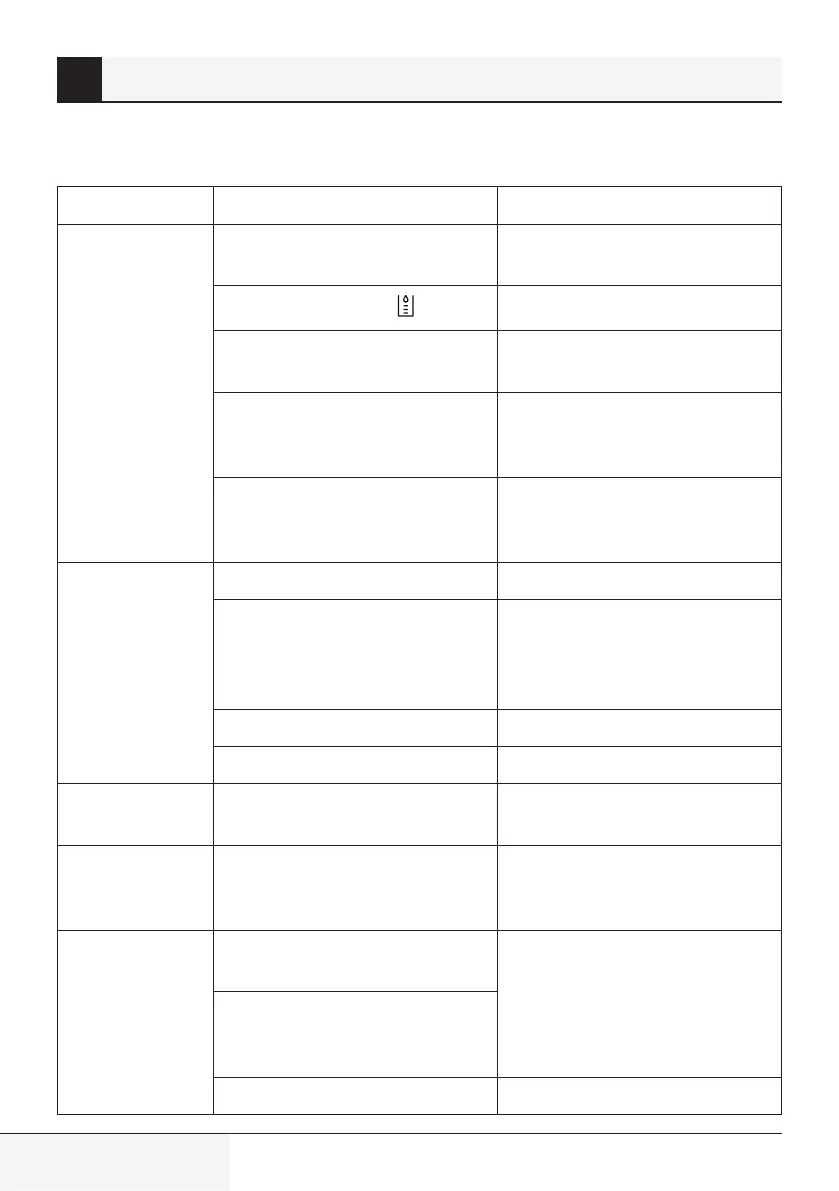
Problems Reasons Solutons
The air
conditioning does
not work.
There is no electricity.
Turn it on after connecting it to a
socket with electricity.
The overflow indicator “ ” light up.
Discharge the water inside.
The ambient temperature is too low
or too high
Recommend to use the machine in at
the temperature of 7-35°C (44-95°F).
In cooling mode, the room
temperature is lower than the set
temperature;
Change the set temperature.
In dehumidification mode, the
ambient temperature is low.
The machine is placed in a room with
an ambient temperature of greater
than 17°C (62°F).
The cooling effect
is not good
There is direct sunlight. Pull the Curtain.
Doors or windows are open; there
are a lot of people; or in cooling
mode, there are other sources of
heat.
Close doors and windows, and add
new air conditioning.
The filter screen is dirty. Clean or replace the filter screen.
The air inlet or outlet is blocked. Clear obstructions.
Big noise
The air conditioning is not placed on
a flat surface.
Put the air conditioning on a flat and
hard place (to reduce noise).
Compressor does
not work.
Overheat protection starts.
Wait for 3 minutes until the
temperature is lowered, and then
restart the machine.
The remote
control does not
work.
The distance between the machine
and the remote control is too far.
Let the remote control get close to
the air conditioning, and make sure
that the remote control directly
faces to the direction of the remote
control receiver.
The remote control is not aligned
with the direction of the remote
control receiver.
Batteries are dead. Replace batteries.
9 Troubleshootng


 To Next Page