TELEVISION
(!)
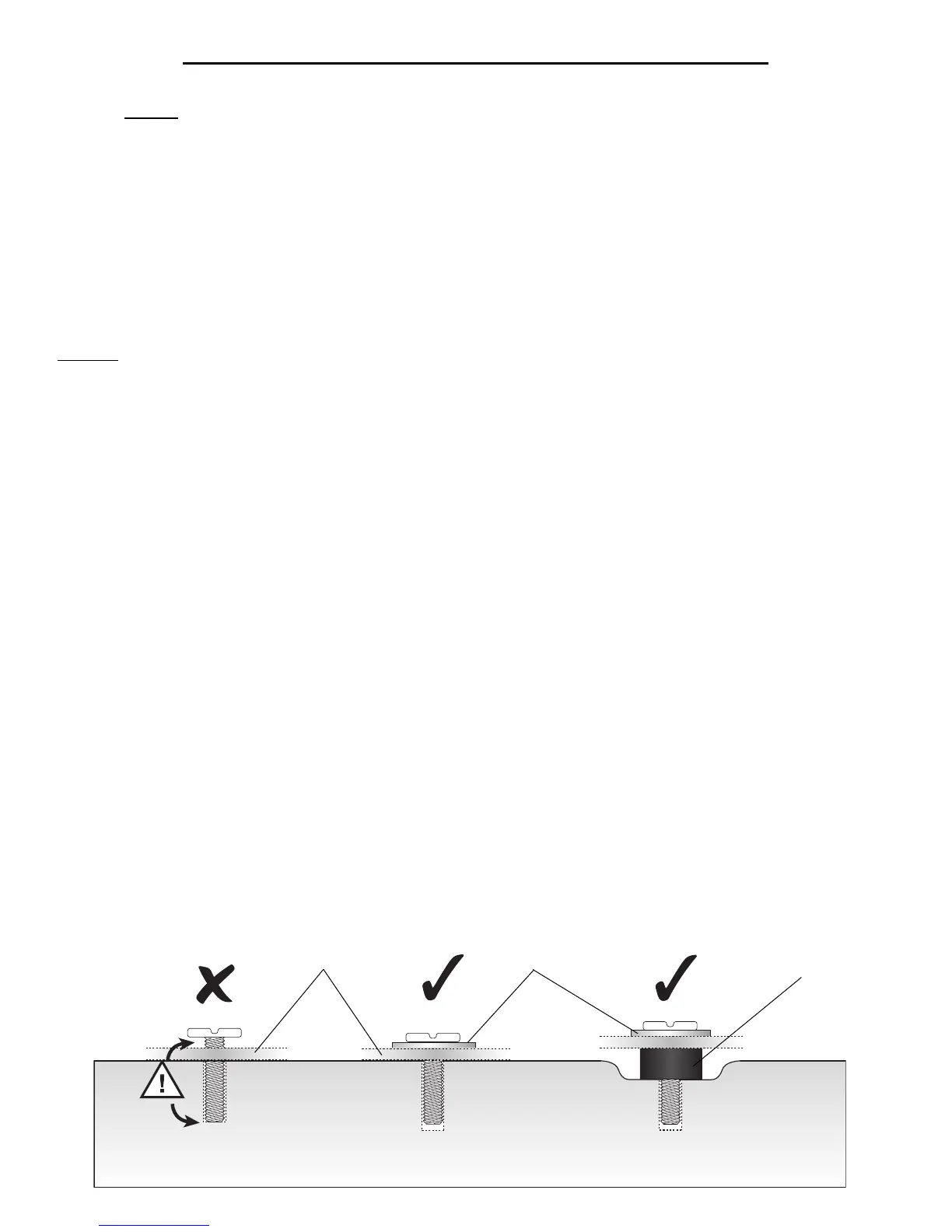
SPACER
WASHER
2-3. SELECT THE CORRECT SCREW. Before beginning, test several of the Screws in your Hardware Kit to find the correct size
and length for your television.
NOTE (!): Use Spacers if Monitor Arms (M5) do not fit firmly against the back of the television, such as when the back of the
television is curved, contains larger recessed mounting holes, or some other obstruction is in the way. Spacers also provide extra
room for cables. The Arms must rest securely on the spacers, and should not be loose.
MONITOR ARM (M5)
MOUNTING THE TELEVISION
CAUTION: CAREFULLY DETERMINE THE CORRECT MOUNTING PROCEDURE TO PREVENT DAMAGE TO YOUR TV AND/OR BELL'O
®
MOUNTING SYSTEM. ALWAYS REMOVE THE TELEVISION & COMPONENTS BEFORE ATTEMPTING TO MOVE THE STAND.
Fig. 2-2


 To Next Page