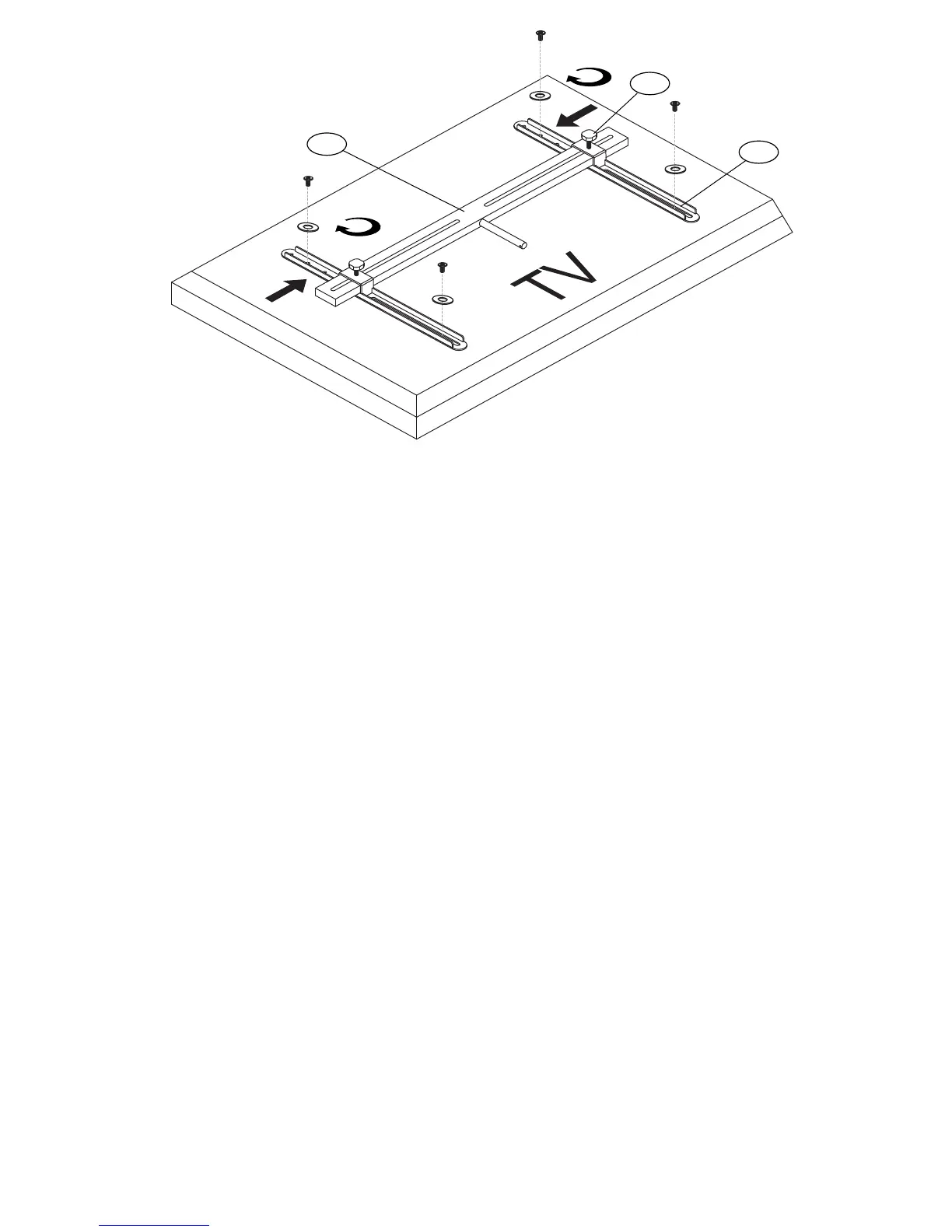
Fig. 2-3
2-4. SLIDE Monitor Arms (M5) on to the Swivel Bar (M4) and then INSERT the 30 mm Turn Knobs (M12) through the Monitor Arms as shown.
DO NOT YET FULLY TIGHTEN THE KNOBS.
2-5.
PLACE your TV face-down on a very soft, non-abrasive surface, taking extreme caution to not damage the face of your TV.
2-6.
ATTACH each Monitor Arm (M5) to the back of your television as shown with selected screws. Make sure that each Washer is placed
between the Screw and the Monitor Arm. DO NOT PLACE THE WASHERS BETWEEN THE ARMS AND THE TELEVISION.
DO NOT YET FULLY TIGHTEN SCREWS.
2-7.
Make sure the
Swivel Bar (M4) and Monitor Arms (M5) are level and m
ake any necessary adjustments. Then go back and TIGHTEN ALL
Screws and Turn Knobs (M12) fully.
M5
M12
M4


 To Next Page