6
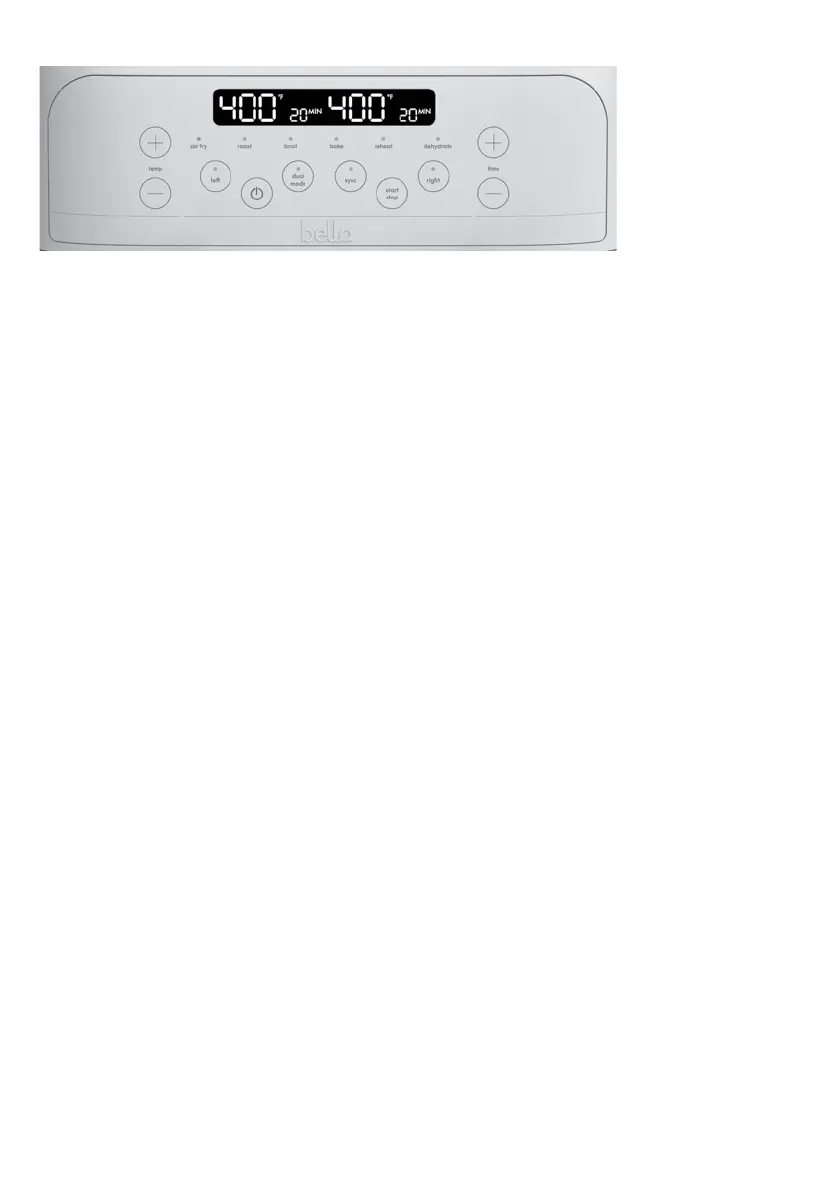
TOUCHSCREEN CONTROL
1. ON/OFF
minutes.
2. LEFT/RIGHT zone Basket Control
buttons will illuminate. Press any MENU button to continue.
right zone.
blinking, press any MENU button to continue.
NOTE: LEFT or RIGHT zones may be programmed independently, at any time before or during operation.
programming at any time, press the appropriate LEFT or RIGHT zone control button. When the light begins to
flash, TEMP/TIME can be adjusted
3. TEMP (+ or - ) / TIME (+ or - )
NOTE: When using DEHYDRATE, TIME will increase or decrease in 1 hour increments.
NOTE: LEFT or RIGHT zone TIME and/or TEMP may be programmed independently, at any time before or during
operation. Press the LEFT or RIGHT button. When the light above LEFT or RIGHT is illuminated, programming can be
adjusted.
4. DUAL MODE
TIP: Do not set two extreme opposing temperatures in each zone. Even with the basket divider in place, the
temperature from the hotter zone can affect the cooking temperature in the other zone.
5. SYNC
NOTE: Once cooking has started SYNC function will not be operable.
6. START/STOP
BEFORE USING FOR THE FIRST TIME
Remove all packing material and labels from the inside and outside of the Air Fryer. Check that there is no packaging
underneath and around each of the fryer baskets and crisping trays.
1. Your TriZone
®
Air Fryer is shipped with the 2 crisping trays and the basket divider into the fryer basket inside
the Air Fryer body.
2. Firmly grasp the fryer basket handle, to pull fryer baskets out of the main body.
3. Grasp the basket divider and crisping tray handle and lift to remove from the basket. (Figure 1)
4. Wash the fryer basket, crisping trays and basket divider in hot, soapy water.
5. DO NOT IMMERSE THE AIR FRYER BODY IN WATER. Wipe Air Fryer body with a damp cloth. Dry all parts
thoroughly.
6. Replace crisping trays into the fryer basket. With the handle facing up, insert each tray so that the rubber
corners fit and lock comfortably into each basket.


 To Next Page