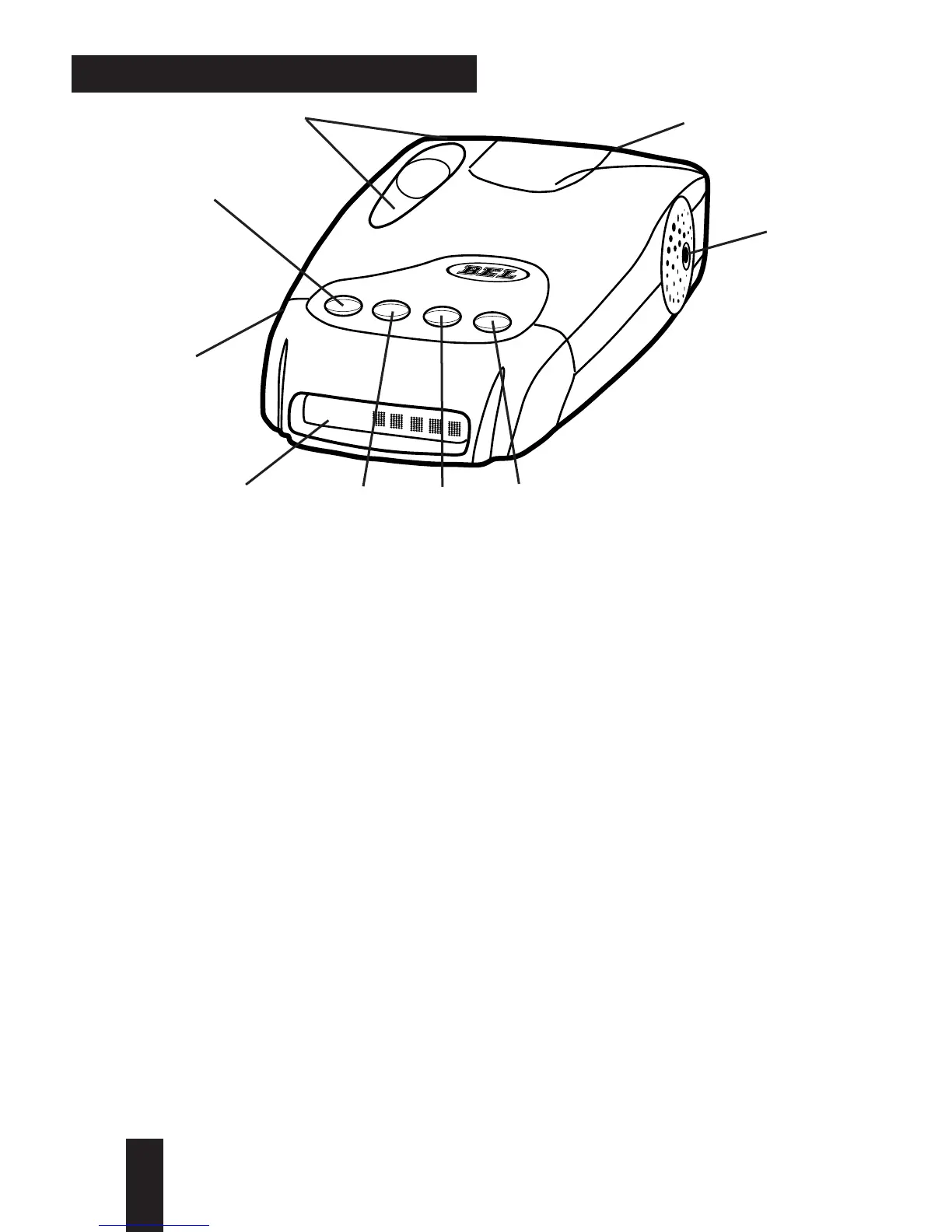
profile of features
1. pwr (Power/Start-Up Mode) Button: pressing and holding
pwr briefly will turn the unit on. Continuing to press the pwr
button will scroll through the three start-up mode options:
NORMAL, MODS (Modificaitons), Q-START (Quick Start) plus
TUTORIAL MODE.
2 Text Message Display: communicates all mode selections
(i.e. DIM, DARK, CITY, HIGHWAY, and AUTOMUTE)and
confirms Radar band and signal strength, presence of Laser
and sws
™
messages received.
3. drk (Bright/Dim/Dark) Button: provides bright, dark and
fully adjustable dim settings of the Text Display for discreet
night travel.Audio alerts are not affected.
4. aud (Audio Mute/Volume Control) Button: provides manual
muting of all Radar and sws
™
alerts. Pressing and holding the
aud button will change the audio level.
5. cty (City/Highway) Button: choose between Highway mode
or for urban/suburban travel, City X or City All modes.
6. Antenna Opening: Radar and sws
™
signals are received by
a patented diecast antenna with integrated transition to
microstrip mixer.







 To Next Page