Reset to Factory Settings
You can reset your unit to factory settings for start-up mode,
volume, drk, aud, cty, Travel Mode and Selectable Features. To
reset, press and hold the cty button until the display shows
“
RESET”. Two “beeps” will sound and your unit will be on and
ready for operation.
Volt a ge Wa r n i n g
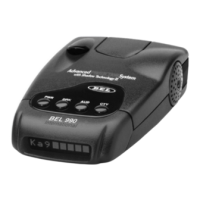
BEL 990 International continually checks your vechicle’s voltage
to ensure proper performance of the detector. The unit’s
operating range is 10.5 to 16.0 volts. If voltage is above 10.5, the
display will flash “
HI VOLT” until condition is rectified. If voltage
falls below 10.5 volts, display will flash “LOW VOLT”until
condition is rectified.
drk (Bright/Dim/Dark) Button
The drk button allows selection of a bright, fully adjustable
dim mode or dark mode. The unit is factory preset to full
bright display. To engage dim mode, press and hold the drk
button. The display will cycle through various levels of dim
illumination. Release the button at your chosen level. To
engage dark mode, press the drk button a second time. A
single “beep” coupled with the brief illumination of “DARK”
on the display confirms your selection.You’ll notice an “H”
(Highway mode) or “C” (City mode) remains dim to confirm
your unit is receiving power. To return to a full bright setting,
press the drk button a third time; two “beeps”confirm this
selection. Use of the drk button does not affect audio alerts.
Important—if you press the the drk button and do not receive
audible confirmation, the audio level has been set too low.
aud (Auto-Mute/Volume Control) Button
Manual Muting of Audio Alerts (Radar and sws
™
)
Whether Auto-Mode is selected on or off in Selectable
Features the audio alerts can be completely muted by







 To Next Page