Quick
Reference
Card
Remove
card
along
perforations
T
BEL
Pro
IX65
Quick
Reference
Card
1
lhere
are 7 user-selectable options so you
can customize your
RX65
for your
own
preferences.
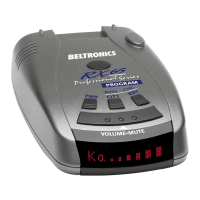
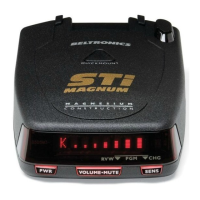
The buttons labeled CI1Y and
BRT
are
also used to
enter
the Progrdm Mode,
REVIEW
your current progrdm settings, and
to
CHANGE
any settings as desired. The
words
PROGRAM,
RVW
and CHG are
located
on
the
top
of
the detector, and are
highlighted
in
grdphics.
How
to
use
Programming
1
To
enter
Program
Mode,
press
and
hold
both
CITY
and
BRT
buttons
down
for
2
seconds.
(The
Lmit
will
beep
twice,
and will display
the
word
"Program").
2
Then
press
the
RVW
button
to
review
the
current
settings.
(You
can
either tap
the button
to
change from item to item,
or
hold the button to scroll through the items).
3
Press
the
CHG
button
to
change
any
setting.
(You can either tap
the
button to
change from setting
to
setting,
or
hold the
button to
scroU
through
aU
the options).
4
To
leave
Program
Mode,
simply
wait
8
seconds
without
pressing
any
button,
or
press
the
PWR
button.
(The unit will
display Complete, beep, and
retum
to
normal opemtion).
Fadory
Default
Settings
To reset
RX65
to its original factory
settings, press and hold the
"CITY"
and
"BRT"
buttons while mming the
power
on. RX65's display will proVide a "Reset"
message, accompanied by an audible
alen, acknowledging the reset.
An
example
Here
is
how
you would
Ulffi
RX65's
AutoMute feaulfc
off.
1 Enter thc ProgrMll Mode by holding
both the CI1Y and
BRT
buttons
down
for 2
seconds. RX65
will
beep twice
and
display
F't'ogt-·arrl.
2 Then hold the
RVW
button down. The
RX65
willscroll
tbrough
tbe categories,
starting
witb
Pilot (F'i
lot),
tben
Voice
(l.)oice),
tben Power-on sequence
(F'IJw'On),
then
Signal strengtb
meter
(l'leter),
and
then
AutoMute
(at'lute).
3 Relcase the
RVW
button
when
RX65
shows the AutoMute item. Since
the
factOlY setting is
for
AutoMute
to
be
on,
RX65
will display
at'lute
m·I
(If
you
accidentally
don't
release
the
RVW
button
in
time,
and
tbe
RX65
goes to
tbe
next
categ01Y,
bold
the
RVW
button
down
again,
and
after
RX65
scrolls
through all categories,
it
will begin
again
at
the top
of
the list.)
4 Press the
CHG
button to change from
at'l,-~te
OH
to
.;:,t'1I.d.e
OFF.
5 To complete the Progrdmming, simply
wait 8 seconds without pressing any button,
or
press the
PWR
button.
77Je
RX65
will
disjJlay
Comp
1e
te,
beep,
and
return
to
nor,nal
operation.
Programming
Detads
~











 To Next Page