6
4. Ka Narrow Bands –With Super Wideband Ka turned
OFF, any Ka narrow frequency which is engaged is
confirmed by rapid flashing of appropriate signal
strength
LED (see page 10).
Pressing PWR anytime during the power up test
sequence will suspend the normal power up test
sequence; your unit will be ready for operation.
Tutorial Mode
The tutorial mode allows you to become more
familiar with all audible and visual alerts. To engage
this mode, press the
AUD and the CTY buttons
simultaneously while the unit is
ON. The audio/visual
alerts will be presented slowly in order of Laser, K, X,
Ka and
SWS
™
. The tutorial mode will cycle these
audio/visual alerts continuously. Press the
P/V button
to exit. Two “beeps” confirm exiting from the tutorial
mode. Your unit is now
ON and ready for operation.
Set and Forget Memory
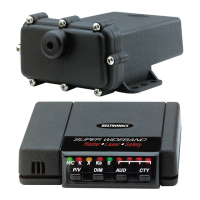
Any time VECTOR LR Remote is turned OFF all
feature settings you have selected are retained in the
unit’s memory. Set and Forget Memory eliminates the
need to reset your preferred feature settings each
time your unit is turned
OFF and then back ON.
Low Voltage Warning
VECTOR LR Remote continually checks voltage to
ensure proper performance. The unit’s operating
range is 10.0 to 16.0 volts. If voltage falls below 10.0,
the highway (
H) or city (C) indicator will flash,
coupled with a series of steady audible “beeps”.
Loss of Antenna Connection
In the event the control panel and Radar antenna are
not properly connected, the X/K/Ka band indicators
will flash, coupled with steady audible “beeps”.









 To Next Page