7
Audio/Visual Alert for Instant-On/Pulsed Radar
This type of signal appears suddenly when a Radar
unit is “triggered”. The instant-on or pulsed alert
consists of an intense, three-second, X, K or Super
Wideband Ka audio “burst”, coupled with the flashing
of the four-
LED display.
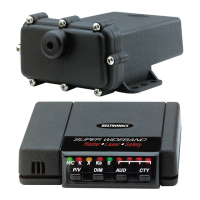
DRK (Bright/Dim/Dark) Button
The DRK button allows selection of a dim or dark setting
for all
LEDS. To engage dim mode, press the DRK button
once. A single “beep” confirms your selection. To
completely cancel the illumination of all
LEDS, press DRK
a second time. You’ll notice the city/highway LED remains
dim to confirm your unit is receiving power. To return to
a full bright setting, press the
DRK button a third time;
two “beeps” confirm this selection. Use of the
DIM
button does not affect audio alerts.
Important – if you press the DRK button and do not receive
audible confirmation, the audio level has been set too low.
AUD (Audio Mute/Volume Control) Button
Manual Muting of Audio Alerts (Radar and SWS
™
)
Whether Auto-Mute is selected ON or OFF in
Selectable Features, the audio alerts can be completely
muted by pressing the
AUD button during an alert.
No audible alert will be heard for approximately 12
seconds. If the signal is still present after 12 seconds,
the unit will remain in manual mute mode.
Volume Control
Press and hold AUD button to engage the volume
control. Release the
AUD button when you have reached
your desired audio setting. To reverse direction of the
volume, release and press
AUD a second time.
Note – because Laser alerts are not lengthy or
sustained, muting is not required (see page 17).









 To Next Page