14
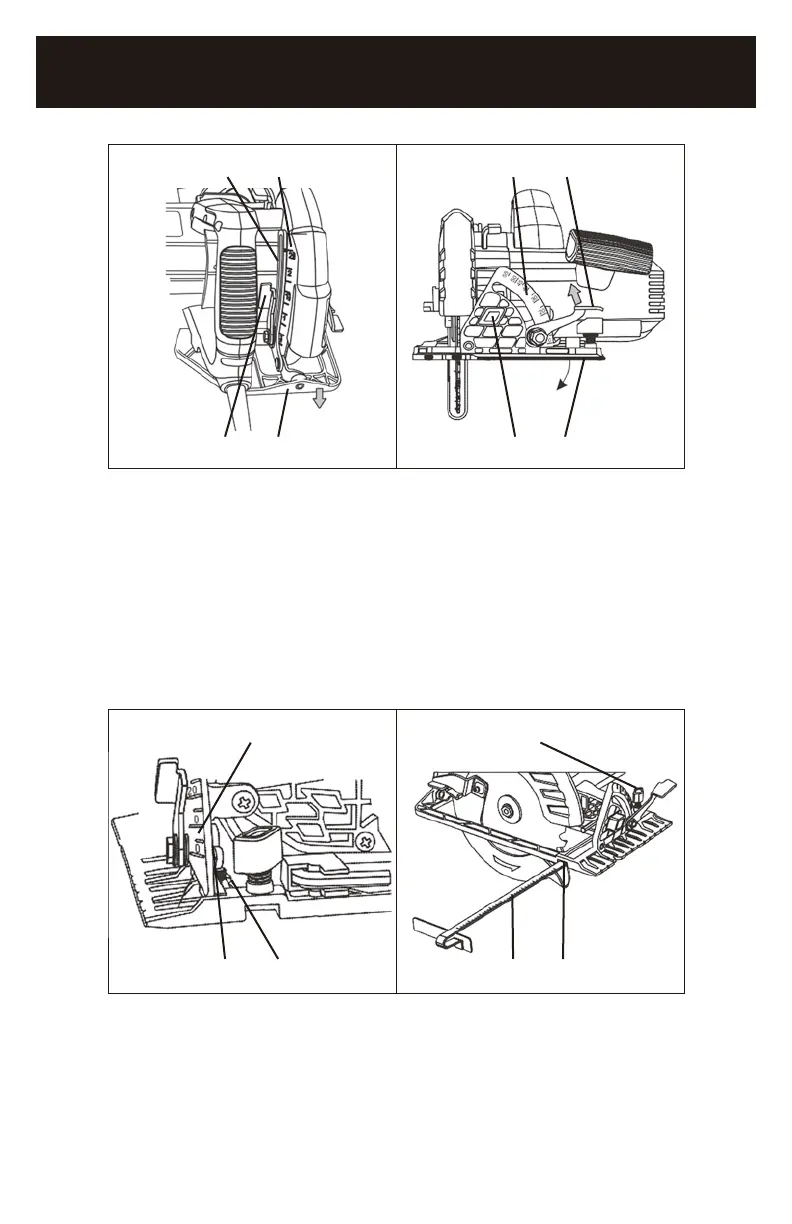
3 4 3 1
1 2 4 2
FIG. 4 FIG. 5
ADJUSTING THE 0° ANGLE STOP
1. Set the bevel angle to 0° (1) (Fig. 6).
2. Use a carpenter’s square to check the angle between the blade and the sole
plate.
3. If the angle is NOT 90°, use a 2.5 mm hex key and adjust the 0° set screw (2)
so the angle is 90° when the 0° stop contacts the set screw.
NOTES: Make a test cut to verify that the saw is cutting at 90°
1 1
1 2 2 3
FIG. 6 FIG. 7
INSTALLING THE RIP GUIDE
1. Loosen the rip guide adjusting knob (1) (Fig. 7).
2. Slide the rip guide rod (2) into the rip guide slot (3). Continue to slide the rip
guide rod across the sole plate and into the rip guide slot under the rip guide
adjusting knob.
1265-000
7-1/4" CIRCULAR SAW


 To Next Page