16
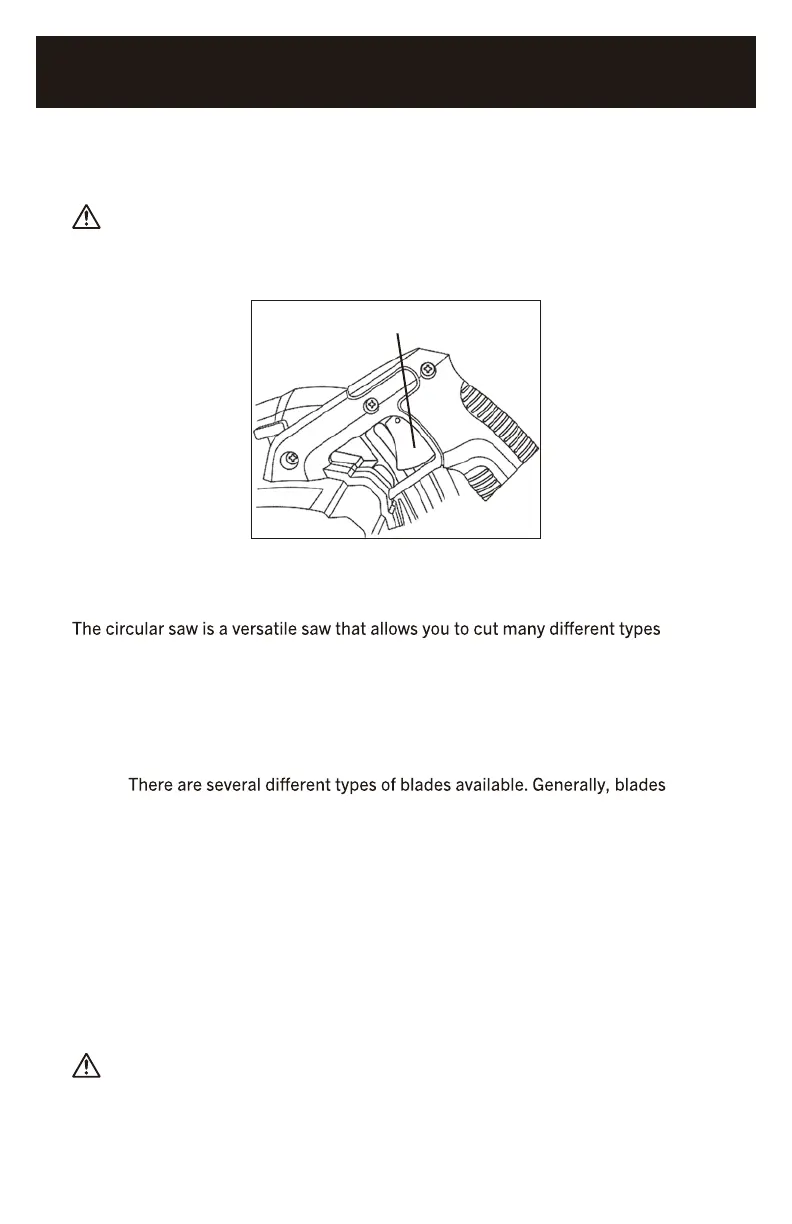
TRIGGER SWITCH
1. To turn the saw ON, squeeze the trigger switch (1) (Fig. 9).
WARNING: Never carry the saw with your finger on the trigger switch.
The saw could be accidentally started and cause severe personal injury.
2. To turn the saw OFF, release the trigger switch.
1
FIG. 9
MATERIALS THAT YOU CAN CUT
of materials. Some of the materials include:
• Wood products such as lumber, hardwood, plywood, composite board
and paneling
• Drywall
• Masonite and plastic
NOTE:
with carbide- tipped teeth cut better and stay sharp longer. Tooth count and
configuration are also important. High tooth counts cut slower, and are best suited
for making smooth cuts on thinner materials such as paneling. Use the correct
blade for your application.
GENERAL CUTTING
1. Make any adjustments to the saw before installing the blade. Adjustments include
cutting depth, cutting angle and rip guide (if installed).
2. Clearly mark the workpiece to locate the position of the cut.
3. Hold a smaller workpiece with a vise. Clamp a larger workpiece to a workbench or
table.
DANGER: Any workpiece that is not adequately clamped in place may come
loose and cause serious injury. Never hold the workpiece in your hand.
4. Make sure there are no nails, screws, clamps or foreign materials in the path
of the saw blade.
1265-000
7-1/4" CIRCULAR SAW



 To Next Page