fastHEX™ Analysis Method TD-550/560 Oil in Water Analyzer
16 TD-550/560 Oil in Water Analyzer
Operation Manual
PN 106737
REV H
Part 2—Preparing a Calibration Standard
The following table values apply to a 10:1 (water to oil) extraction ratio.
Select a concentration that is equal to the maximum anticipated in your water samples. Prepare a
Calibration Standard by diluting the Stock Standard with clean solvent. Recipes for preparing several
typical concentrations are given in Table 1. To prepare the Calibration Standard shown in column 1,
pipette the Stock Standard volume given in column 3 into a 100 mL volumetric ask, then ll the ask to
the 100 mL mark with clean solvent.
Calibration Standard, ppm Oil-in-water Equivalent., ppm
(assuming 10:1 extraction ratio)
Stock Standard Volume
5,000 500 50 mL
2,500 250 25 mL
1,000 100 10 mL
500 50 5.0 mL
250 25 2.5 mL
100 10 1.0 mL
Table 1. Calibration Standards
For video tutorials on preparing calibration standards, see the How to Video Library on the Help &
Settings screen.
To calibrate the analyzer for fastHEX
TM
method
1. Turn on the analyzer tablet and tap Start.
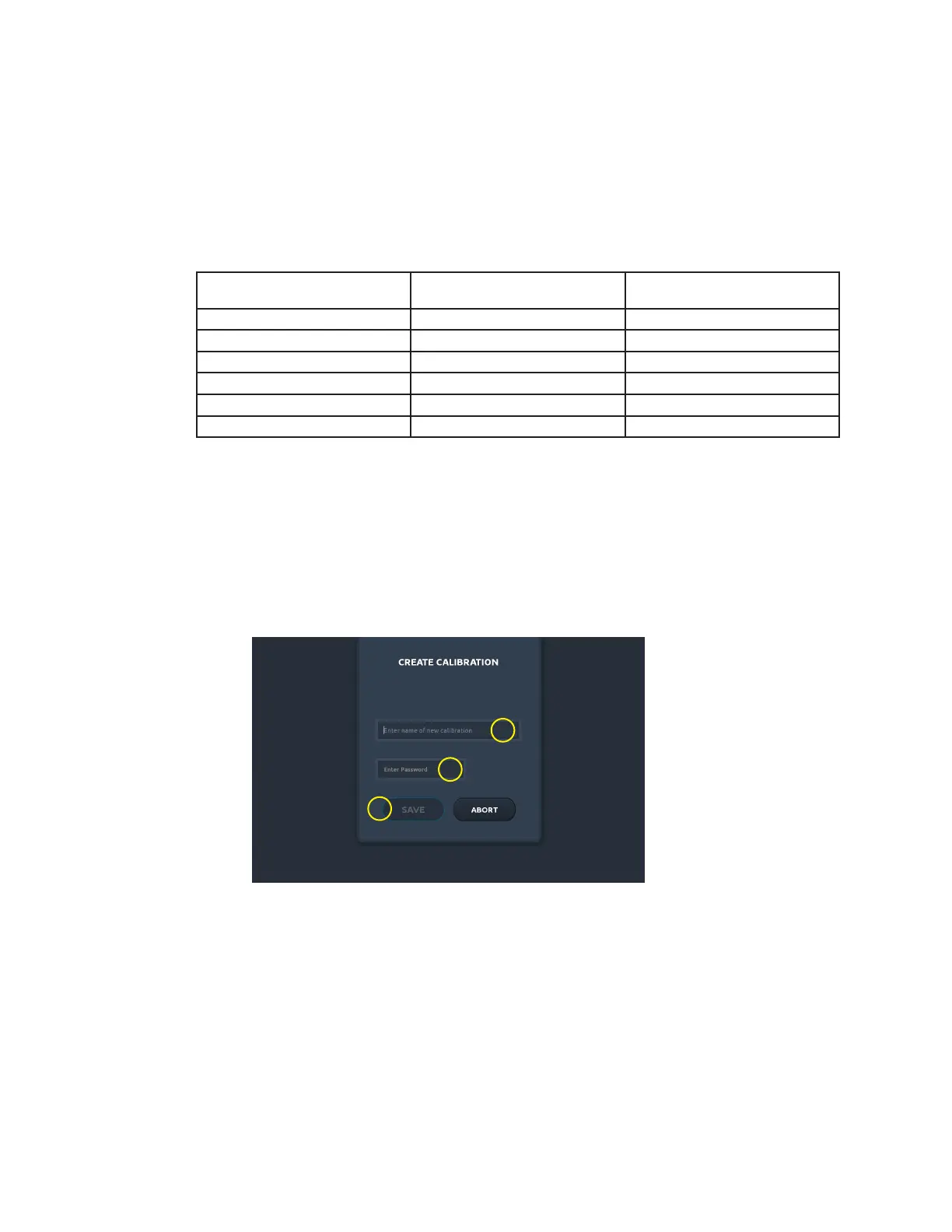
2. On the Home screen, at the bottom of the Calibrations list, tap New. The Create Calibration
screen appears.
1
2
3
3. On the Create Calibration screen, tap the Name eld (1) and enter a name for your calibration.
4. If you wish to use a password, which is not recommended, tap the Password eld (2) and enter
your password. Otherwise, leave the eld blank and proceed. See Section 2.1 Touch Screen
Interface.
5. Tap Save (3). The Calibration screen appears.


 To Next Page