TD-550/560 Oil in Water Analyzer fastHEX™ Analysis Method
PN 106737
REV H
TD-550/560 Oil in Water Analyzer
Operation Manual
17
8
2
6
8
7
1
3
4
5
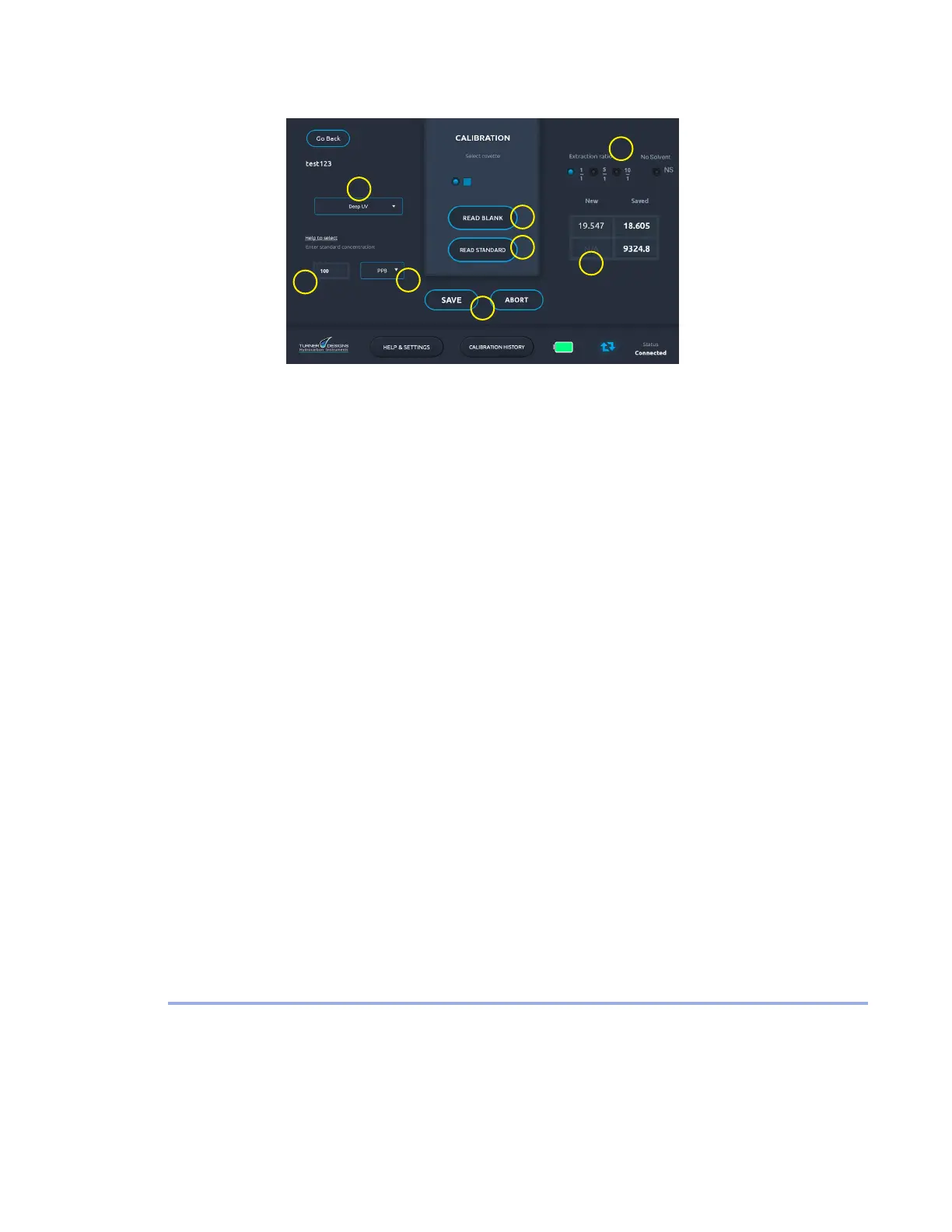
6. On the Calibration screen, choose a channel (1) from the drop-down menu (TD-560 only).
7. In the Standard Concentration eld (2), enter the concentration of oil in solvent (not the
corresponding oil in water concentration).
8. The cuvette type and extraction ratio settings are chosen by default but can be changed (3).
9. Select a unit of measurement from the Units drop-down list (4).
10. Prepare a blank by lling a cuvette with clean extraction solvent. Wipe the outside of the
cuvette with a clean laboratory grade tissue to remove any liquid, dirt or oil that might be
present.
11. Open the sample well lid, insert the blank cuvette into the cuvette adapter, and close the lid.
12. Tap Read Blank to have the analyzer record the uorescence reading of the blank (5). Do not
tap Read Blank again.
13. Remove the blank cuvette from the sample well.
14. Fill a new cuvette with the calibration standard. Wipe the outside of the cuvette with a clean
laboratory grade tissue to remove any liquid, dirt or oil that might be present.
15. Insert the calibration standard cuvette into the cuvette adapter and close the lid.
16. Tap Read Standard to have the analyzer record the uorescence reading of the standard
solution (6). Do not tap Read Standard again.
17. Check that the uorescence response is at least 200 uorescence units greater than the
blank. Calibrations with uorescence response differences less than 200 indicates insufcient
sensitivity. If this occurs, consult Section 6 Troubleshooting.
18. A value appears in the New eld (7). To store the calibration (8) tap Save, or tap Abort to try
again. Tapping Save returns you to the Home screen. Do not attempt to save values more than
once.
19. On the Home screen tap and hold a calibration in the list if you want to delete it.
The calibration is now complete. However, the calibration should be checked for linearity as discussed
in Section 6 Troubleshooting. The calibration will be stored and maintained when the analyzer is turned
off.
For video tutorials on calibrating the analyzer, see the How to Video Library on the Help & Settings
screen.
4.4 EXTRACTION AND CALIBRATION PROCEDURE METHOD
SUPPLIES
The TD-550/560 can be purchased with the extraction kits for heavier and lighter than water solvents.
These extraction kits have enough supplies for approximately 96 sample analyses each and they
include necessary laboratory supplies and glassware required for the extraction procedure. Extraction


 To Next Page