4
MRCDB423_D00396_00_M_XXEN/06.2020
MRCDB423
3.8 External, combined test or reset button T/R
Reset= pressing the external button briefly (< 1 s)
Test= pressing and holding the external button (> 2 s)
The device function can be tested using the test button "T".
3.9 Device parameter settings
The device parameters are set via the control buttons on the front. The device parameter settings are pass-
word-protected.
4. Installation and connection
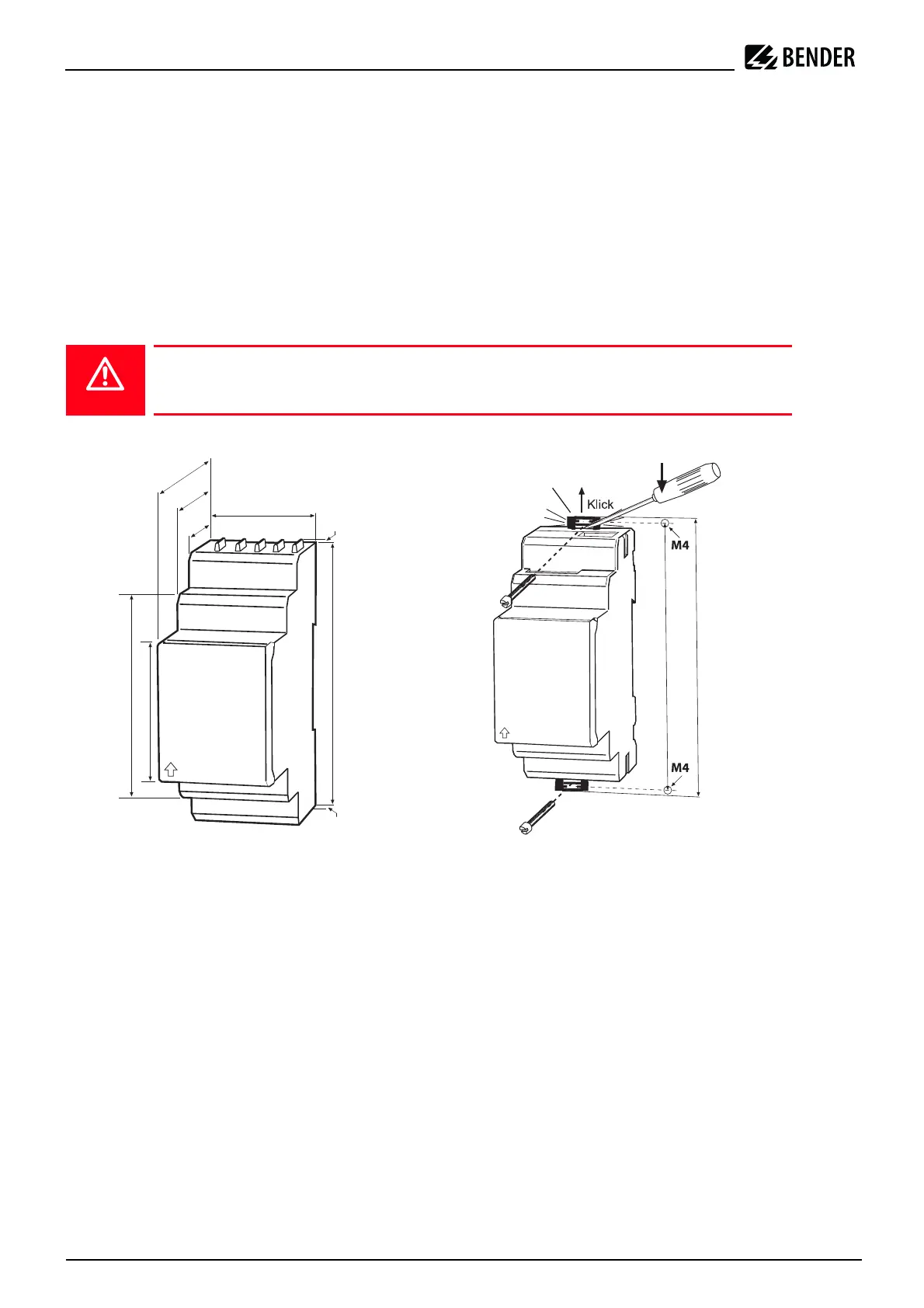
Dimension diagram and drawing for screw fixing
The front plate cover can be opened at the lower part marked with an arrow.
4.1 DIN rail mounting
Snap the rear mounting clip of the device into place in such a way that a safe and tight fit is ensured.
Danger of electric shock!
Ensure that there is no voltage in the installation area and follow the rules for working on
electrical equipment.
90 mm
45
67,5
36 mm
31,1
47,5
70,5
2
2
100 mm
116 mm
Zubehör/
Accessory








 To Next Page