8
MRCDB423_D00396_00_M_XXEN/06.2020
MRCDB423
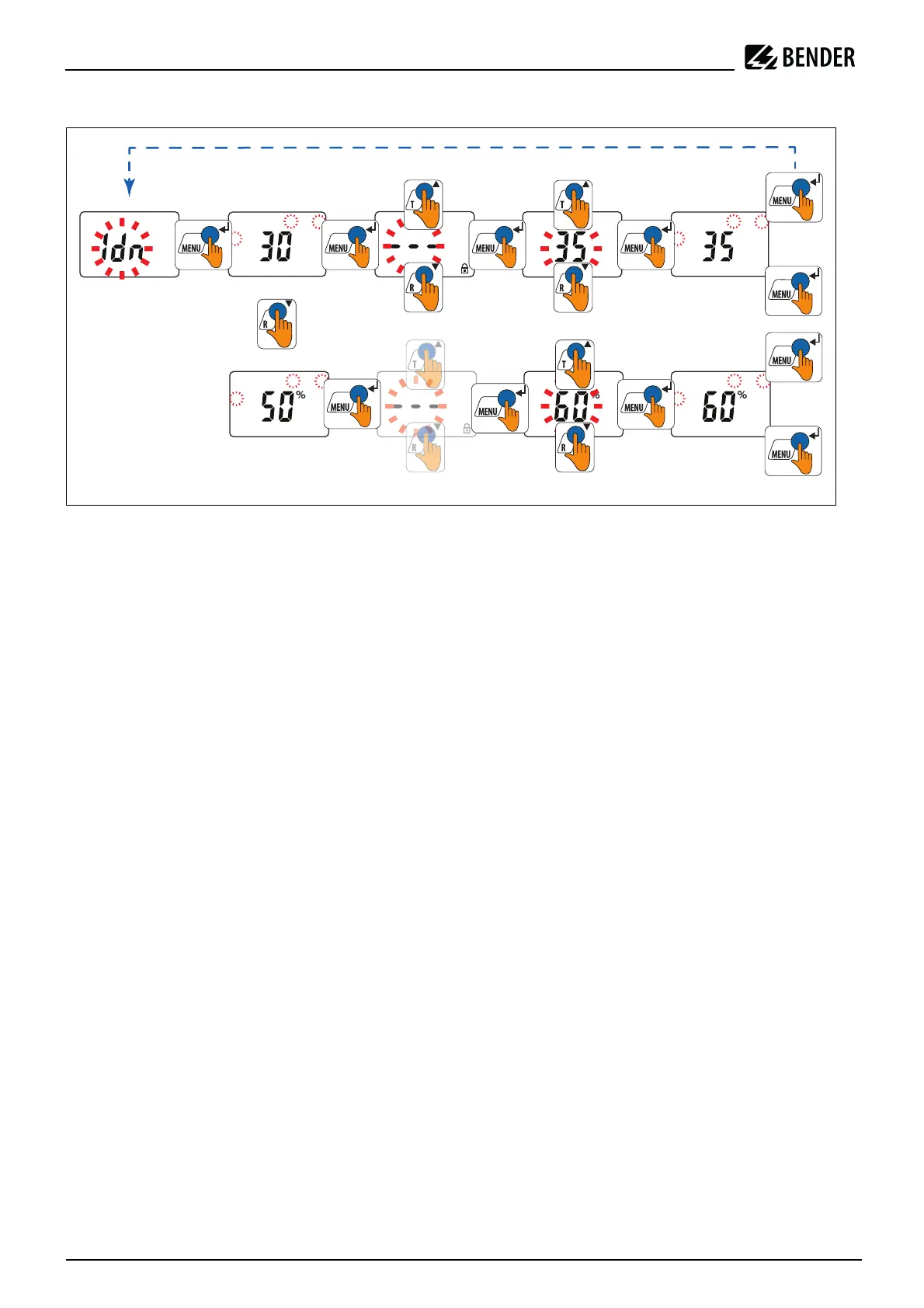
Increasing response value I1 (prewarning) an value I2 (overcurrent alarm)
5.5 Explanatory notes on the setting parameters
5.5.1 t menu (set delay times)
The following delays can be set:
• Response delay t
on1
(0…10 s) for K1
• Response delay t
on2
(0…10 s) for K2
5.5.2 SEt menu
Password protection (on, OFF)
If password protection has been enabled (on), settings can only be made after entering the correct password
(0...999).
FAC factory settings
After activating the factory settings, all settings previously changed are reset to the state upon delivery.
5.6 InF menu (query device information)
This function is used to query the software version. After activating this function, data will be displayed as a
scrolling text. Once one pass is completed, you can select individual data sections using the arrow-up/arrow-
down buttons.
5.7 HiS menu (erasable history memory)
The first alarm value to occur is written to this memory. Select the history memory via the HiS menu. Use the
arrow-up and arrow-down buttons to view the next display. If Clr is flashing, the history memory can be erased
by pressing the Enter button.
>
1
l
A
m
>
2
l
>
1
l
A
m
>
2
l
>
1
l
A
m
>
2
l
2
2








 To Next Page