T
I
,.
.
RAD DST
I
I
Awe
the
DME
over
to
your number
2
NAV
receiver during the ILS approach,
you
can keep
it
locked
onto
the VOR frequen-
cy indicated
on
your KNS 81
by
using
the DME Hold function
on
the KDI
572
remote indicator.
It's
simply a matter
of remembering
to
put
the KNS 81 in the
VOR
mode
first and
flipping
the DME
selector switch into the HLD position
before changing over from the VOR to
the
ILS
frequency.
You'll
still get distance
information
to
the VORTAC throughout
the approach.
to
have in a situation like this,
a
word
.
,--
-
-
,
-
.
f
switching
of
caution
is advised regarding the use
of DME Hold with the KNS
81's
other
operating modes.
isolates certain DME functions from the
logic
of the
KNS
81's
RNAV computer,
the information being processed is
rendered incomplete. Thus, it is recom-
mend that DME Hold be used only
in connection with straight VORllLS
navigation, and not with RNAV or its
related modes.
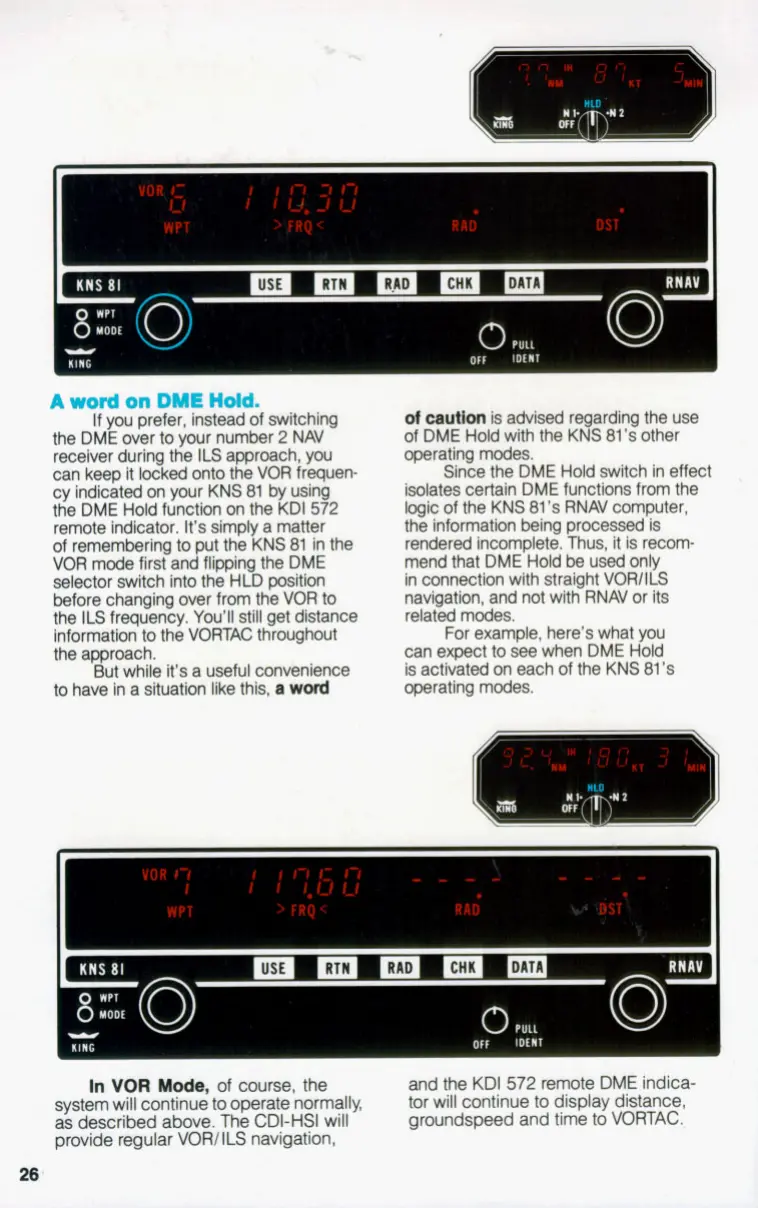
For example, here's what you
can expect
to
see when DME Hold
is activated on each of the KNS
81's
operating modes.
Since the DME Hold switch in effect
But while
it's
a useful convenience
YlN
r
In
VOR
Mode,
of
course, the
system will continue
to
operate normally,
as
described above. The
CDI-HSI
will
provide regular VORl
ILS
navigation,
and the
KDI 572
remote
DME
indica-
tor will continue
to
display distance,
groundspeed and time
to
VmAC.
26
KING


 To Next Page