EasyManua.ls Logo

BenQ MX808ST - Connection; Signal Source Connection Guidelines; Cable Type Identification

BenQ MX808ST
48 pages
Print Icon
To Next Page IconTo Next Page
To Previous Page IconTo Previous Page
Loading...
17 Connection
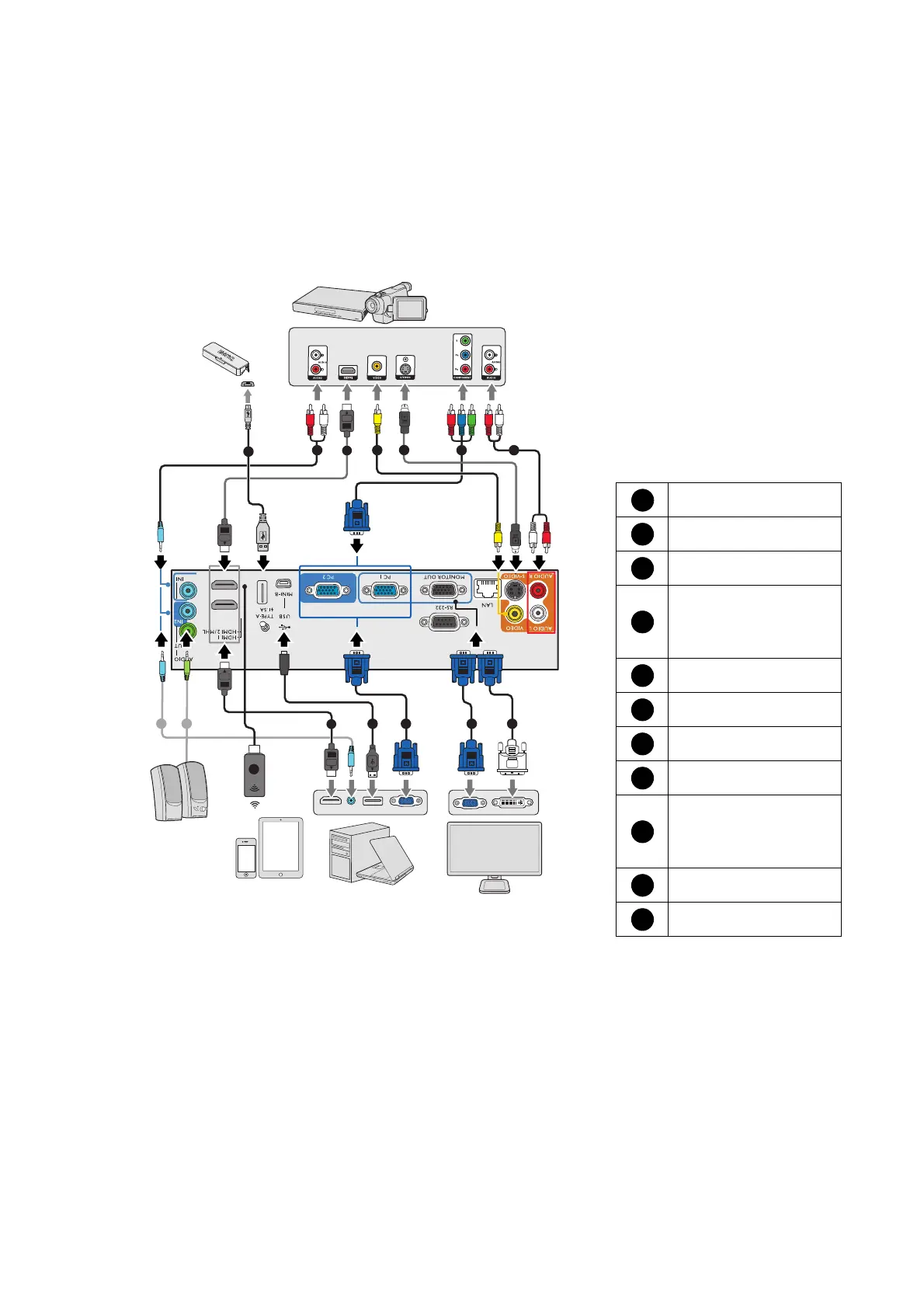
Connection
When connecting a signal source to the projector, be sure to:
1. Turn all equipment off before making any connections.
2. Use the correct signal cables for each source.
3. Ensure the cables are firmly inserted.
7
2
77
10
4 8
3
1
1
5
6
10
11
9
0;67
0:67
Notebook or
desktop computer
VGA cable
VGA to DVI-A cable
USB cable
Component Video to
VGA (D-Sub)
adapter cable
S-Video cable
Video cable
Audio cable
Audio L/R cable
USB cable (A to mini
B type) connect
to Touch Module
HDMI cable
HDMI wireless dongle
1
2
3
4
5
6
7
8
9
10
11
Speakers
Monitor
Smart device
A/V device
Touch
module

Related product manuals