EasyManua.ls Logo

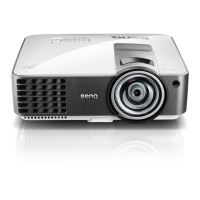
BenQ MX813ST - User Manual

BenQ MX813ST
74 pages
Print Icon
To Next Page IconTo Next Page
Loading...
Welcome
Digital Projector
Us
er
Ma
n
u
a
l
MX813ST

Table of Contents

Other manuals for BenQ MX813ST

Questions and Answers

  • T
    Tammie CordovaAug 11, 2025
    How to fix a BenQ MX813ST Projector that does not turn on?
    • R
      robertramirezAug 11, 2025
      If your BenQ Projector isn't turning on, there could be a few reasons. First, ensure the power cord is securely plugged into both the projector's AC inlet and a working power outlet, and that the power outlet switch is on. Second, if you've recently tried turning it on and it didn't work, the projector might be cooling down. Wait until the cooling process is complete before attempting to turn it on again.
  • S
    Steven AllenAug 17, 2025
    Why doesn't my BenQ MX813ST remote control work?
    • A
      Andres HillAug 17, 2025
      If your BenQ Projector's remote control isn't working, consider these potential causes. The battery may be out of power, so replace it with a new one. There might be an obstacle between the remote control and the projector; if so, remove it. Finally, ensure you are within 8 meters (26 feet) of the projector.
  • Y
    ybaileyAug 26, 2025
    What to do if my BenQ Projector has no picture?
    • C
      Carol Barber DVMAug 26, 2025
      If your BenQ Projector is displaying no picture, several things could be the cause. First, make sure your video source is turned on and the signal cable is correctly connected. Second, verify that the projector is correctly connected to the input signal device. Third, ensure that you have selected the correct input signal using the SOURCE key on the projector or remote control. Finally, check that the lens cover is open.
  • R
    rebecca62Sep 2, 2025
    How to fix a blurred image on my BenQ MX813ST?
    • H
      Heather HoltSep 3, 2025
      If you're experiencing a blurred image with your BenQ Projector, there are a few things you can check. First, the projection lens may not be correctly focused, so adjust the focus using the focus ring. Second, the projector and the screen might not be aligned properly; adjust the projection angle, direction, and height of the unit if necessary. Finally, make sure the lens cover is open.

Summary

Important Safety Instructions

General Safety Guidelines

Essential safety guidelines for projector operation, handling, and maintenance.

Introduction to the Projector

Projector Mounting Recommendations

Provides recommendations and safety advice for mounting the projector.

Positioning Your Projector

Choosing an Installation Location

Guides on selecting the best location for projector installation.

Determining Optimal Projector Position

Methods to calculate projector position based on screen size and distance.

Connecting Your Projector

Connecting Computers via VGA or HDMI

Step-by-step guide for connecting computers for display and audio.

Projector Operation Basics

Starting Up and Initial Setup

Procedures for powering on the projector, initial setup, and language selection.

Adjusting Projection Angle and Focus

How to adjust the projector's physical angle and focus.

Image Tuning: Clarity and Keystone Correction

How to sharpen the image and correct trapezoidal distortion.

Navigating the On-Screen Display (OSD) Menus

Explains how to navigate and use the projector's OSD menus.

Security Features: Cable Lock and Password

How to use a security cable lock and set up password protection.

Proper Shutdown and Direct Power Off Procedures

Procedures for powering off and safely disconnecting the projector.

Overview of the OSD Menu System

Explains the structure and main categories of the OSD menus.

Network Control and Remote Management

Configuring LAN Environment Control

Setting up network settings for remote projector control.

Remote Control via Web Browser Interface

Accessing and using the web interface for remote management.

Maintenance and Care

Projector Care and Cleaning Procedures

Guidelines for cleaning the projector lens and case.

Lamp Usage Information and Life Extension

How to check lamp hours and extend lamp life using power saving modes.

Lamp Replacement Timing Indicators

Warning messages and indicators for when the projector lamp needs replacement.

Replacing the Projector Lamp: Safety and Steps

Safety precautions and step-by-step instructions for replacing the lamp.

Lamp Replacement Procedure Details

Continuation of lamp replacement steps, including handling and securing components.

Troubleshooting Common Issues

Resolving Power, Picture, and Focus Problems

Covers power, picture, focus, remote, and password issues.

BenQ MX813ST Specifications

General IconGeneral
ResolutionXGA (1024 x 768)
Brightness3200 ANSI Lumens
Contrast Ratio13000:1
Display TechnologyDLP
Projection TechnologyDLP
Aspect Ratio4:3 (native), 16:9 compatible
Speakers10W
Input ConnectorsHDMI, VGA, Composite Video, USB Type-A
Noise Level33 dB (Normal), 29 dB (Eco)

Related product manuals