Setting Up Your Projector 13
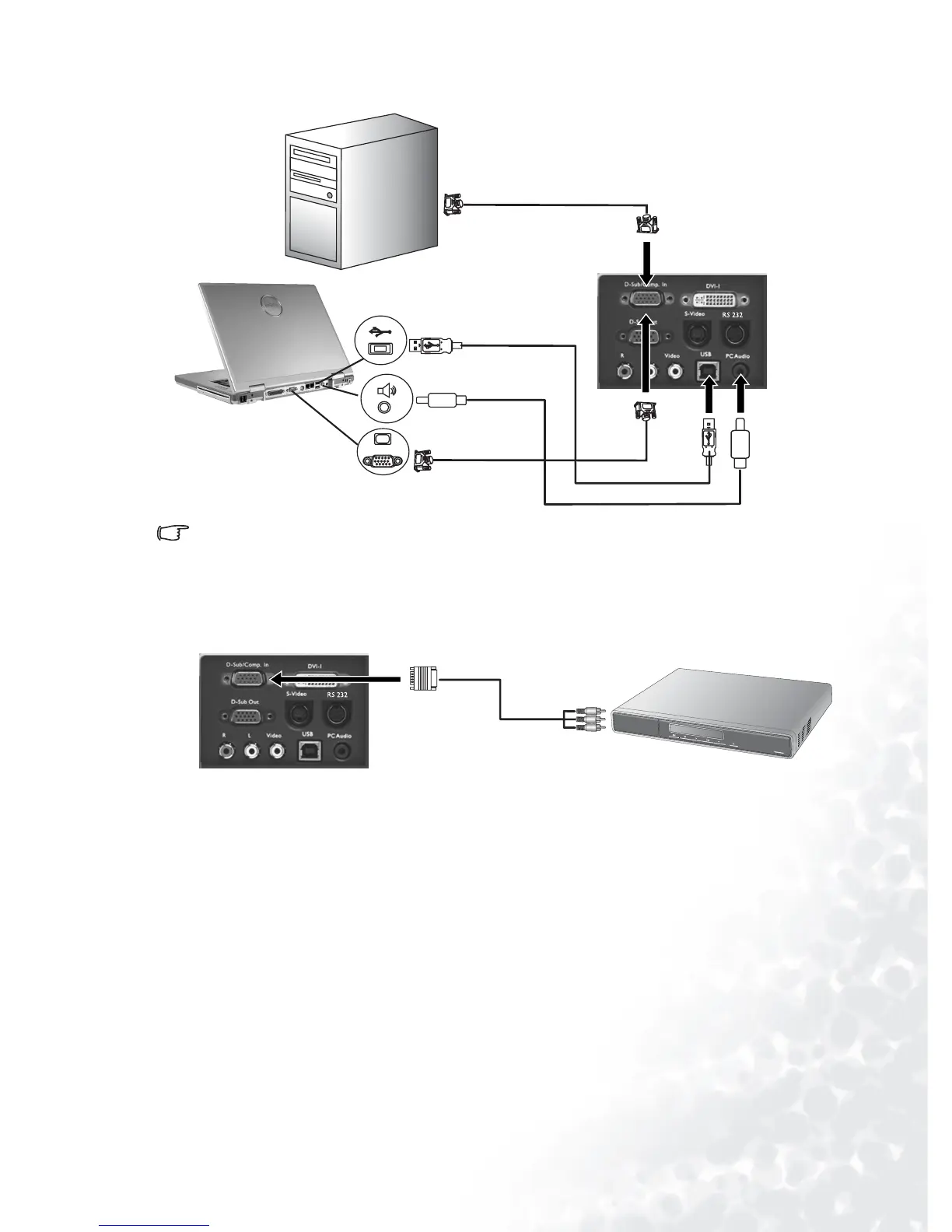
Connecting to a Laptop or Desktop Computer
A Mac adapter (an optional accessory) may be necessary needed if you are connecting to an
older Macintosh computers.
The USB cable is required if you intend using mouse functions on the remote control.
Connecting Equipment to the Component Video Input
The projector is capable of displaying various High Definition TV display modes. Some of
these sources are:
Most of these sources will provide an analog component video output, a standard VGA out-
put, or a YP
bPr (default) format.
The projector is capable of accepting HDTV data through a Component Video connector.
Use a Component Video cable that came with your projector to display these images.
The following standards are supported in the HDTV function:
RGB
VGA cable
To RGB input
USB cable
USB
PC audio
RGB
To RGB
input
USB
PC
audio
VGA cable
Audio cable
• Digital-VHS (D-VHS) player • DVD player
•Satellite Dish HDTV receiver •Digital TV tuners
• 480i • 480p
• 576i • 576p
• 720p (50/ 60 Hz) • 1080i (50/ 60 Hz)
AV e q u ip m ent
YPbPr
Component Video cable
RGB



 To Next Page