Maintenance 39
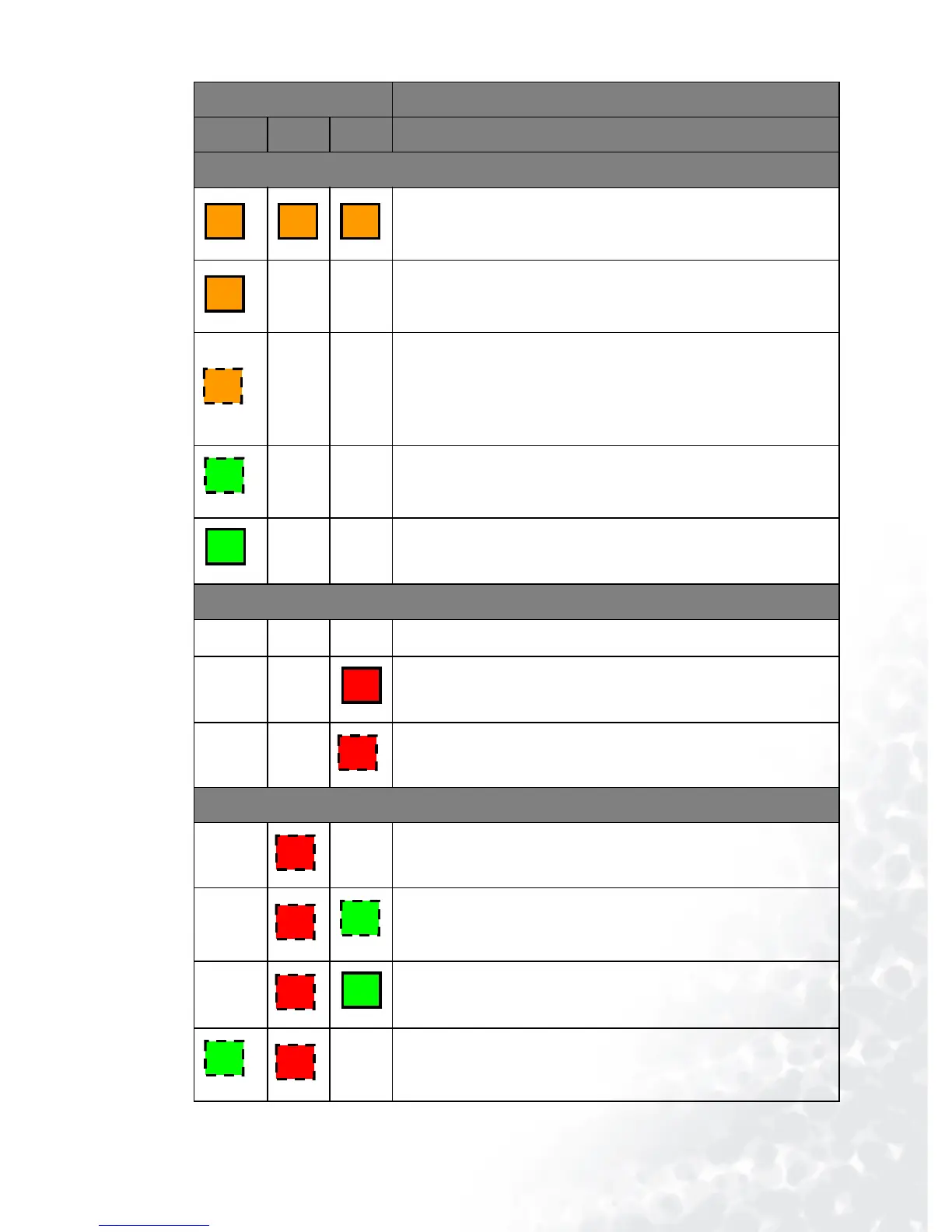
LED Status & Description
Power Temp Lamp
Power events
The projector has just been connected to a power outlet.
--
Stand-by mode.
--
(1) The projector needs 90 seconds to cool down as it was
abnormally shut down without the normal cooling down
process. Or
(2) The projector needs to cool for 90 seconds after the power
is turned off.
--
The Power indicator light is flashing during powering up.
--
The projector is under normal operation.
Lamp events
---
The lamp counter has developed a problem.
--
It is warning you that lamp usage has exceeded 2000 / 3000
(Economic Mode) hours. Replace the projection lamp with a
new one immediately.
--
The lamp is not properly attached or the lamp is damaged.
Please contact your dealer for assistance.
Thermal events
--
The projector has shutdown automatically. If you try to re-
start the projector, it will shutdown again. Please contact your
dealer for assistance.
-
The projector has shutdown automatically. If you try to re-
start the projector, it will shutdown again. Please contact your
dealer for assistance.
-
The projector has shutdown automatically. If you try to re-
start the projector, it will shutdown again. Please contact your
dealer for assistance.
-
The projector has shutdown automatically. If you try to re-
start the projector, it will shutdown again. Please contact your
dealer for assistance.
O O O
O
O
G
G
R
R
R
R
G
R
G
G
R



 To Next Page