Parts of the display and their functions 17
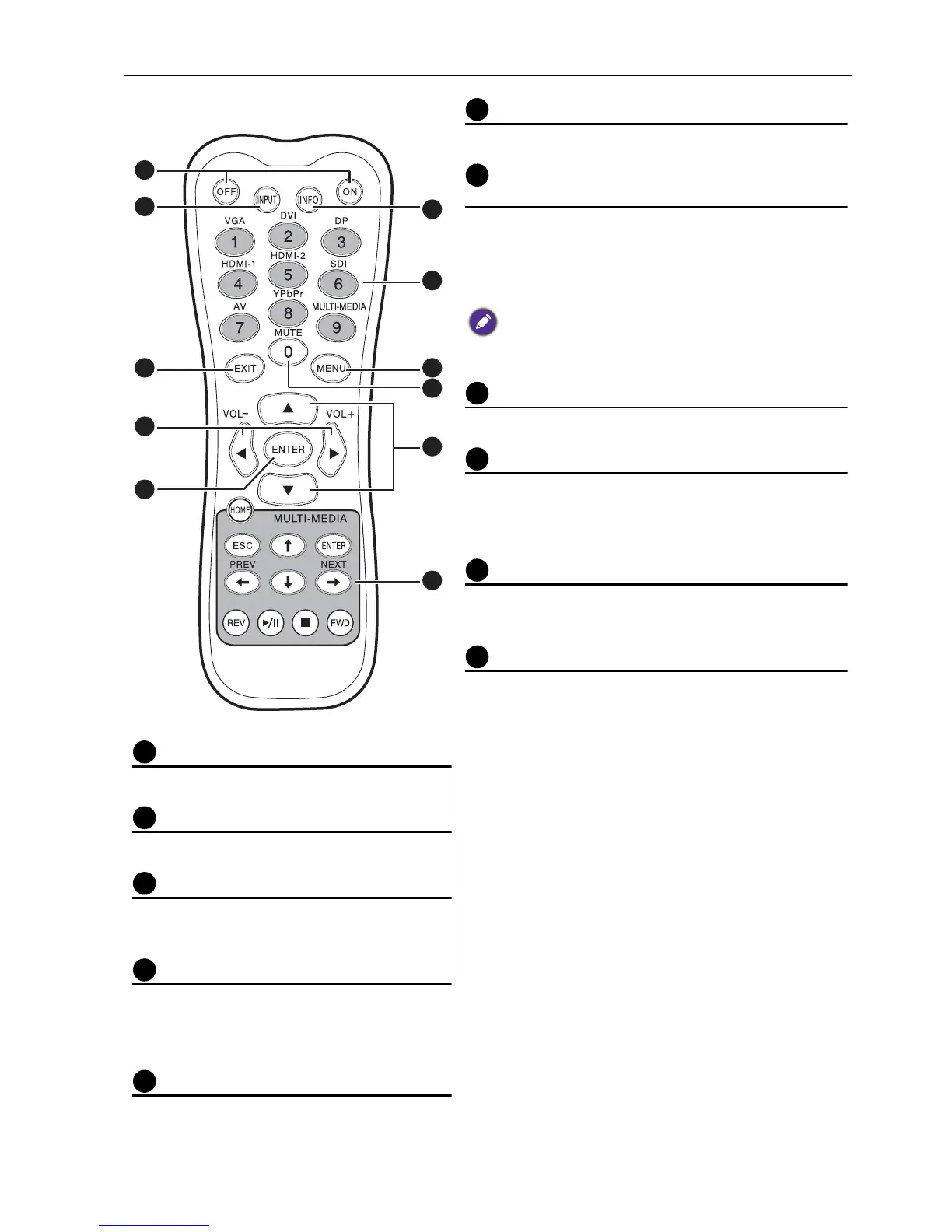
Remote control
ON/OFF
Turns the display on or off.
INPUT
Selects an input source.
EXIT
Returns to a previous menu or closes the
OSD menu.
/ VOL- // VOL+
• Scrolls through settings and options in
the OSD menu.
• Turns down/up the volume.
ENTER
Confirms your selection or save changes.
INFO
Shows the current input source and resolution.
Numeric buttons (1-9) /Input source
buttons
• Performs as numeric buttons when the OSD
menu is on.
• Performs as input source buttons when the OSD
menu is off.
SDI and MULTI-MEDIA functions are not available with
this display.
MENU
Opens or closes the OSD menu.
Numeric button (0)/MUTE
• Performs as a numeric button when the OSD
menu is on.
• Turns on or off the mute function.
/
Scrolls through settings and options in the OSD
menu.
MULTI-MEDIA buttons
These functions are not available with the display.
1
6
7
8
9
10
11
4
5
3
2



 To Next Page