60
English
• Pulling it too quickly may cause the lamp to break
and scatter broken glass in the projector. To reduce
the risk of injuries to fingers and damage to
internal components, use caution when removing
lamp glass that has shattered.
• Do not place the lamp in locations where water
might splash on it, children can reach it, near or
above heat sources, or near ammable materials.
• Do not insert your hand into the projector when
the lamp is removed. If you touch the optical
components inside, it could cause blurred images.
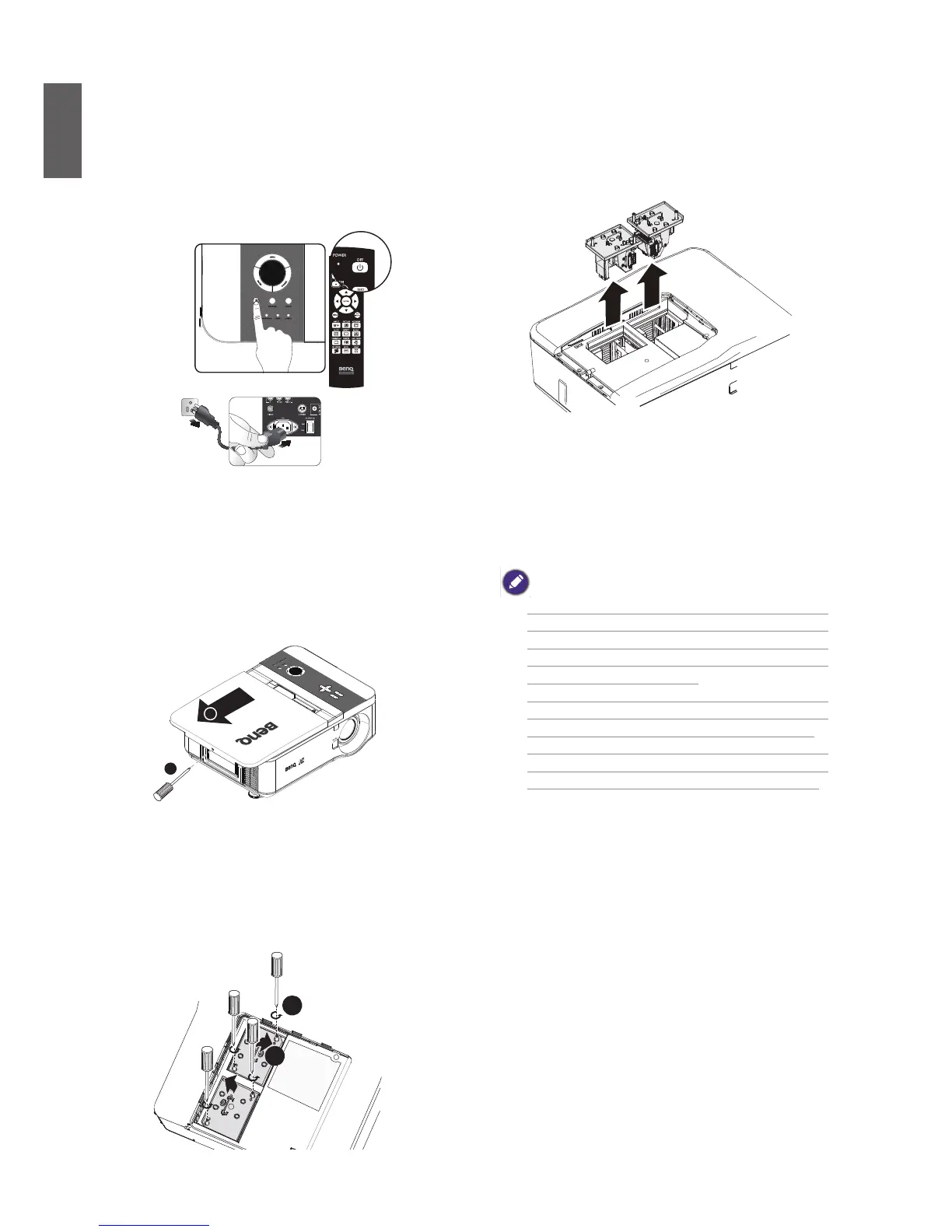
1. Turn the power off and disconnect the
projector from the power outlet. Turn off
all connected equipment and disconnect
all other cables.
2. Remove the screws on the lamp cover (A),
and slide the lamp cover as shown (B).
A
B
3. Loosen the two captive screws on the
lamp module (A). Lift the module handle
up as shown (B).
A
B
4. Pull rmly on the module handle in the
direction shown to remove the lamp.



 To Next Page